I was trying to use the +GUIDE and +GUIDELOOP features to trigger an audio cue that says “section repeat” whenever I loop a section with the loop button.
The challenge is that I have a 27-song set, and creating a separate audio file for every section of every song would take quite a bit of time. So I was wondering if there’s a way to trigger an audio cue based directly on my MIDI sections (Verse, Chorus, Intro, etc.) instead.
That would be incredibly helpful, especially since I already add an audio cue (Verse, Chorus, Intro, etc.) for each section along with the MIDI track.
You might also want to check out this related thread , where a closely related concept is being explored for dynamically queuing the next song. The same underlying logic could potentially be extended to sections, since the criteria are very similar.
At the moment, there isn’t a built-in way to handle this dynamically. That said, this is something that’s currently being considered. I can’t say when or how it might be implemented, but it’s definitely an idea that has sparked interest.
First: I love AbleSet 3 and all possibilities that came with it. Great work as always.
I also needed a way to trigger audio cues based on MIDI Clips or in general based on OSC commands. What I came up with is creating a small Max for Live device that loads cues from a folder into memory, listens for OSC commands and plays the cue with the name of the OSC command.
I use this at the moment in multiple ways:
Dynamic Song Cues for next Song based on Setlist. Also triggered when ableset jumps to next song and stops playback. So everyone knows the next song, even if playback is not started yet → this is triggered by a Track of Midi Clips and their Names. @Onassis you could use this approach also for Section Cues easily
Audio Cues based on Stop Description in Setlist. I use the stop description to Cue things like “Guitar Change” or “Leave the Stage”. So I can edit them in Setlist view and my cues will follow. This is triggered by a project script which sends the Stop Description of the current Song as OSC Message when the Song is finished.
Audio Cues based on Button presses in Canvas via OSC messages.
The second and third thing I could also solve via midi Note messages and a sampler instrument, but I hate to map Midi Notes to Cues, for me it makes way more sense to send an OSC message with the name of the cue.
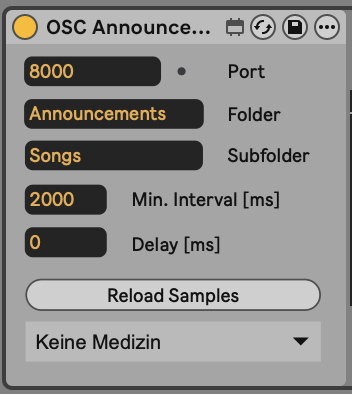
This is how the Max for Live Device looks on my “Song Cues Track”. It gives the opportunity to specify a Folder, where the audio cues are (it’s all relative to the project folder thereby it works on the A and B machine in a redundant setup), the min interval between two cues (clicking through the setlist doesn’t trigger all cues at once), and a delay between incoming OSC message and the cue trigger. Reload is just if you made changes to the files while ableton is running, it reloads automatically when you open the set.
And this is how I trigger it with Midi Clip Descriptions: I just created Audio Cue Files for each Song with an ai voice, copied them into a subfolder in the project folder and added the “+OSC [localhost:8000]” flag to my Song track (I have a track with the Song names exactly like the section track, just with midi files named after the Song). Now whenever ableset jumps to a new song, the song name is send on Port 8000 and the Max for Live Device plays the cue with the corresponding name. The same thing would work with sections.
The Setlist announcement could also be done via a short project script that sends the activeSongName on OSC changes. So the real thing here is to have the Max for Live as an Instrument in Ableton that listens to OSC messages and plays corresponding Cues as Audio Cues. As I have this now the possibilities on how and when to trigger Cues are endless.
I wanted to upload the max for live device here for everyone who wants to try it, but I don’t have the permissions right now because I’m listed as new user. Ask if you need it. I can try it later again or otherwise upload it somewhere and share a link.
That’s funny timing, I just released a AbleSet 3.1.0-beta.2 that does exactly this, including automatically generating the audio files based on song and section names.
You can also use OSC to trigger these cues (/cues/say "Song Name") for more custom use cases.
Wow I just read the description and I’m blown away. Exactly what I dreamed of.
But I love that I took the time to implement this on my own. It was the perfect project to try out all new features of Ableset 3 and increase my understanding of max for live, OSC and Ableset
I will definitely try it and replace my current setting as soon as I can. I will tell you if I encounter some issues.
Again big thanks to your fast and wonderfull development of new features.
Would you be able to go into more detail on how you detected the end of a song in the project script?
Looking to play around with some OSC automations to run after songs but I can’t seem to find the osc value to indicate we’ve reached the end of a song.
I’m actually very interested in this topic as well. Is there now a way to have the name of the next song announced automatically?
The workaround you mentioned here obviously works and sounds great. But I’d ideally like to have the cue much earlier — for example already during the outro — so that I can mentally prepare for the next song before it actually jumps. Is there any way to make Ableton do that?
I also have a folder containing audio files with the song names spoken in them. The folder is located in the Samples folder as well. Is there any way for Ableton to automatically detect which song is coming next and trigger or assign the corresponding audio file?
You could achieve this with the AbleSet Cues plugin and a small Project Script.
The script reads the next song from your setlist, so it keeps working when you reorder the set.
Announce the next song when the outro starts
Open Settings → MIDI Mapping, OSC & Scripting → Project Script and add this:
// Speaks the next song's name when the playhead enters a section called "Outro"
onOscChange("/setlist/activeSectionName", ([section]) => {
  if (section !== "Outro" || !osc("/global/isPlaying")) return;

  // Next song according to the current setlist order
  const next = osc("/setlist/nextSongName");
  if (next) sendOsc("/cues/say", next);
});
As soon as the playhead reaches a section called “Outro”, AbleSet speaks the name of the next song in the setlist.
If you’d like the cue at a different point, add a section at that position and replace "Outro" in the script with that section’s name.
Using your own recordings
/cues/say plays through the AbleSet Cues plugin, and that plugin can use your own audio files. Copy them into a folder named Custom inside the Cues folder of your project’s AbleSet folder. They need to be mono WAV files named exactly like the song (e.g. My Song.wav). AbleSet will then play your recording instead of the generated voice, and fall back to the generated voice for any song without a matching file.