Perfect timing Leo, I was messing around with creating my own AI cues for some more “Custom” calls and now I can use these within Ableset’s cues feature!!
Not out of character for me, I have a couple of questions…. haha
I saw there’s a way to adjust the delay to the samples with [70ms] in the name, does that shift it forwards or backwards?
I have a “count in” section at the start of every song and I was wondering if there was a way to make that not generate the words “count in”, but give me a 2 bar count instead? (1, 2, 1, 2, 3, 4).
The way I’ve done cues in the past is over 2 bars.
So if it was just calling Chorus, it would be like this…
x, x, Chorus, x - 1, 2, 3, 4 and then if I had some kind of dynamic cue it would be….
Chorus, x, Breakdown, x - 1, 2, 3, 4…
Not sure if that makes sense or not, but it’s worked really well so far and was wondering if it was possible to look at getting a similar functionality?
How I would imagine it working would be that I can tag a section with a dynamic cue within the section track name, but this would not display as part of the section name in canvases, for instance, “Pre Chorus 1 [Build]”.
The functionality would then be that if there is no , it would place the section name on beat 3 of the 2nd last bar, with the 4 count over the last bar.
If there was present, then it would place the section name on beat 1 of the 2nd last bar and the bracket cue on the 3rd beat of the 2nd last bar, then with the 4 count on the last bar…
I know this is a super specific use-case, but thought I’d ask about it because then I could completely use Ableset’s built-in cues feature instead of having to manually go in and do my own for every song. It would also mean I can easily use all of my new cues files automatically within all the songs I’ve made up in the past, just adjusting some section names here and there.
You are truly doing some amazing work here Leo, legend status
Hey @Adam_Molinaro, thank you for your feedback, I’m glad you like the new feature!
I’m already working on a 2-bar count-in mode that sounds like this:
This will be customizable per section, so you could add [c:1] for a 1-bar count-in, [c:2] for a 2-bar count-in, and [c:0] for no count-in (syntax isn’t quite set in stone yet). It’s not exactly how you described it but hopefully it works for you anyway.
Providing an alternative section title for cues sounds like a good addition. Do you think this alternative should only be used during count-ins or also when jumping to that section while paused?
This adjustment would mean the file plays 70ms before the beat. I didn’t see a need to shift audio files the other way.
This is amazing! I love the new feature, it’s going to save a lot of time when setting up new songs or full projects!
I have three things I ran into when trying out this new function. First, would it be possible to add the option to only name the next section without the count in. Only next section name is enough in most cases where I use cues and more cues (like a count in) could get more distracting.
Also, when using the Mac System TTS, I’ve found the problem that when I switch to a different voice and/or language in my Mac settings, not all cues change with it. Some cues still stay in the previous voice, while the preview correctly plays the newly selected voice. Restarting AbleSet and Ableton doesn’t solve this.
Also, similar to what @Adam_Molinaro said, I would like to have a function for a 2 bar count for certain sections. For instance for an intro, like Adam said, but also for specific parts. My workaround at the moment would be to use my old GUIDE track for the parts where I would need it, but if there’s a way to implement it, that would be amazing!
While I’m at it, two other issues I’ve found are these. When automatically going from one song to the next one with one bar count in, the song name gets cut. I can’t think of a solution for this one yet, but maybe you and/or others do!
Also, when having a 1 bar section (for instance a 1 bar break or intro), the next cue has a slight, but noticeable delay. In this case, I have a 1 bar count, 1 bar intro and then the verse. The first cue, intro 2 3 4, is perfect. The “verse” cue has a slight delay.
I must have missed the announcement of this new feature! That is insane @leolabs !! You never cease to blow my mind with new features! Thanks for all you’re hard, amazing work!
I noticed a couple versions ago that not all MIDI devices appear in the Edit MIDI Mapping page.
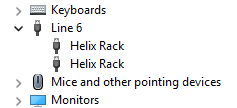
I have two Helix Rack devices connected to my computer. I can see both are active in Device Manager. They are both listed as “Helix Rack” under the “Line 6” branch.
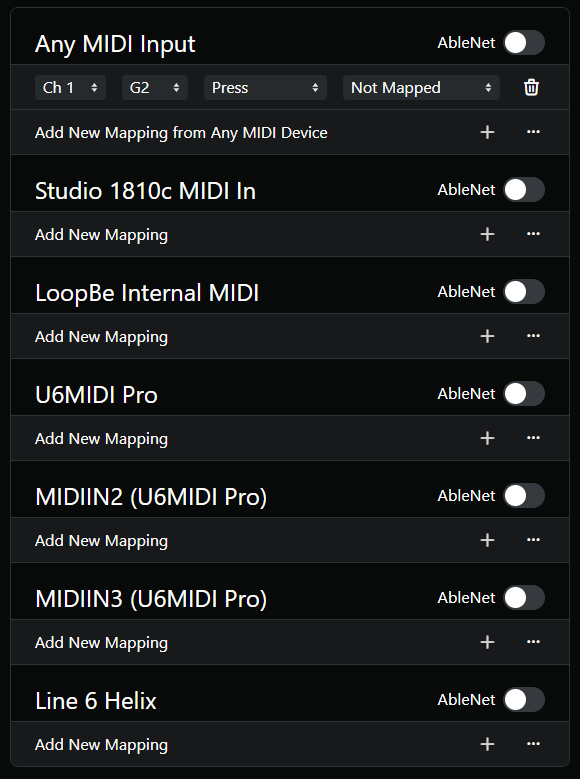
However, in Ableset, I only see one “Line 6 Helix”.
In Ableton Live 12, they are listed as “Line 6 Helix” and “Line 6 Helix #2”.
Can you please take a look at this issue? I don’t know when the issue started, but it’s been several low-level versions ago.
I did some more testing today. I have both Helix Racks connected to the computer via USB. In Studio One, I can receive the expected MID CC messages from the Helix Rack. Also, both Helix Racks respond to MIDI tempo sent from Ableton Live.
In Ableset, however, if I manually set a MIDI mapping, Ableset does not respond to the command.
If I click the + button to have Ableset “listen” for an incoming MIDI command, it does not hear anything. I have tried this under both the single ‘Line 6 Helix’ entry and the ‘Any MIDI Input’ entry.
I know this worked in the past because I have been able to Play/Toggle Loop from my Helix foot controller.