One of my AbleSet uses is in a function band that plays multiple sets throughout a night e.g. we’ll play from 9-10, take an hour’s break, then play 11-12. Or sometimes it’s 3 x 45 minute sets.
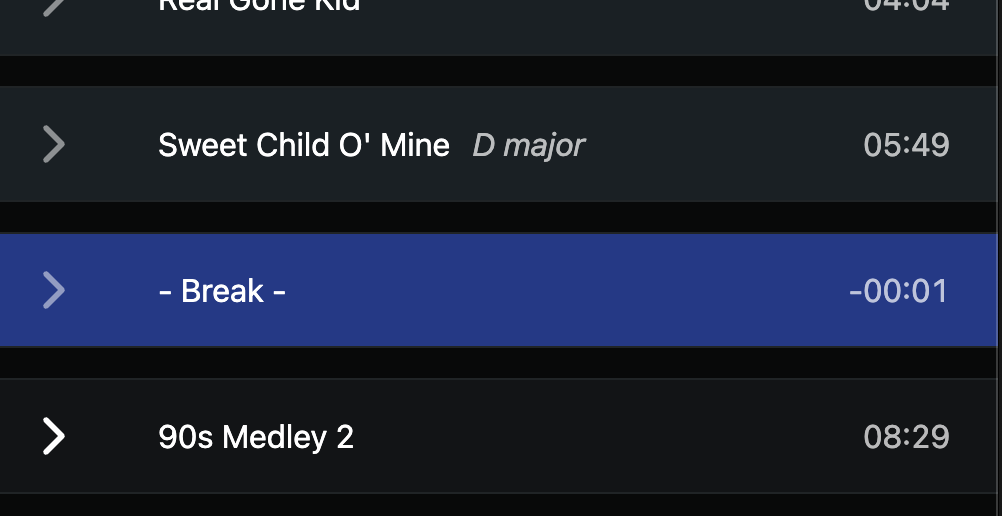
In order to organise the setlist, I create one-bar ‘songs’ that I use as breakpoints for the end of set one and the start of set two:
This works pretty well, except I don’t know how long each set within the list is. If I played three sets, I’d know 1) the entire duration of all the songs, and 2) the duration of the final set (because that’s just the final songs remaining). But I wouldn’t know set 1’s length or set 2’s length.
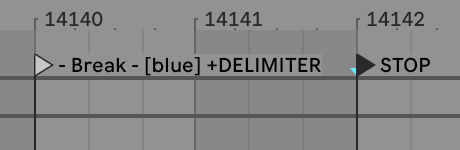
My suggestion would be to create something like a ‘+DELIMITER’ flag on the AbleSet locators:
What this would do is create an entry into the setlist which does not show a song length, but rather shows you the duration of all the songs until that point. If a setlist had two of these delimiters, the second delimiter would count the duration between that and the first.
Of course, the total length displayed at the bottom would still show the entire length of all songs on the setlist.
Delimiter might not be the best term for it, but I think this would be a good feature for bands running longer sets that need to signify sections within it, or account for breaks.
I’m planning to implement a feature that allows you to add non-song items like delimiters or notes to the setlist, but this will take a while as I’ll have to rewrite the setlist data structure from scratch.
In the meantime, please let me know if you have any further suggestions!
I too use a similar “faux song” as a break-point. Regarding the name “+DELIMITER,” if the only reason/function for this “+” flag is to get a “subtotal” of time for all songs within each +DELIMITER, then maybe the flag +SUBSET or +SUBTOTAL is more accurate. Yet, essentially this functionality is describing a “Set” is being described here (ie, a performance may have three “Sets”…each with a “setlist” of songs). For a moment, to ponder the future, perhaps a +SUBSET flag would, in the future, not only tally minutes of the SUBSET, but facilitate a way to visually expand/collapse entire SUBSETS of songs.
@nevillewhitemusic - I agree that ‘subset’ is a better term than ‘delimiter’! I added the “+” flag because that’s the syntax AbleSet uses on other features (“+LOOPFULL”, “+G:GUITARS”), but yes essentially it would be creating a subtotal of all the songs between one of these subset entries and the next.
Perhaps this functionality could be integrated directly into the web UI, eliminating the need to manually add a locator using a +whatever flag in live.
Yes, that actually is best. My LIVEset is not in Setlist sequence. This needs to be a web UI based feature. (oh good, we can use “+whatever” for some future feature)
Yes! AbleSet shows how much time is left in your set, both in Setlist and Performance view (Performance has a toggle for showing/hiding it).
As you can see in the video, the Setlist View automatically updates the remaining time based on the songs you still have left to play, so the total adjusts as you move through the show.
Here’s a short demo showing how Stop Descriptions work and how you can edit them directly in the web interface and how the remaining set time updates:
thanks for this example. Pretty Slick.
It seems this feature works based on the Locator “stop desc” text of “song 4” (in your example).
Can I ask, does this (“Stop Description” feature) assume songs 1 thru 3 (in your example), are, in the Ableton file, in Arrangement View, all to the LEFT of “Song 4” ? If I were to guess, the answer is, no.
So the real-world way this works, is that one must know the “last song” of the “set”.
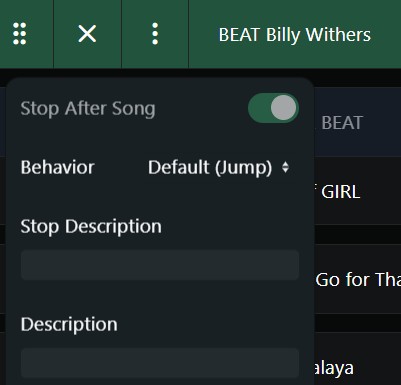
Regardless of where you enter it — either in the web interface (Setlist Edit Mode) or directly in Ableton using cue notation on a STOP or SONG END locator ({...}) — the Stop Description is always tied to the end of the specific song you add it to.
So if you move that song up or down in your setlist, its Stop Description moves with it automatically. You don’t need to worry about its position in Arrangement View or about other songs being to the left or right — it always stays attached to that song’s ending.
I never thought about “either in the web interface (Setlist Edit Mode)”
I see in the screen shot, a “STOP DESCRIPTION” in web interface edit mode. I have never looked at that. Would I enter the STOP language here…the same text …just like in the LOCATOR?
Yes! You can edit Stop Descriptions in either place — Ableton Live or the Web Interface.
The Web Interface is usually the more handy option since you can tweak things quickly without jumping back into Live. But if you prefer having your Stop Descriptions more “hard-coded” in Live, or if you don’t mind going back to Live to edit some descriptions, that works just as well. The behavior is identical in both cases.
Just one detail:
• In Live, you write it with brackets: {quick tuning break}
• In the Web Interface, you just type the text without brackets.
And once added, the Stop Description always stays attached to the end of that song and moves with it when you reorder your set.
The Stop Descriptions are cool, but unfortunately don’t fulfil the brief of this request for me at least… what I’ve been trying to work out is how long is left within a particular group of songs in the set.
Say I have a gig featuring a setlist with 10 songs, 5 coming before the break and 5 after, and I’m 2 songs in through the first half, I’d like to know the duration of songs I’ve still to play within that half. So including songs 3-5, but excluding songs 6-10.
The figure at the bottom as pointed out by Augustin is the total setlist time remaining, but not these ‘sets within a set’. This is why I still think these breakpoints would be useful to add in addition to Stop Descriptions. You could move the breakpoint and the total duration of the songs above it would change. It would be a very handy way of working out how much time you have left before the break.
I of course appreciate that this is a feature request, so if it’s not something Leo intends to implement then that’s not a bother But I do think it would be useful.
Thanks for explaining your use case, that’s an interesting suggestion!
Yes — AbleSet currently only shows the total remaining set time, so it doesn’t calculate the remaining time within smaller subsets of the setlist. Stop Descriptions work mainly as visual info in the setlist, attached to the end of the song where you add them.
Yes thanks for the hard work in reply Agustin - this is also what I was asking for. I play in a function band and we will be asked to play two sets in an evening, and we need to know how long each set is, set 1: 45 mins, set 2, 60 mins etc. So it would be fantastic to be able to put a break in the setlist on the webapp to be able to calculate how long the set is up to that break point. Hope that makes sense.
This might not be exactly what you’re looking for, but AbleSet 3 will make it easier to switch between setlists without having to export and import files. With this in place, you might be able to just create one setlist per set and quickly load the next set when you need it.
Here’s a preview of what this looks like:
Let me know if that would be a good workaround for you
Thanks Leo! I’ve been trying out the new setlist manager in the beta, love it and makes things so much easier.
I probably wouldn’t use it as a workaround for this particular use case, if only because in this context, we do sometimes jump around and incorporate songs later in the set (either for additional time, or what the audience responds well to); during a live performance it’s not practical to edit the setlist and add songs on the fly. I’d still be keen for some ‘breakpoint’ functionality in the future. It would also mean fewer setlist files created - with the workaround we’d have to have ‘Gig X Part 1’, ‘Gig X Part 2’, ‘Gig X Part 3’ etc.
But I do want to reiterate that the new setlist manager is fantastic

 But I do think it would be useful.