Is there a way to insert a pre-defined pause into a set, like for talking or for a stage/instrument reset? Depending on the setlist, we may want two songs to run directly into each other, we may want to stop and manually start, or we may want them to run together but with a small buffer in the middle. For example, if we’re going fast song to slow song, it’s often not appropriate to immediately jump. Inserting a 5 or 10 second break for some banter would be nice. Or, we want to keep the set moving but need a few extra seconds for a guitar change.
I know I can add the pause onto the beginning or end of a track, but sometimes we don’t want it so it’s best to keep the tracking in Ableton “tight” with their section markers.
Is that possible without adding a “pause” track in Ableton?
If I understand your question correctly, no you can’t insert a pause from the Setlist view. I would however advise a custom “pause song.” It would appear in the setlist view and also be customizable as to the length of pause desired.
That would work, but how would it be customizable? Each song and each set might need different pause lengths. Could I customize it without going into Ableton? My goal is to not have to use or adjust the Ableton session when creating or modifying setlists.
By “customizable”, I’m meaning that you could place the SONG END locator at the desired seconds, or you could specify a loop that would"hold" the set until you released it.
Until @leolabs rolls out the feature that allows duplicate songs, you’ll have to create unique pause songs for your use case.
I think the SONG END solution is the best for now. It’s not flexible in allowing the duration to change based on the setlist (i.e. adjust timing based on what song is next) but it will work for now.
A loop with a manual release isn’t much different than having the song stop at the end with a STOP marker. I’m trying to avoid the manual restart.
Fingers crossed for pauses or duplicate songs in a future Ableset release.
If you’d like to give it a try already, you can download the latest beta here: AbleSet 3.0.0-beta.12
I’ve tested this version thoroughly, but there might still be bugs I haven’t found yet, so I’d advise you to test this on your set before using it live.
Hi Leo,
fiddled a bit with this feature today, however there is still one thing missing:
I want to put a pause between two songs = like 20min everybody having a drink etc, then starting again. However, start needs to be manually.
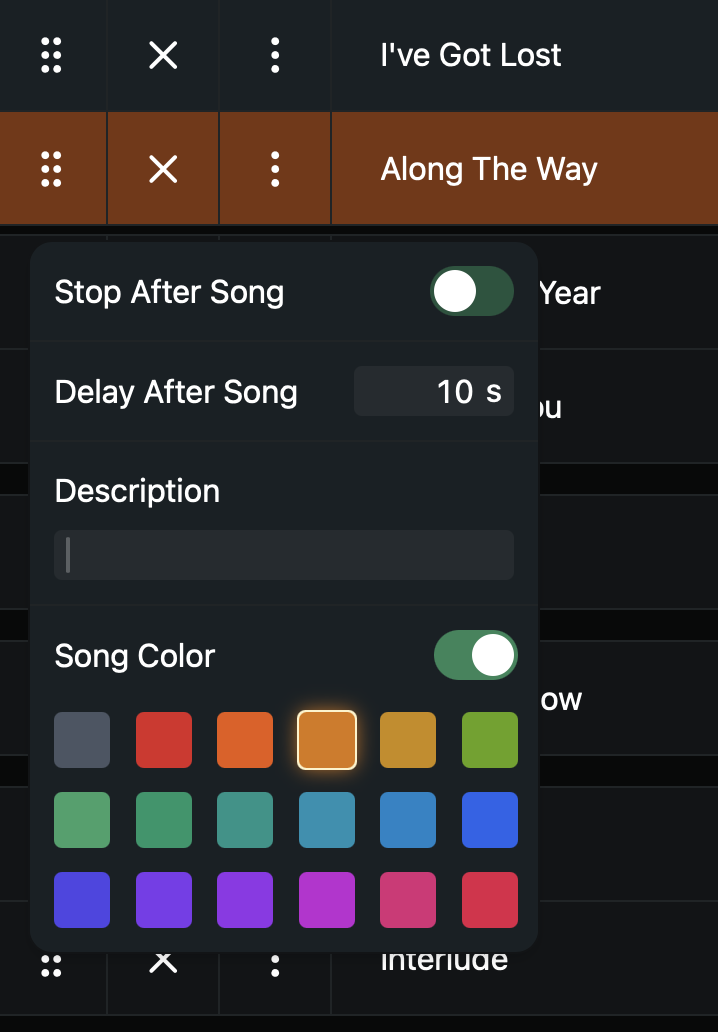
Now I can only “stop after song”, moving to the next song, and enter “Pause” into the Space. Then it’s visible in the Setlist, however not calculated in the duration.
Or I can enter a pause duration in seconds, but only without the “Stop after Song”, so then it will start again automatically.
So what I am missing is a kind of placeholder showing “Pause” in the setlist, and entering a duration like 15min to be calculated on the setlist duration, all in stop mode with the next song to be started manually. That would be a nice addition.
Best, Sebastian
@Sebastian you could solve this by creating a dummy song called Pause [15:00]. This will show up in the setlist as a 15 minute long song regardless of how long it is in your Ableton timeline, and will be added to the setlist’s total duration.
And now another related question in terms of setlist duration calculation - I’ve got several loop parts that vary a bit in length, sometimes 6 times, sometimes 8 times. Can I also put a time in brackets behind the loop part name to make ableset calculate an estimated duration instead of just one single loop duration?
If you know in advance how often you’d like to loop the section, you can also add it to the flag (e.g. > Section Name +LOOPFULL:8) which will disable the loop bracket after the 7th loop to play the section 8 times and automatically calculate the song length including the duration of those 8 loops for that section.