Describe your issue here:
I recently bought AbleSet and want to install the AbleSet plugin for my fresh Ableton Live installation but it won’t work.
Not automatically, not manually.
I found a thread related to permission issues but the thread didn’t tell how to actually fix the issue.
Please fill out these values to make it easier to troubleshoot:
- OS and Version: Windows 11 Pro
- Version of AbleSet: 3.1.2
- Version of Ableton Live: 12.4.3 Ableton Live Lite
Thanks in advance!
Hey @nikname, welcome to the forum!
I’m sorry to hear that you’re experiencing issues with the plugin installation. To troubleshoot this, could you send me a screenshot of the error you’re seeing along with a log package? You can create one by opening AbleSet’s status window, clicking the settings icon on the top right, and then selecting “Create Log Package”.
All files can be uploaded to my support inbox.
Hi @leolabs, thanks for reaching out. I’ve dropped the requested files in your support inbox.
Hey @nikname, thank you for the log package!
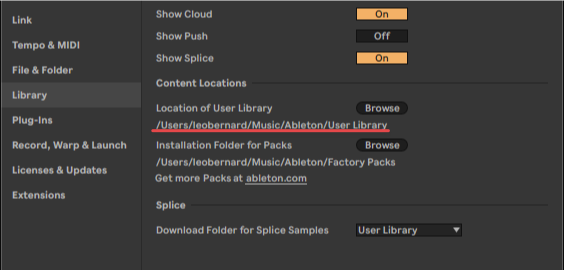
It seems that the folder you selected to install the plugin into isn’t an actual User Library. The User Library should include a folder called “Ableton Project Info” and optionally a folder called “Remote Scripts”.
You can check the location of your User Library in Live’s settings:
Let me know if this helps 
Hey @leolabs, I’m sorry to take up your time with such a layer 8 problem. I I assumed user library meant the users plugins directory. My fault. It’s something different. Thank you very much!
Cheers