Some of my Ableton/AbleSet projects contain Measures tracks, some do not. I like to display my measures in Performance view for the projects it’s set up for, but for the projects that don’t use Measures, I want to hide the “0.0” that would display the whole time.
I’ve noticed that I can’t hide ‘Current Measure’ if the project does not contain a Measures track. This is a screenshot from the second-most-recent beta:
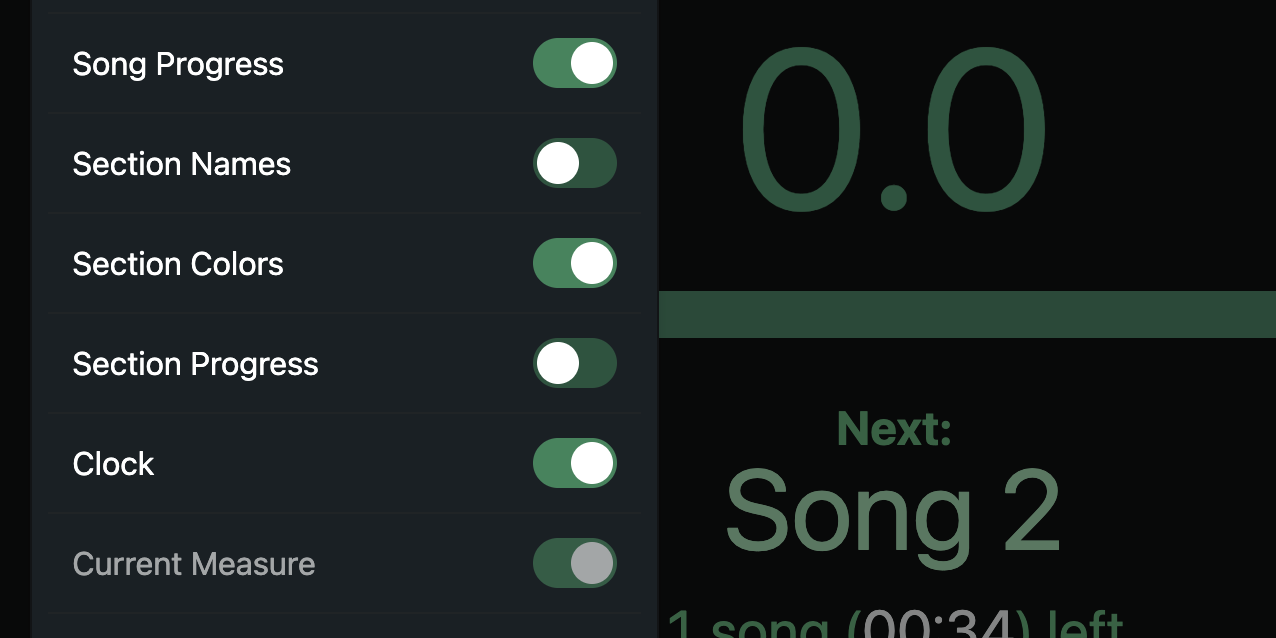
Unless there’s a technical limitation, I can’t think of any reason why this button shouldn’t always be accessible. If the project doesn’t contain a Measures track, then by all means the display can show “0.0” as it currently does.
Right now the workarounds are:
- Open another project that does contain Measures, hide ‘Current Measure’ in Performance view, then open the project you actually want (time consuming)
- Create a Measures track in the project that doesn’t do anything except allow access to the button to hide Measures in Performance view (adds ‘clutter’ to the session by adding a track that serves no purpose in the project)
Just a small quality of life suggestion 
