Hey @andrwpl,
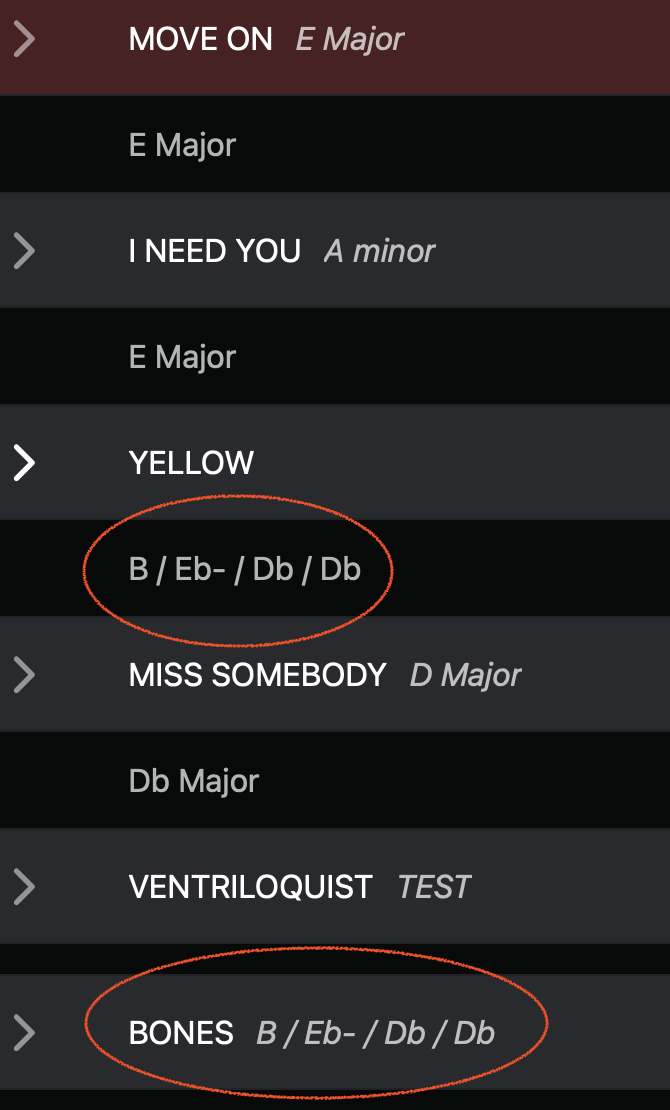
From what I can see in your Ableton timeline, one of your locators appears to be slightly misaligned with the first downbeat of the bar. For AbleSet to perform as expected, it’s important that locators are perfectly aligned to bar 1 of each section — so I’d recommend correcting that first. I also strongly recommend adding a time signature change at the very beginning of every song.
In your screenshot, the last song (“BONES”) seems to display and behave correctly, so that one looks fine.
And what you’re seeing under the song YELLOW seems to be the stop description for that song. Could you go into Setlist Edit Mode and confirm whether that’s the case?
I’m looking forward to your reply!
Thanks!
I haven’t been using SONG END markers. Worked fine previously without them. Are they required now? Having adding them to each song, AbleSet appears normal. Though now I can’t toggle AUTOPLAY from stopping after some songs etc.
Upon further inspection, it appears as the STOP markers are still attached to songs despite not having been added. I can’t AUTOPLAY.
One more thing… opened an old session that previously worked flawlessly. Same issue. I’m on Ableton 11.3.43. Perhaps that’s an issue?
Huh, bar 5 is very specific. Are the project file still the same as on your last log package? I’ll take a look at it then 
Yeah exactly the same as previous files, but somehow that issue has fixed itself after we played a song with a 2/4 bar intro 

it was the little blue arrow that (I think) tells AbleSet or Live where to play from, it would always appear on exactly bar 5 of ANY song, but now it’s decided to randomly fix itself  my brother said it was incredible that Leo was able to push and update to use without any internet connection
I wrote this earlier so I can paste it in to save my internet minutes onboard*
Hey Leo
I think I have found a few bugs with Multi-file projects (possible all linked as they seem to be time related issues)
AbleSet 3.0.0 [Pro]
Ableton Live 11
MacBook Pro M1Pro - MacOS 26
I believe that AbleSet is not correctly communicating with Live. When I click around the timeline, live is no longer moving the loop selection along the top of the timeline with which section I am in - I’m not sure if you have updated how AbleSet 3 now talks with Live but this is something I have noticed
Also, I have had issues where AbleSet is telling Live to start songs at bar 5 consistently and I have had to click go to song start every time a new song was loaded*
*this issue has randomly resolved itself when we loaded a song with a 2/4 bar intro - but it was still a massive issue during sets
I also had an issue where live is not allowing me to play from specific sections, for example - I click on a section mid song and hit play and Live plays the song from the beginning of the song even though AbleSet is flashing to say “this section is now queued”
I tried uploading a screen capture of this but this internet keeps timing out on the upload - specifically the song is Be The One - Dua Lipa
I have also had issues where the visual metronome it’s out of time but2 beats, the visual metronome is flashing bars of 8 beats on 4/4 songs and other weird bugs (again, these all seem to be happening randomly and I cannot recreate them to try and prove they are happening ) I know this isn’t not useful at all but I feel I could be one of a few that use the multi-file projects with such a large rep maybe either that or I’m the only one having issues with it haha
I don’t think I’m going to be able to send you my log package now I am back on a cruise ship, but i also havent changed anything since the last log package i sent when i was home just before AbleSet 3.0.0 launched
Cheers,
Addy 
Hey @Addy_Walters,
Thank you for reporting this!
The loop brackets behavior has indeed been changed in AbleSet 3. The app now won’t move the loop bracket every time you jump to another section, but you can still enable the loop as before and AbleSet will move the loop bracket as required.
This is mostly a visual change, the loop functions behave exactly the same as before.
Does this always occur with the same songs? If so, could you check if there’s a locator at the place where your song starts and ensure that “Set Song Start Time Here” is disabled?
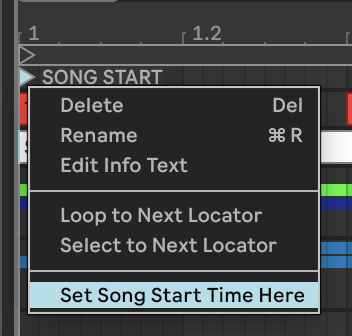
Otherwise, Live will jump there every time you start playback. You can also check this by manually placing the playhead somewhere in your arrangement and then starting playback from within Live.
The visual metronome uses your project’s time signature by default, or if you have a Measure Track, it will use that to determine how to display the metronome.
I hope this helps and look forward to your further reports!
Hey @leolabs thanks for your answer, I wasn’t able to do it either way you mentioned. No update within the v2.7.5 app. I have not found any link for renewal in my inbox. Then I downloaded the AbleSet 3 version and it will not allow me to validate it for the v3.0.3
so I am a bit at a loss, would you be able to pinpoint where I made a mistake? Or how can I proceed now? Is it possible that my v2.7.5 are just not valid for the v3 of AbleSet?
Thanks a lot for your help, truly appreciate it!
Ivo
Hey Ivo,
It seems that your license is indeed not valid for AbleSet 3 yet. I just sent you a link where you can renew your license for another year of updates.
Let me know if this helps!
OMG why did you make Abletin sooo expensive??  was 150$ not enough?? love the intro plan but its too expensive and the Standard Plan +30$? i think this is very disappointing… I tought you would make the survey about the prices and the new abo model to listen to the community but man i can absolutly not see that? 270$? For Pro? WHAAAATTT?? no words…
Hey @simon6347, thank you for your feedback! I’m sorry to hear that you’re unhappy with the prices of AbleSet 3. I did take the survey responses into account when deciding on the prices of the three editions, but I can see how especially the Pro license can seem expensive for some.
What prices were you hoping for?
Question! Is there a way to go back to using Ableset 2.7 if Ableset 3.0 introduces any issues?
Admittedly, I’m a little traumatized because I recently upgraded to Live 12 and it’s been a nightmare and virtually non-functional for my needs and I quickly reverted back to 11. So just want to know if there’s a safety net in case there’s some kinks that need to be worked out (and I can go back to using 2.7 if need be). Thanks!
Currently have a 2.7 license that I will need to buy a $75 upgrade for. But want to know what my options would be before spending the extra $$$
Hey @miikaii,
You can always download older versions of AbleSet from the Changelog page or from the Releases category on this forum. Your license stays valid for AbleSet 2 after renewing for AbleSet 3.
I hope this helps!
Usecase question - haven’t figured out the answer.
I’m currently using Multi-file project for a one off. All the loading and everything works wonderfully - unfortunately- the newly opened songs have the timeline locator starting all over the place.
What’s the magic trick to either 1. have it auto load from the top or 2. add a button that loads to the first locator I called ‘top’ at 1.1? Thank youuuuu
Hey Vince,
Thanks for reporting this.
Since you’re in a hurry, a simple command you can use for now is forcing AbleSet to reload the current song from the top with this OSC command:
/setlist/jumpBySongs 0 force=true
This tells AbleSet to reload the currently active song and start it from the beginning.
You could assign that to a Canvas button or a MIDI mapping as a quick reset action.
To understand what’s going on, could you also please send a Log Package?
You can create a log package by opening AbleSet’s status window, clicking the settings icon on the top right, and then selecting “Create Log Package”.
Please make sure to include your project files as well (just the .als files, no audio needed).
To send the files, you can upload them to AbleSet’s support inbox.
I’m looking forward to your reply!
A post was split to a new topic: DAD AX Center and AbleSet
Hello! For the Mixer functionality, can you add return tracks as options to add to the Mixer in Ableset?
Hey @LibTab_Sound,
Yes, you can add return tracks to the Mixer. The +G: flag works on any track in Ableton — audio tracks, group tracks, and return tracks alike.
Just add +G:YOURGROUPNAME to the return track’s name in Ableton (no space between the colon and the name), and it’ll show up as a group in AbleSet’s Mixer. For example:
A-Reverb +G:REVERB
B-Delay +G:DELAY
One thing to keep in mind: group names must be written in UPPERCASE and can only contain letters, digits, dashes, and underscores. If you want a name with spaces, use underscores — they’ll be displayed as spaces in AbleSet. So +G:SEND_FX shows up as “Send Fx” in the Mixer.
You can also include the main track as a group by enabling Include the Main Track as a Group in Settings → Mixer.
Hope that helps clarify things!