Hey @leolabs & @agustinvolpe! Loving all of these new updates, amazing work! I’m currently updating a client’s playback rig and we are adding a DAD AX Center. I’m looking for documentation on setup with DAD interfaces but not seeing anything. If we are planning to run Cat6 connections straight from interface to the laptops for DVS connections, but have Ableset network (and RTP MIDI) running through a hub in order to keep these networks seperate, is that going to affect Ableset’s ability to see and control the DAD’s “Control Pack” redundancy settings? Let me know if you have any suggestions on how I should set these devices up to work together.
Thanks!
Hey @cameronsimons,
I moved your question to a new thread to make it more easily discoverable for others.
AbleSet communicates with DAD interfaces over the network, so for them to show up in the app, your computer needs to have access to them. As long as any of the network interfaces on your computer have access, the AX Center should be discovered automatically.
Let me know if this works for you 
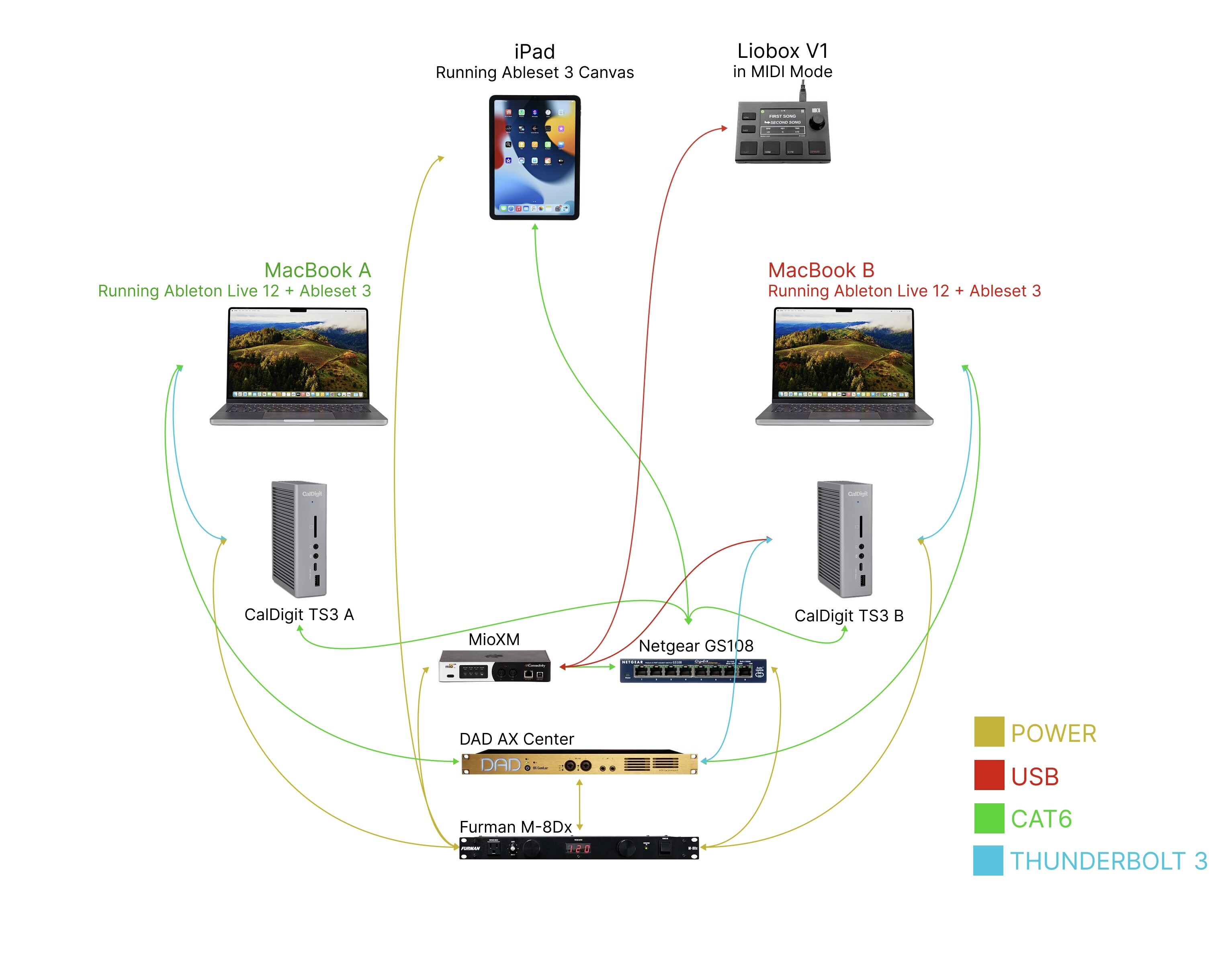
Hey @leolabs thanks for the response! I spent the whole day prepping our rig with the audio team, and we’re still having issues. I’ve set up DAD Control Pack and am able to switch playback between A and B computers seamlessly if I press the correct button in the DADman software (connected to the B computer via Thunderbolt for admin). However, I’m afraid that because the main interface connections to Ableton are via Dante Virtual Soundcard on a seperate network, Ableset is not seeing the interface. Ableset and RTP midi are running properly with static IPs through an unmanaged switch. We needed to keep the Dante connections seperate for several reasons, and these connections are using typical DHCP network connections, as this is what Dante handles best. There are no VLANs being used, Dante is just on a completely different network from Ableset and RTP midi. I’ve attached a diagram to illustrate all of the physical connections in our rack. I’ve also set both laptops up on Sonoma, since I’ve had terrible issues with both Dante and Ableset networks being impeded by Sequoia security updates. Is there any workaround for this? Am I doing something wrong? Thanks again.
Want to be clear that both computers see both networks no problem, and everything else is working as expected. Ableset just shows zero indication that there is any interface connected to the system. I’m not sure why Ableset isn’t able to locate the Dante connections.
Updating this for anyone looking here in the future. It is not possible for Ableset to interact with devices running on a separate network, even if your computers see all networks simultaneously. Ableset must run on the same network as DVS, if DVS is how your interface is connecting to your computers. Dante documentation seems to suggest that running MIDI and show control on the same network as Dante is not a problem, so that’s what I’ve decided to do for our system.
Hey @cameronsimons, sorry for the late reply on this thread!
This is an issue I’m aware of and I’m planning to add a workaround in the future. Basically, for AbleSet to discover DAD devices, it broadcasts a message to the entire network asking for them to identify themselves. However, this broadcast can’t be sent to all network interfaces at once and the operating system seems to use the default network interface for this.
I’m not sure how I can tell the operating system which network interface to use yet, but I’ll hopefully have a solution to this in the not so far future
1 Like
IM prettey shure this a mac thing… The prioritedes network settings i the issue here right ?
Hey @Lasse_Kirk, welcome to the forum!
I recently released a new beta version that should fix this issue. You can download it here to give it a try: AbleSet 3.1.0-beta.9
Let me know if this works for you