Hey Leo,
First I’d like to say thank you for this amazing product!
I’m having an issue with the section count-in function when jumping between multiple sections. The first time I first time I jump to a section, the click solo’s and works as expected. If I jump past more than one section, the click track solos momentarily but does not stay on. Am I doing something wrong?
I also wanted to ask if there is a way to include my slates being solo’d during the count-in function. Thank you 
Ableton 12.3.1
Ableset 2.7.5
Companion 4.2.0
Mac OS 26.2
(I sent you an email with a short video to illustrate. I was trying to upload it here but it was not letting me)
Hey Mark, welcome to the forum!
Glad to hear you’re enjoying AbleSet.
A couple of things I’d like to check with you:
You mentioned you’re on AbleSet 2.7.5 — could you try installing the latest AbleSet 3 beta and see if the behavior changes?
There have been quite a few fixes and refinements since 2.7.5.
Please also make sure you’re running the latest version of the AbleSet Control Surface in Ableton’s Preferences → Link/Tempo/MIDI. An outdated control surface can sometimes lead to issues like this.
You can add the latest plug-in version by clicking on AbleSet’s tray icon > Gear Icon > Add AbleSet Plugin to Ableton.
Regarding your second question about soloing slates:
AbleSet will solo the main click track during the count-in, and it will also solo any track flagged with +CLICK.
This will make them behave the same as the click track during the count-in.
Let me know once you’ve had a chance to try the beta, and we can take it from there.
If the issue persists, feel free to send us a log package so we can look further into this.
You can create a log package by:
- Opening AbleSet’s Status Window
- Clicking the settings icon in the top right
- Selecting Create Log Package
Then please upload the ZIP file to our support inbox here.
I’m looking forward to your reply!
Thank you for the reply Agustin
I’ve updated to beta.19 and the issue I described about the soloing was resolved. I think it is worth noting that the issue only popped up when I was trying to click through multiple sections at a time on my stream deck, but if I clicked through multiple sections in the ableset pop out window with the mouse everything works normal.
Also, thank you for the tip about +CLICK, very helpful!
Are you doing shows on beta.19? i was going to wait until the official 3.0 release came out, but I’m definitely liking the newer functions I’m finding.
I’m having one other little issue, maybe you can point me in the right direction again.
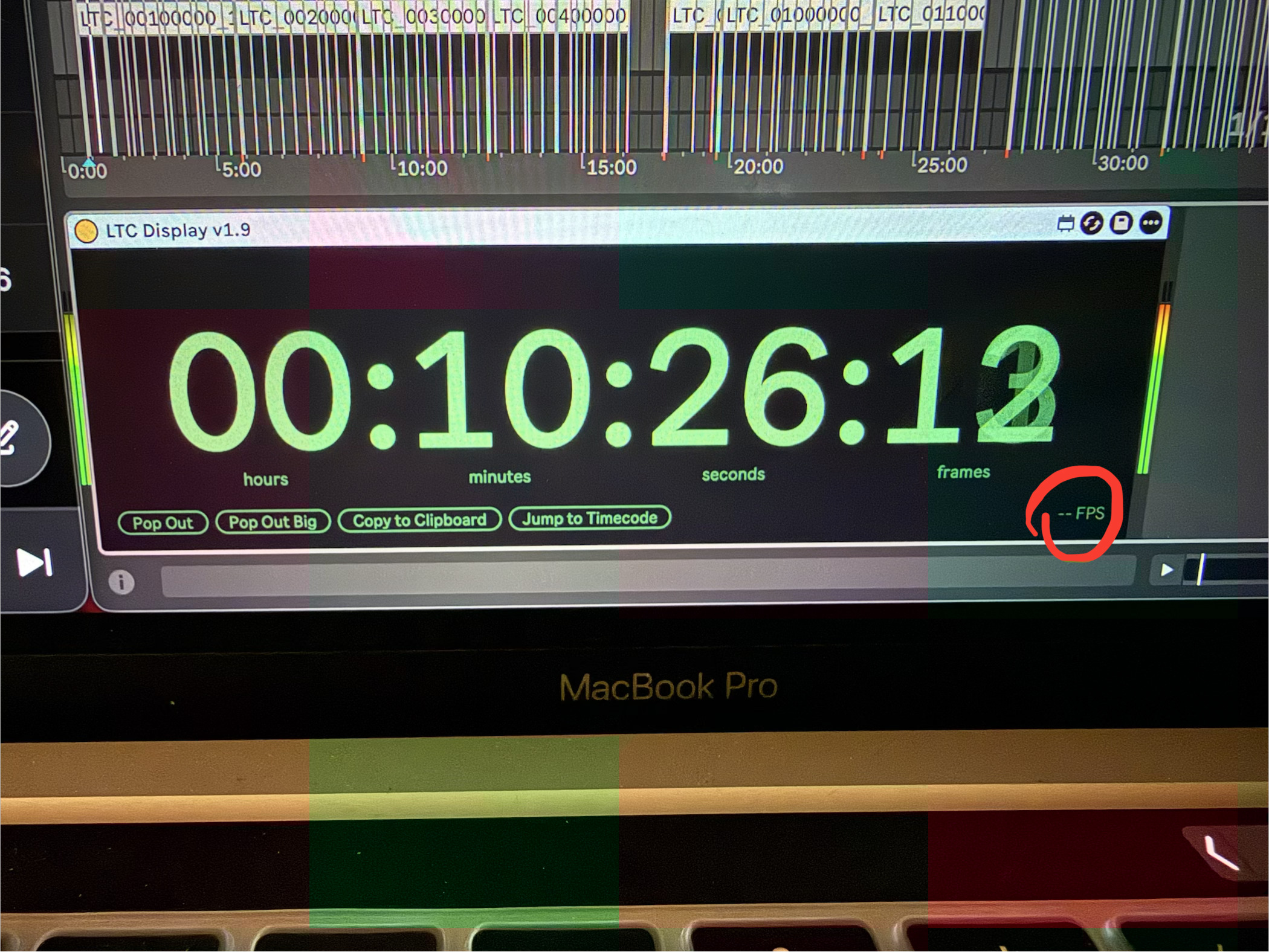
I’m using LTC display v1.9, and in the bottom right corner the fps is not displaying anymore. It reads “–FPS” It also displays that way on the stream deck button preset. This was happening before and after moving to beta.19
Thank you for your time
No worries at all Mark, happy to help!
Good to hear that updating to the beta resolved the soloing issue, and thanks for the extra detail.
Regarding betas:
Yes, I’m currently running the latest beta (beta.24) myself, and I actually used it in a live show last week, including a Project Script — it was rock solid on my end.
That said, every setup is different, so I’d recommend taking a close look at how your set is structured and, if possible, giving it a proper run-through in a rehearsal environment first.
About the LTC Display, a couple of questions:
- Could you check whether the audio on your timecode tracks might be accidentally warped?
- What version of Companion are you using?
Feel free to share a bit more detail there and we can dig into it together.
If needed, we can also take a closer look if you send over a log package.
Thanks again for the thorough feedback — looking forward to your reply!
Okay, I just checked and nothing is warped. I’m on companion 4.2.0
Here is a picture of the LTC Display running so you can see what I was talking about
I’m going to email a log package over as well, thanks!
1 Like
Hey @MarkFDavis,
Please excuse my late reply on this issue!
The LTC Display you’re using is outdated. Could you try updating to version 1.10 by downloading it from your Gumroad Library and checking if that helps?
If that doesn’t fix the issue, could you send me some samples of the LTC files you’re using so I can try to reproduce the issue on my end? You can upload them to my support inbox.
I hope this helps and look forward to your reply!
Hey Leo,
Thank you for the reply. I’m having trouble accessing my gumroad library atm. I use facebook for my gumroad login and I’m getting an “app not active” prompt when I try and access 
Is there anywhere else I can download LTC Display v1.10?