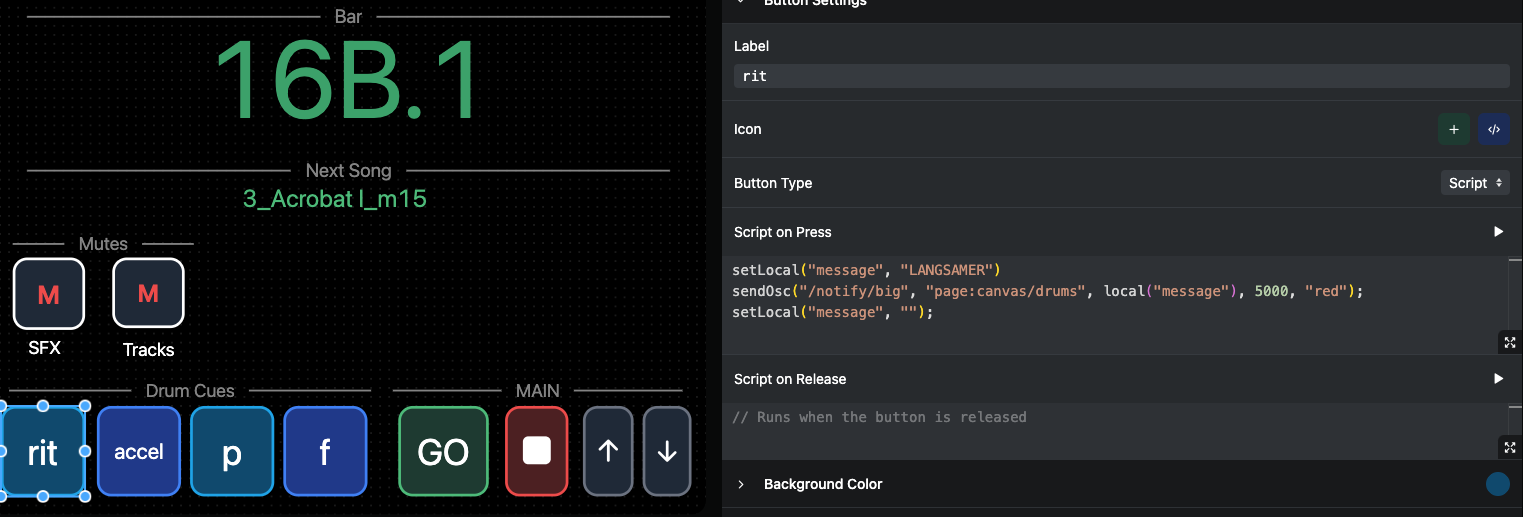
Hello,
I would like to have some of my canvas custom script Buttons being triggered by MIDI.
I tried to create separate MIDI Commands in the settings but the following code didn’t work there. But the script works perfectly on the button in the canvas.
setLocal("message", "LANGSAMER")
sendOsc("/notify/big", "page:canvas/drums", local("message"), 5000, "red");
setLocal("message", "");
When I assign this to a MIDI button, it won’t work. Why?
Or alternatively, is there an easy why to assign these “p”, “f”, “rit.”, and “accel” button to MIDI?
Thank you and best,
Nate
Hey @Nathan_Shelley,
You can just inline the message for the MIDI mapping like this:
sendOsc("/notify/big", "page:canvas/drums", "LANGSAMER", 5000, "red");
That will work in a MIDI mapping Custom Script.
For the “p”, “f”, “rit”, and “accel” buttons you can do the same: one MIDI mapping per button, each with its own message. You don’t need a script for these: just set the action to Custom OSC and enter the command directly:
/notify/big page:canvas/drums rit 5000 red
Since these are single words, no quotes are needed. If a message contains spaces, wrap it in quotes, e.g. "slow down".
Let me know how this goes!