Hello there!
If I want different jumpstyles throughout my setlist; Is there a way to toggle the jumpmode via a midiclip?
Thx
Hello there!
If I want different jumpstyles throughout my setlist; Is there a way to toggle the jumpmode via a midiclip?
Thx
Hey @AdamSampler!
Yes, you can change Jump Mode during the show using an OSC Track.
You can do it with this message:
/settings/jumpMode [quantized | end-of-section | end-of-song | manual]
So for example, placing a MIDI clip named:
/settings/jumpMode quantized
will switch the jump behavior to Quantized right when that clip is triggered.
Also, if you want to make this more flexible, you can use track attributes to set a prefix or a target on the OSC Track name itself.
For example, you can prefix all commands on a track like this:
OSC Track Name: General Settings +OSC [/settings/jumpMode]
Then your clips can just be named:
quantized
end-of-section
manual
AbleSet will automatically send:
/settings/jumpMode quantized
etc., based on the clip name.
You can find a list of available OSC track attributes here.
Would that work for your use case?
Agus
Dear Agus, brief question related to this: so when running Ableton with Ableset, I can automatically use a OSC track in Ableton without any further plugins being required, correct? any option to place a timed “mute”/“unmute” for a specific track in this OSC Track? Wondering who is the “receiver” of those commands from this track = if the commands finally end up in Ableton, or just in Ableset…
Hey Sebastian!
There are actually a few ways to handle this depending on what you want to control: AbleSet’s track groups (if you’re using AbleSet 3 beta), Ableton’s mixer, or both.
Let me break it down 
 1. Using an OSC Track (+OSC)
As long as you create a track in Live and add +OSC to its name, AbleSet will treat it as an OSC track — no extra plugins needed.
If your goal is to program timed mute/unmute actions directly on the Arrangement timeline, this works perfectly:
My OSC Track +OSC
Then you can place MIDI clips on that track to trigger AbleSet OSC commands at exact moments.
If you’re using AbleSet 3 beta, and your tracks are flagged with +G, you can control whole groups using AbleSet’s native mixer commands:
/mixer/[group name]/mute [0|1|toggle]
/mixer/[group name]/solo [0|1|toggle]
/mixer/[group name]/fadeIn [ms]
/mixer/[group name]/fadeOut [ms]
More OSC commands are documented here.
2. Using AbletonOSCIf you want to control individual Ableton tracks (not just AbleSet’s Track Groups), then AbletonOSC gives you full access to Live’s mixer.
You can get it here.
Unzip and rename the folder to AbletonOSC.
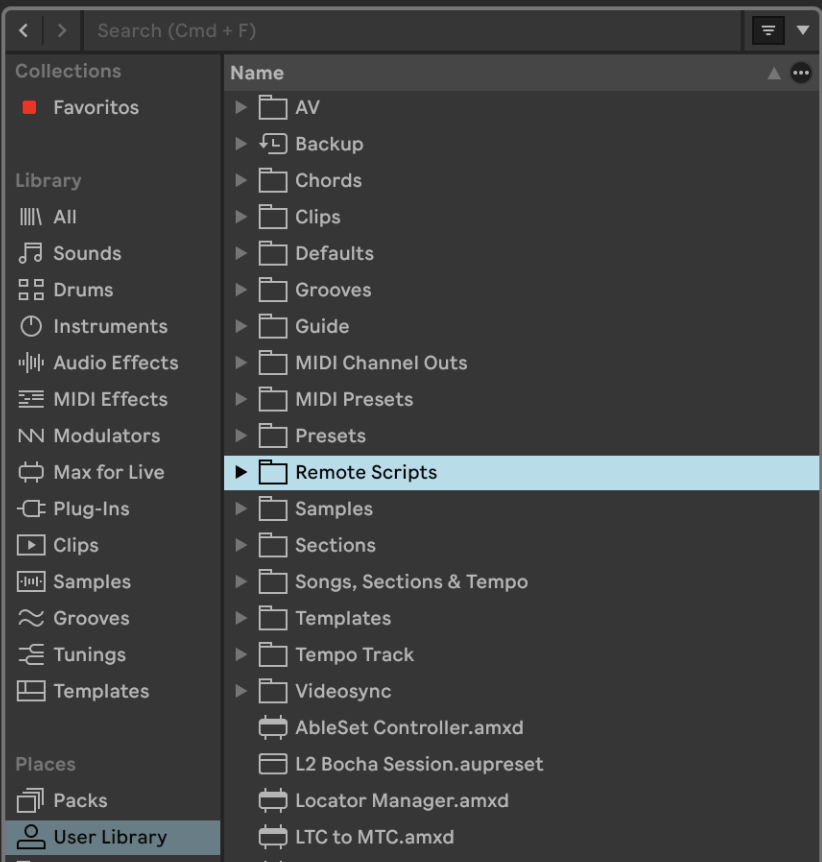
Drop it into User Library → Remote Scripts 
(so Live recognizes it as a Control Surface)
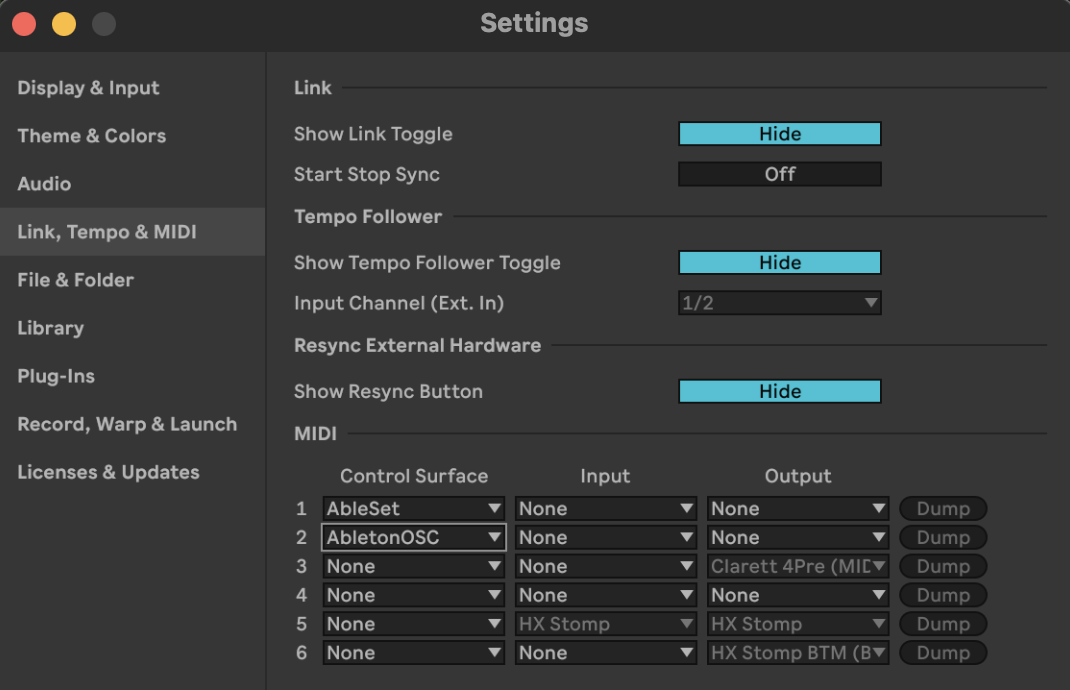
After this you might have to restart Live. Then open Live → Settings → Link/Tempo/MIDI and select AbletonOSC as a Control Surface
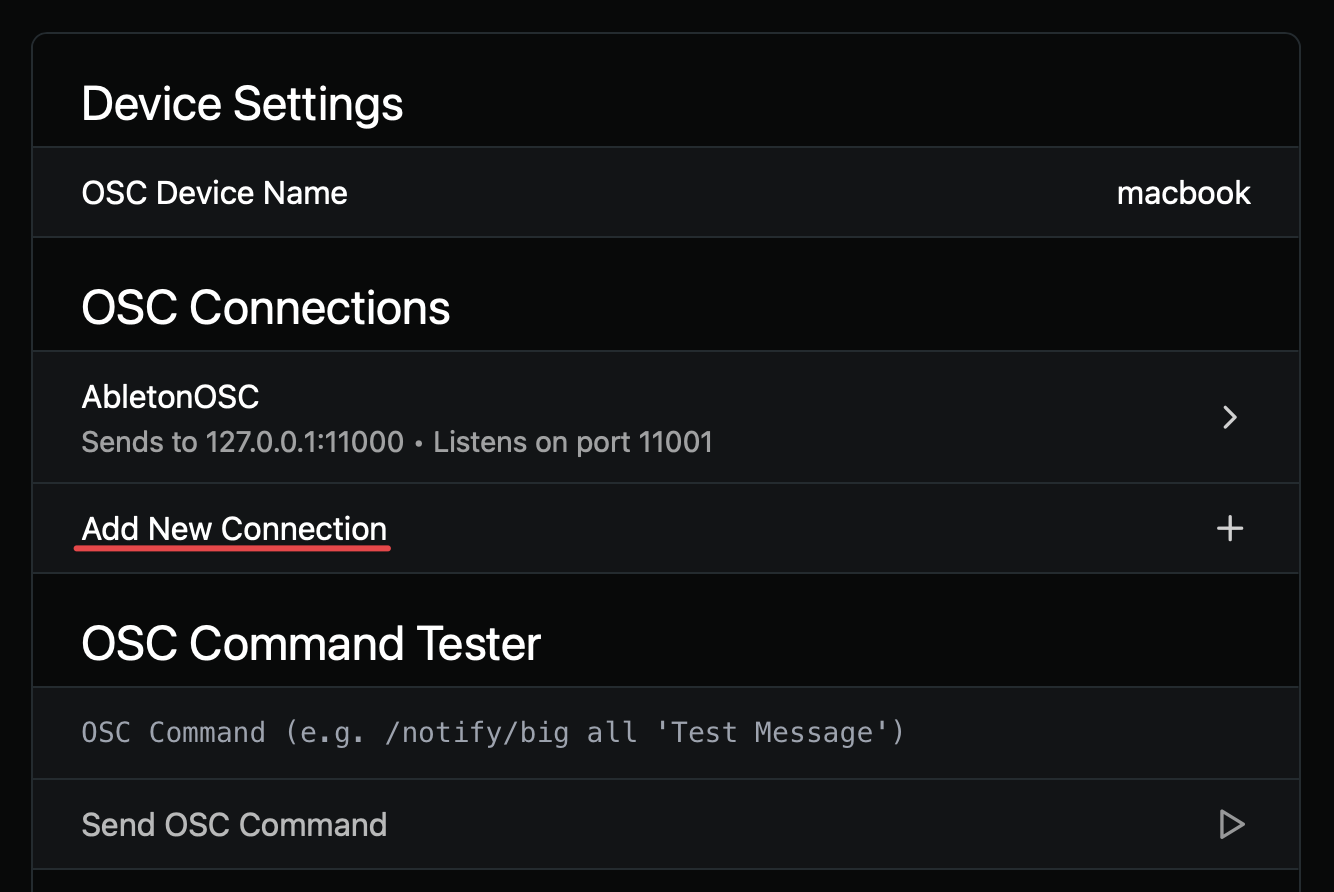
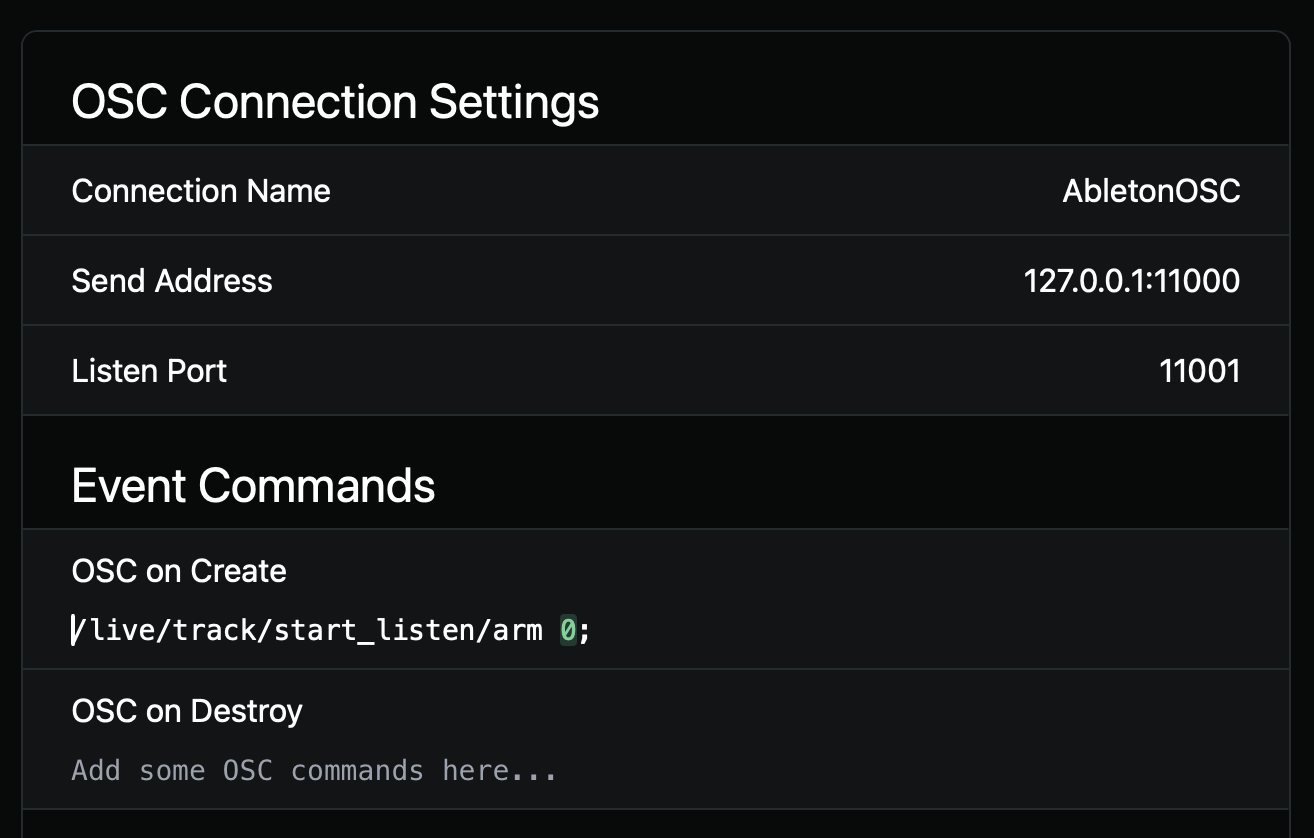
In AbleSet’s settings, add a new OSC Connection:
Once active, you can mute/unmute any track using:
/live/track/set/mute track_id mute
Where:
track_id starts at 0 (so even though Ableton shows tracks starting at 1, the OSC index is zero-based)mute = 1 (muted) or 0 (unmuted)Mute Track 1 in Ableton Live:
127.0.0.1:11000/live/track/set/mute 0 1
If you want to mute Track 10, the index would be 9:
127.0.0.1:11000/live/track/set/mute 9 1
And so on.
Hope this helps, I’m looking forward to your reply!
Agus
As always: works flawlessly. Great advice! Can I use a similar command also to trigger mute/unmute from a button in Ableset canvas?
Yes! You can absolutely do that from the Canvas as well.
Just add a Button element (click the + icon in the Canvas editor and search for “Button”), and then set its action to the same OSC command you’re using on your OSC track.
If you’re using AbleSet’s native mixer controls:
/mixer/click/mute toggle
This is the recommended approach and will toggle the mute state of the CLICK mixer group.
Or if you’re using AbletonOSC:
127.0.0.1:11000/live/track/set/mute 0 1
(This will always mute. To unmute you’d use 0 0, so you’d need two separate buttons for mute / unmute.)
Both approaches work perfectly from a Canvas button.
Let me know if this works for your use case!
Agus
Hi Agnus,
This information has been useful to me. I wanted to to do something similar but none the commands have worked.
I wanted to create a few button on my canvas from my groups I have made. They are pre-live stems I have have so on my shows if I need to quickly turn them on incase something drops out then I can.
At the moment I have to go back into the mixer view to turn them on because it won’t let me toggle the command directly from canvas view. Is there a work around for this?
The groups are also singular tracks (Keys, Guitar, Bass). Just would like to figure out a way to mute and unto them on the fly.
Many thanks
Chris
Hey @CTMusic,
Thanks for the details! You should be able to toggle any AbleSet mixer group directly from a Canvas button.
First (just in case): could you try the latest AbleSet 3 beta? Some Canvas / OSC–related things have been improved in recent builds.
You should be able to achieve this as follows:
Add a Button element and paste this in OSC Command on Press:
/mixer/group-name/mute toggle
Example (click group):
/mixer/click/mute toggle
Important: must match the AbleSet mixer group name in lowercase (the one you see in AbleSet’s Mixer groups), not the AbletonOSC /live/track/… format — that one is only for AbletonOSC.
Hope that helps!
Perfect thank you so much!!
That worked, I think because I never put it in lower case that’s why it wasn’t working fir me.
The only other thing I wanted to try work out was how to have it green when unmuted and red when muted. The colour dynamic commands seem more tricky for me than the other commands.
Many Thanks
Chris
Nevermind I managed to find it. The command is below for anyone else that is looking for it.
${osc(“/mixer/bass/muted”) ? “red-700” : “green-950”}
Many thanks