Issue
I recently started using Ableset to control a live backing track. During rehearsals everything went perfect, even playing through our whole set at once, several times.
The first show however, weird things started to happen: ableton live, not playing things in the right order, jumping from one place to another where it wasn’t intended to.
The cause: for this show we had to leave out some songs, so I made a custom setlist and thats where things started behaving as described above. Some investigation learned that having markers with the same name causes problems when creating custom setlists (while it doesn’t when not using custom setlists).
Sometimes we start playing a song, we transition to another song and pick up the previous song again. The markers for the song that was split into two parts both had the same name: the name of that song. It seems that when using custom setlists, ableset puts these two markers together in the setlist (when reopening the saved setlist), leading to unwanted results
Not sure if this is to be considered a bug, but it is certainly something that needs to be taken into account when creating custom setlists. Especially since it doesn’t create problems when you don’t use custom setlists: everything seems to work great and all of a sudden it doesn’t.
Please fill out these values to make it easier to troubleshoot:
- OS and Version: macOS 26
- Version of AbleSet: 3
- Version of Ableton Live: 12
Hey @Hans_Humblet, welcome to the forum!
Thanks a lot for sharing this.
Would you mind sharing a few screenshots of how your project timeline is set up, especially the locators and sections for the affected song? That would help us better understand how AbleSet is interpreting those.
Also, I noticed the thread is edited as resolved now, so if you found what was causing it, it’d be great if you could share that here as well.
I’m looking forward to your reply!
Hi @agustinvolpe,
I marked this topic ar resolved myself because I’m not sure if this is to be considered as a bug and I found a straightforward way to make it work: unique naming for song markers.
I think the issue should easily be reproduced by adding some markers on a timeline with unique names. Then adding some markers wit identical names, scattered at different locations along the timeline. This should work fine with no custom setlist loaded. But when you edit the setlist and save it, I noticed that after closing and reopening ableset and loading that custom setlist, all the songs with the same name ar put right underneath the first song with that name.
So if in your timeline you have these markers e.g.
SONG A - SONG B - SONG C - SONG D - SONG B - SONG E - SONG F
In a custom setlist this would (unintended) result in:
SONG A - SONG B - SONG B - SONG C - SONG D - SONG E - SONG F
when opening the custom setlist
I’ll try to provide some screenshots later today.
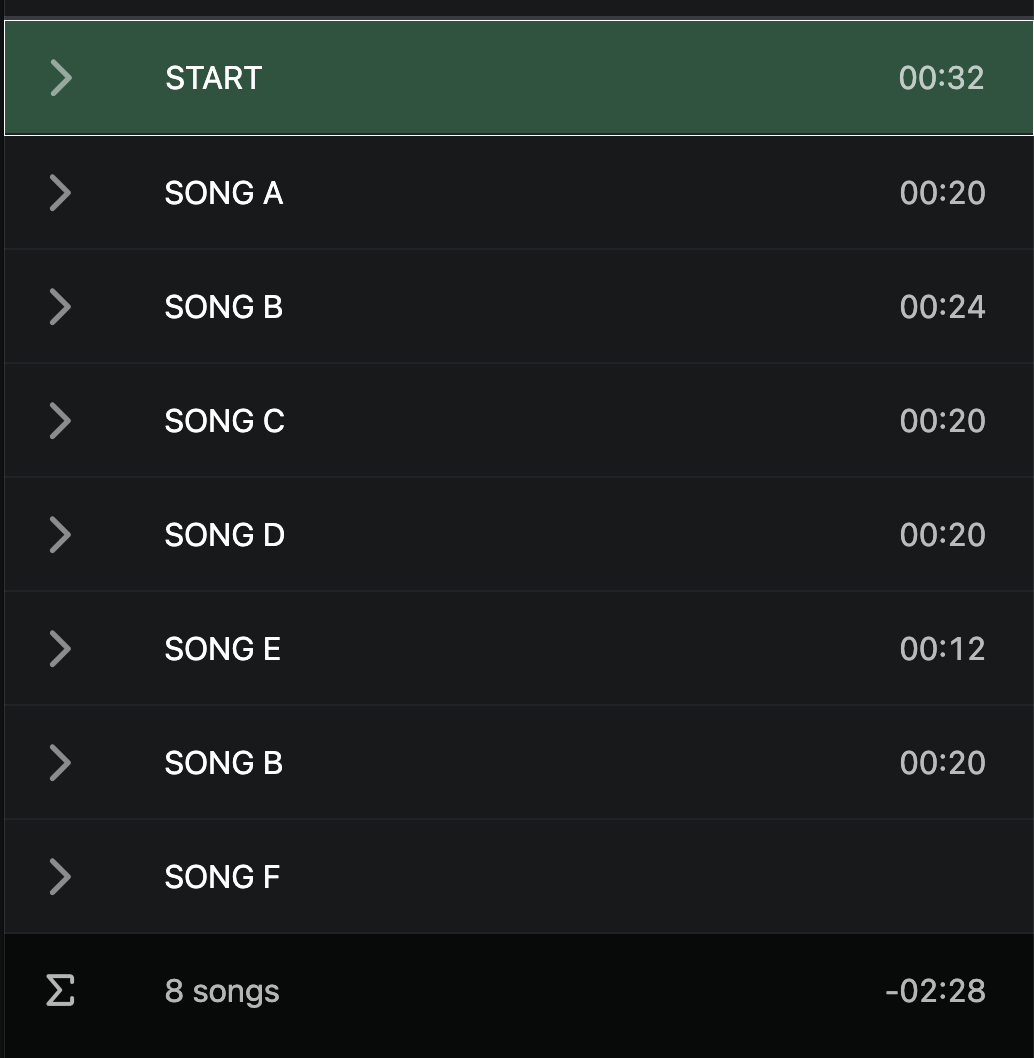
This is what my default setlist looks like (not a saved one):
As you can see it perfectly reflects my timeline.
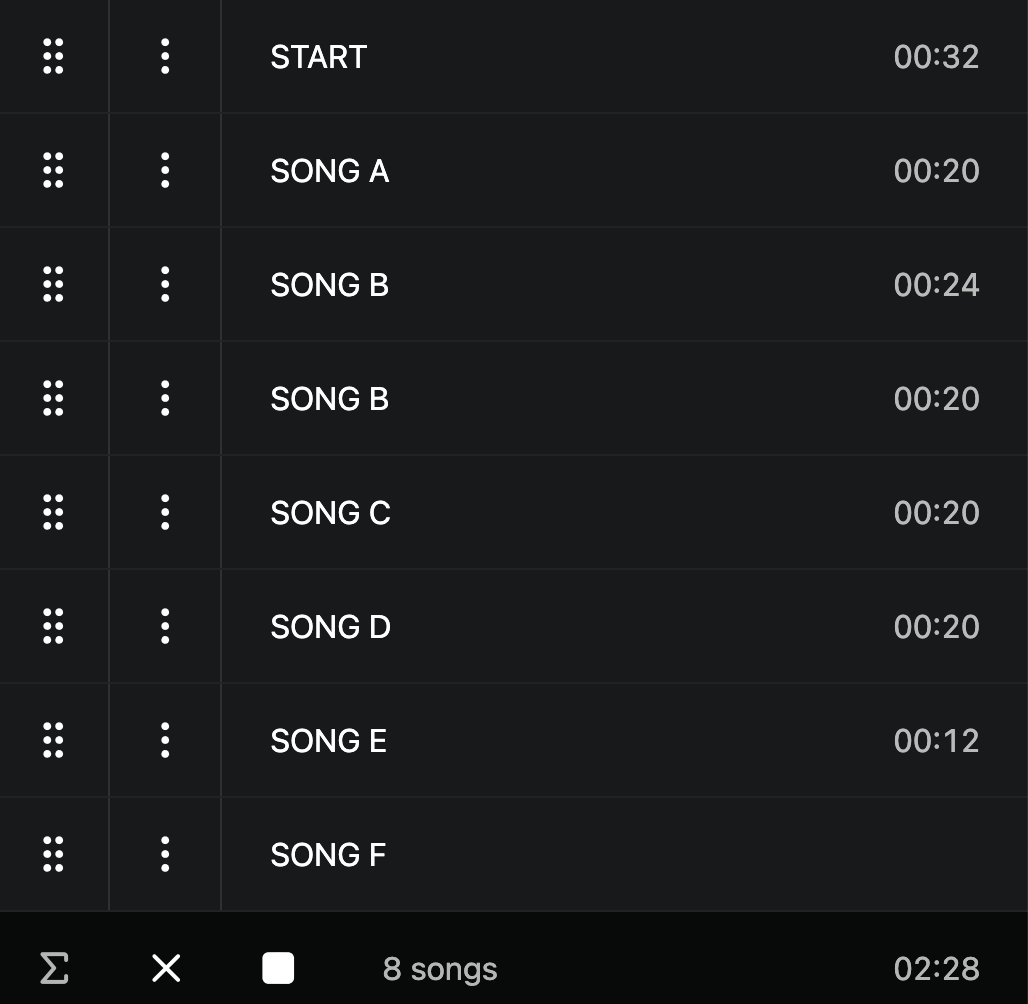
Once I save the setlist (without any changes, just saving it as a json) and re-open it (I basically shut down ableset and live and restart them), it looks like this:
As you can see, the second “Song B” has now moved right underneath the first “Song B”.
When you move it back to it’s correct position, save it and reload it, it goes faulty again.
I hope these screenshots help in illustrating the issue.
Hey @Hans_Humblet,
Thanks for the screenshots!
I noticed there are no SONG END locators in your project.
Could you try adding a SONG END locator at the end of each song and see if that solves the issue?
I’m looking forward to your reply!
Hi @agustinvolpe, I just tested this, but it doesn’t seem to fix the problem.
If it worked, this would also be just a workaround. Personally I prefer renaming the songs (as I did), because it doesn’t require extra markers just to prevent the problem. Giving the duplicate songs a proper name (e.g. SONG B-PART 1 and SONG B-PART 2) seems to make more sense to me, because it also adds information about what part you are dealing with during preparation and performance.
As I said: for me this is not really an issue anymore (hence the “RESOLVED / WORKAROUND / FIX” in the title). Although it would be nice if it could be fixed, I think the important part is that it is mentioned in this forum and that there is a fix, just in case other users bump into the same problem.
Hey Hans,
Thanks again for the detailed explanation, I really appreciate it.
I tried reproducing this on my end by setting up a project similar to yours, including duplicate song names and saving a custom setlist. After saving, closing everything, and reopening both the project and the setlist, the song order remained exactly as expected and didn’t get regrouped.
So at least from what I’m seeing here, this doesn’t seem to be happening consistently.
Would you mind sending us a log package so we can take a closer look at what might be different in your setup?
You can create a log package by opening AbleSet’s status window, clicking the settings icon on the top right, and then selecting “Create Log Package”.
Please make sure to include your project files as well (just the.als files, no audio needed)
To send the files, you can upload them to AbleSet’s support inbox.
Even though you’ve already found a workaround, it’d still be great to understand what’s causing this on your end, just in case there’s something we’re not seeing yet.
I’m looking forward to your reply!
@agustinvolpe, I sent you the log package. It is not the file I use live, it is just a dummy file to check if the problem was reproducable (seems like it was).
I noticed that the setlist json file is in there too, so I assume opening it would give the same results I’m having. I also noticed that although in the json file itself, the order of the songs seems correct, opeing it in Ableset still mixes things up.
Really curious about what may be causing this 
1 Like
Hey @Hans_Humblet, thank you for the log package!
I just released a new beta version of AbleSet that addresses these issues. You can download it from here: AbleSet 3.1.0-beta.8
Let me know if this improves the behavior on your end, I’m looking forward to your feedback
Hi, @leolabs, I just tried running the beta version you provided, but it says my licence is not valid for this version. Would this be because I activated Ableset over a year ago?
Hey @Hans_Humblet, that was right! I just extended your license for a few months so you can use it to activate AbleSet 3.1 and try out the beta