What I’m trying to achieve:
I am trying to send text as OSC values to be displayed in canvas. Similar to how section/song names are sent, but a custom track with reminders/notes timed to sections of the current song.
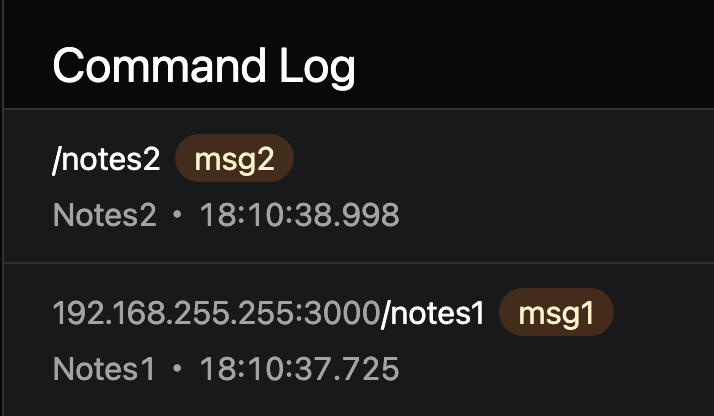
Currently I can see them in the log, but not via canvas. I also can’t see them via Protokol (on the host computer or another device on the same network) so realise I must be missing a step somewhere.
Current setup:
Tested 2x different tracks sending OSC along with a dynamic label in canvas - both below
As it’s cut off, top track name: Notes1 +OSC [192.168.255.255:3000/notes1]
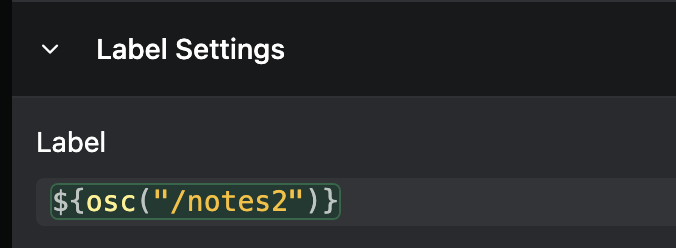
Labels
and
Results:
Both labels result in “null”, however, the values can be see in the OSC command log
I’ve also tried creating a connection as below, but that reports “no OSC values received yet”
Please fill out these values to make it easier to troubleshoot:
-
OS and Version: MacOS Sequoia 15.5
Version of AbleSet: 3.0.0-beta.25
-
Version of Ableton Live: Suite 12.3.1
Hey Zac, thanks for the detailed breakdown — this actually explains the behavior you’re seeing.
What’s happening is that Canvas can only read OSC values that AbleSet exposes as state, not arbitrary OSC messages that just pass through.
Even though your clips are correctly sending:
/notes1 "msg1"
and you can see them in the Command Log, those messages are actions, not persisted values. Since /notes1 and /notes2 don’t exist in AbleSet’s exposed OSC values, osc("/notes1") will always return null in Canvas.
You can achieve this the following way:
For dynamic text in Canvas, you’ll want to use Shared Variables.
From your +OSC track, send:
/shared/notes "msg1"
and later:
/shared/notes "msg2"
Then in the element’s Value field:
${shared("notes")}
Shared variables are:
- persisted
- readable from Canvas
- synced across all devices
Once you switch to that, the null issue should disappear straight away.
Hope that helps — cool use case, by the way!
2 Likes
Thanks Agustín, that’s a great solution 
1 Like