I initially used locators to mark song sections in Ableton, which allowed me to jump between sections during playback. However, this cluttered the Arrangement view and made editing inefficient. To keep the set cleaner, I switched to MIDI clips to represent sections, which improved organization, but I lost the ability to jump between sections during playback.
Is there a way to jump between sections in a quantized manner during playback without using locators, or are locators the only option?
I found a workaround where I use “Automatically Place Locators on Sections” before the gig and remove them afterward. The issue is that using this tool causes playback glitches and Ableton hanging, although once I save and reopen the set, playback becomes stable.
Is this currently the best and safest solution, or is there a more reliable way that avoids any risk of playback issues? Looking forward to your response thank you
Hey @khoslaraghu, welcome to the forum!
In short: yes — locators are currently the only reliable way to jump between sections during playback.
Sections defined via MIDI clips can be displayed and jumped to only when Live is stopped. Jumping to them while playing isn’t possible due to Ableton Live API limitations.
At the moment, there’s not much that can be done on AbleSet’s side until Ableton exposes this in the API.
This is a well-documented caveat. If you place the locators, save and reopen the set once, playback will be stable and safe for the show.
Hope this helps!
1 Like
Hello! I have my locators placed but the jumping to section is not working, i dunno why…
i hit a section to jump, it blinks a few times and then stop blinking as the song continues to the fallowed section, but never make the jump… i dont remember any setting that can make this behav
also the stop by the end of the song is not working…
Hey @Gerson_Benjamin_Sobe,
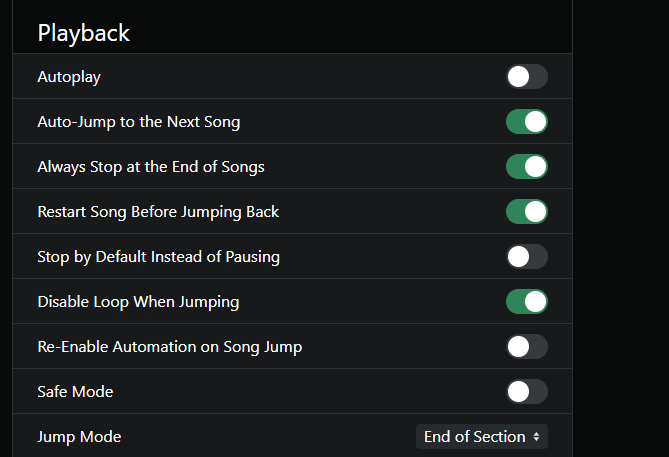
Could you share a short screen recording of the behavior you’re experiencing, along with a screenshot of your Playback settings in the AbleSet UI?
That should help point us in the right direction.
Looking forward to your reply!
esta es la configuracion, pero al parecer era un problema de versiones, un choque