Hey Charles,
You can address multiple specific devices in the [devices] argument by listing their device names directly (the same names shown in the OSC Settings → Device Name ), or by using all , depending on what you want to target.
I actually posted a very similar approach some time ago, in this thread.
You can put this either in an OSC track or inside a MIDI mapping using a chained Custom OSC command, like in the screenshot below 
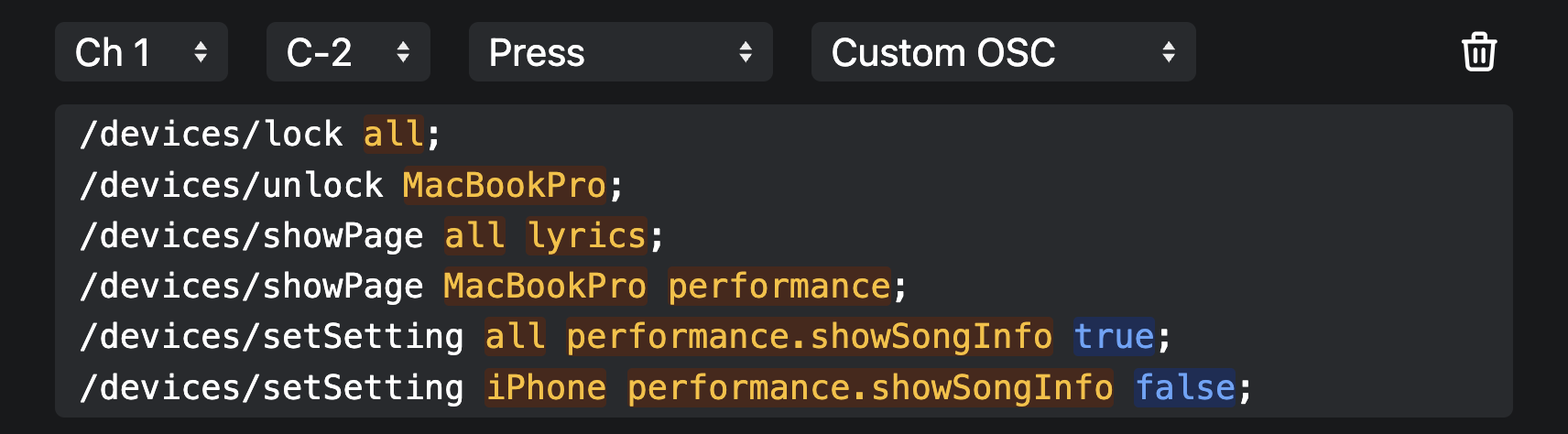
In this example, the sequence does the following:
- Locks all devices
- Unlocks only the MacBook Pro
- Sends all devices to Lyrics View
- Switches the MacBook Pro back to Performance View
- Enables song info in Performance View on all devices
- Disables song info specifically on the iPhone
So you end up with:
- Everyone seeing lyrics
- The main machine in Performance View
- Slightly different UI behavior per role, all from one trigger
One thing to keep in mind: There’s a 50ms delay between OSC commands by default, so if you’re sending a longer chain, the full configuration might take 2–3 seconds to propagate to all devices. In practice, it’s not really an issue.
This pattern scales really well once you start handing out multiple iPads on stage.
Hope that helps!