We are preparing a project in which two of three musicians will be live looping multiple instruments. Some of those tracks will have some effects that would be great if the musicians could hear while playing live. The effects are always Ableton native and trying to stay minimalist here (they also use pedalboards themselves). Target latency no more than 5ms.
We are thinking and preparing all the hardware or software besides ableton live that we will need for the show. One of the technicians suggested to get all the signals into a stagebox and then to the laptop (Ableton) and then with a Usb C to a Ethernet conversor go via DANTE to the FOH console throughout Able Set.
My question is: Is this a good way to do it? the best way? Better than getting a Dante ready RME Interface for example? Does Able Set ad latency in some way?
Will apreciatte your comments and knowledge. Thank you so much.
That setup could work, but there are a few things I’d keep an eye on:
• AbleSet will handle playback — it won’t add any latency, since all latency comes from the audio interface, Live’s buffer size, and Dante.
• USB interface → Dante adapter adds extra stages, so total round-trip latency may creep past your 5 ms target depending on the interface + buffer size + Dante Virtual Soundcard. You’d have to test this in your setup.
• A Dante-native interface (RME, etc.) would definitely be the more stable approach, since you’d avoid extra conversion and clocking.
You can absolutely try this with the gear you currently have — the signal flow is valid. Then again, if ultra-low latency and reliability are priorities, a Dante-ready interface is likely the safer option.
We’re using almost the exact same setup for our band – a Dante interface that receives audio from our stage box, loops it through Ableton Live for effects, and returns the audio back to the stage box.
We’ve been using RME’s DigiFace Dante but recently switched to the DAD Core256 as that has even lower latency, though it is more expensive and might be a bit overkill for what you’re trying to do.
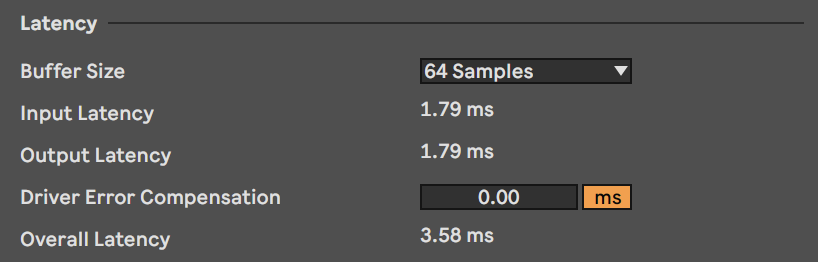
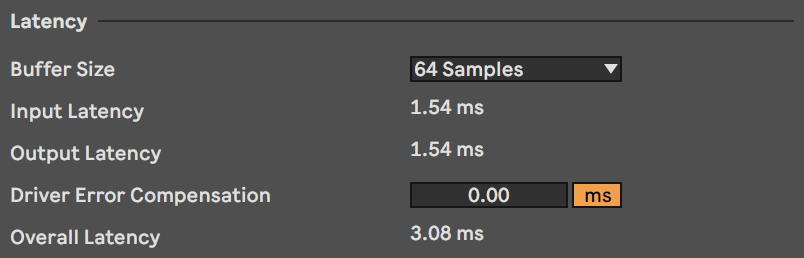
With a short safety offset and 64 samples of buffer, I’m able to get a roundtrip latency of around 3.5ms:
You’ll have to add ~2ms of roundtrip latency for the Dante connection, though you might be able to get this down to ~1ms depending on what hardware you’re using on the other end.
I hope this helps! Let me know if you have any further questions
Thank you for your replies guys, I see that you always talk about an interface. Our technician says that we will be able to get it going from the stagebox to the computer (with no interface) and then, with a simple converter (I guess usb c to an ethernet connection) and by using able set software we’ll be able to go to the FOH console with no latency (just the 2ms of the Dante net) So, is this reliable? I understand it is reading this from Agustin:
So we should try that before buying and interface right?
Also I don’t understand the following things:
And then? from the Stage Box the console? How? And how would be our IEM’s routed? Please take in account that we need the musicians the mix their own IEM’s through an Ableton mapped Techtools Midi Fighter Twister (3 musicians with 3 Midi Fighters).
Also I understand the sample rate, but what do you mean with a “short safety offset, or normal…”)
Lastly, by using RME’s Driver Kit drivers you mean instead of the mac os Core Audio? Is it better then that way?
Sorry for the number of questions but this is important for us, we have a deadline and we really need to have all of these cleared as soon as possible. Thank’s again.
Could you elaborate on which stage box you’re using and what other gear you already have in your setup? That would allow us to be more specific in our help.
Generally, there won’t be any way to connect a stage box to a computer without latency. For example, if you were using a Behringer X32 Rack or WING Rack as a stage box, connected to the computer via USB, you’d have a roundtrip latency of around 6.3ms at 64 samples of buffer for the USB connection. Other stage boxes might have different latencies.
Generally, I’d advise against mixing your in-ears in Ableton Live. That would mean you’d have to loop all sources through Live and in case it crashes, you’d lose your in-ear monitoring completely. Rather, I’d recommend using a rack mixer that can be remote-controlled via the network so each member of your band can adjust their mix on their own phone or tablet. This would also allow you to monitor your inputs that don’t need to be looped through Ableton Live at near-zero latency.
The Behringer WING Rack is a good solution, but there are good alternatives by other brands like Allan & Heath as well.
Those are RME-specific settings. The safety offset is basically a buffer within the audio interface that prevents small dropouts in the USB connection from disrupting the audio signal. A higher safety offset means less chance of disruptions at the cost of higher latency.
RME offers two different drivers – a kernel driver and a DriverKit driver. The DriverKit driver is more modern, but some people swear by the kernel driver as it has been around for longer.
I don’t offer private 1-on-1 consulting, but there are other Live Playback specialists who do. You can find a directory of specialists here: Certified Training | Ableton
If you have any further questions regarding your setup, please feel free to ask on this forum and we’ll try to answer them as best as we can