Hi Leo
Hope you are well.
Pls can you help and take a look at this issue. We have 2 big is this weekend (Its Valentine’s day!) and Ableset will not load up my multi-file project.
I attach here screenshots and logs.
I am using the following;
MacBook Pro, Intel
I am using V3 (now 3.0.2)
Multi-file projects.
Ableton 12.3.5
It was all working just fine until I did a restore of my data to the MacBook in question which is my live playback machine with minimal stuff installed, no email, internet etc.
It all works just fine on my test machine.
For some years now I have been using Ableset and using ChronoSync to backup the files from my test/development machine to the live playback machine. I use the test machine for creating and editing tracks etc.
I do a full sync (IE bi-directional sync) of the Ableton folder which includes my songs folder where all my multi-file projects are stored. It also includes the Ableset folder.
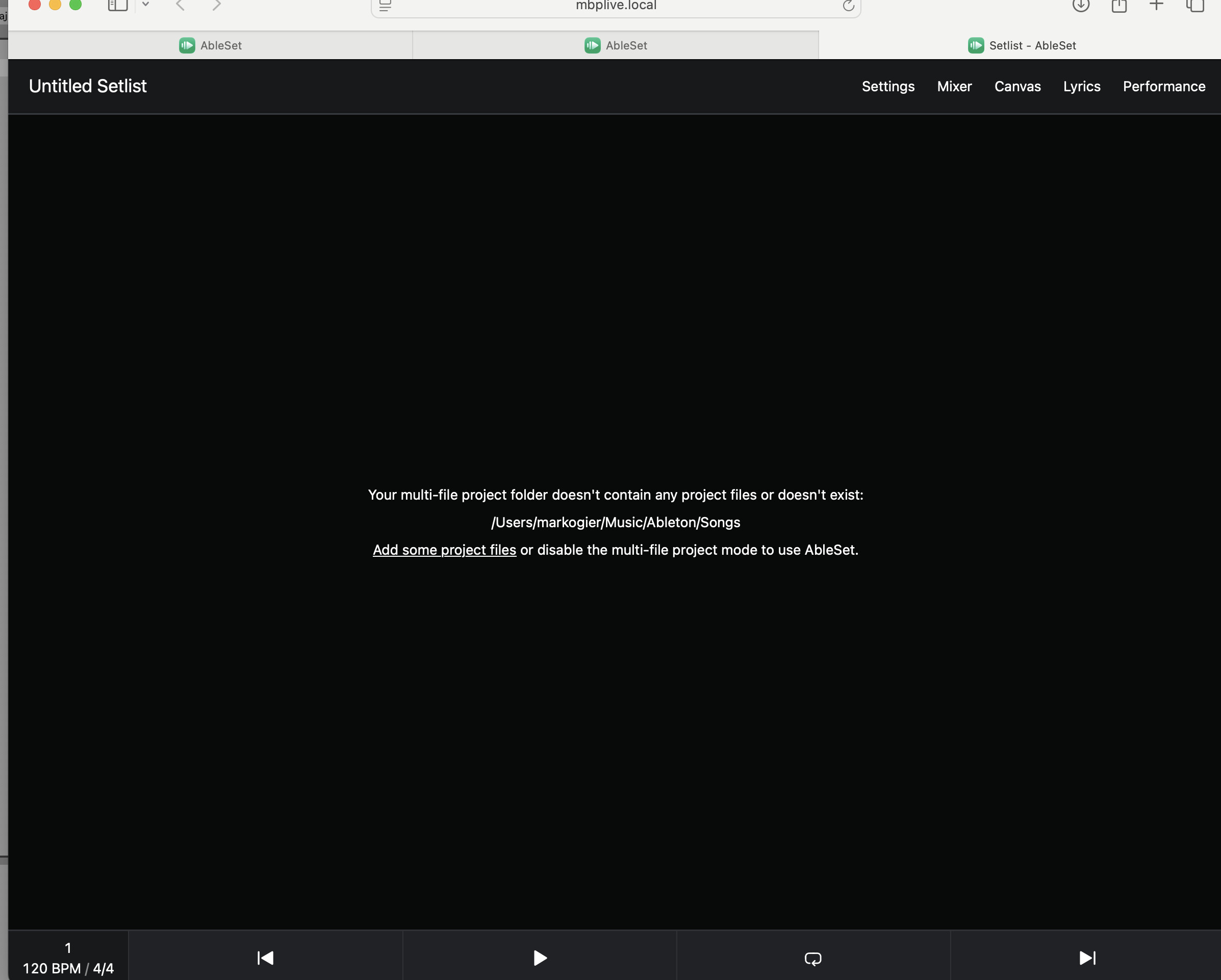
After I did the restore of the backup (from the SSD I use for backups) to the Live machine, Ableset will not find the multi-file projects. See screen shot.
From the screenshot I have a feeling that it is looking in the wrong place as the file path stated in the web page message says
/Users/markogier/Music/Ableton/Songs
Which is the correct file path on my Test/Dev machine, but not the file path on the Live machine. The file path on the Live machine is
/Users/Music/mark/Ableton/Songs. (Not the difference in the user name part of the path)
In many years of using Ablest in this way, with the same workflow to transfer my files over I have never had this issue. I can only assume you used to use the file path with the home folder identifier (~/Music etc) and now you are using the full path including the name. Is this some security check for license maybe?
I may be wrong about the reason for the issue, just my thoughts.
One other thing. If I select to option in the Ableset menu to ‘Open Project Folder’ nothing happens. It doesn’t error but it doesn’t open any folder, just nothing.
In any event, I am now dead in the water with 2 gigs looming. I can load the songs manually in Ableton, not ideal whilst people are stood watching, but doable. The issue is I rely on ABleset to fire off OSC and MIDI to control all sorts of other stuff. If it is not loaded none of that is going to work 
Hope you can help
PS I sent an email with log files etc.
Thanks
Mark
