Describe your issue here:
Hello all,
We are using a “Sessions” track to control Ableton. There are several +PAUSE messages as part of this. We have noticed that occasionally, playback will resume at the previous +PAUSE marker, rather than at the marker that playback originally was paused at.
I have not been able to identify a pattern as to when this happens. It seems to be random. Most of the time, everything works normally, and playback resumes at the correct marker, where it stopped. Sometimes it does not.
I have a debug log snippet of when this occurs. AbleSet clearly jumps from bar 172 to bar 156.
(...)

[04:36:46.472][setlist]Pausing playback on cue:
{
  "name": "Restart Bar 172 +PAUSE" <-- playback paused at bar 172
}

(...)

[04:36:48.651][setlist]Updating active cue
{
  "cueChanged": true,
  "isPlaying": false,
  "currentNextTime": 8075, <- currentNextTime appears to be earlier than oldNextTime
  "oldNextTime": 8120
}
[04:36:48.652][setlist]Matched cue:
{
  "name": "Restart Bar 156 +PAUSE", <-- playback starts at bar 156
  "id": "live_36948595072",
  "isCountingIn": false,
  "lastSongTime": 8059.083425364781
}

(...)
(I can’t seem to attach text files to dump the whole relevant log section. Will do that once I figure out how.)
Any help with this is appreciated. Happy to provide more information as needed.
Thank you,
Jacob
Please fill out these values to make it easier to troubleshoot:
- OS and Version: macOS Tahoe 26.2
- Version of AbleSet: 3.0.11
- Version of Ableton Live: 12.4
EDIT: I’ve attached my log export as a .json text file. It’s not really pure JSON but that’s the only extension I could upload it with.
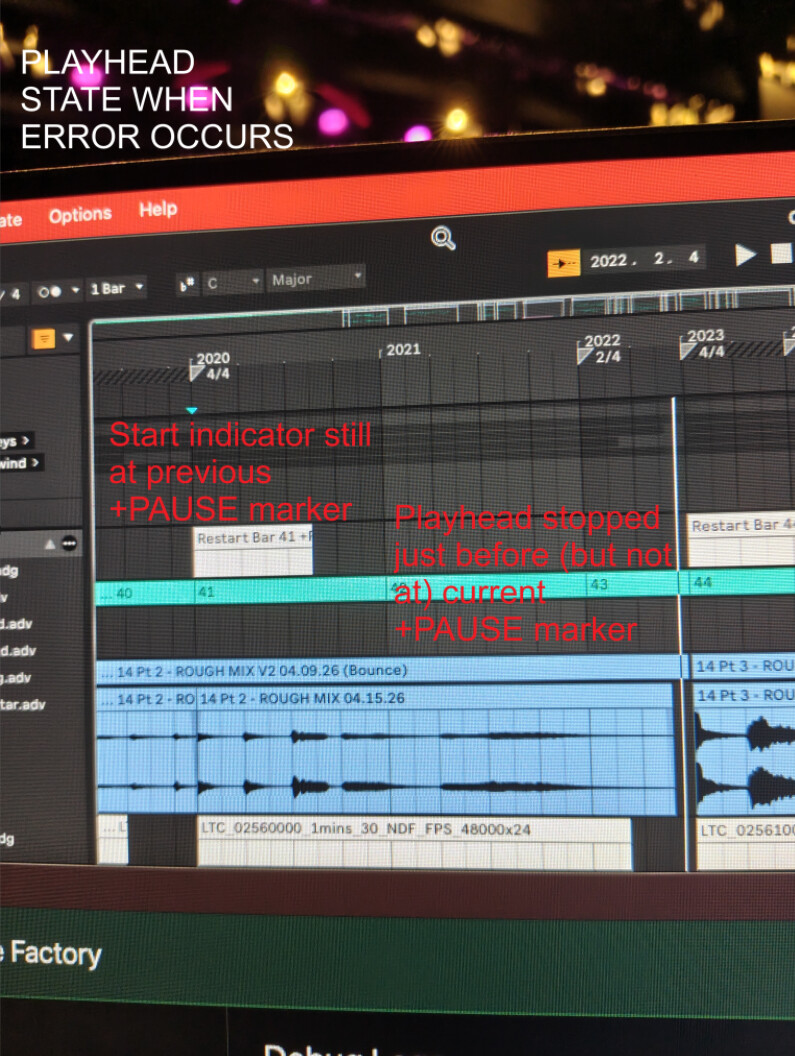
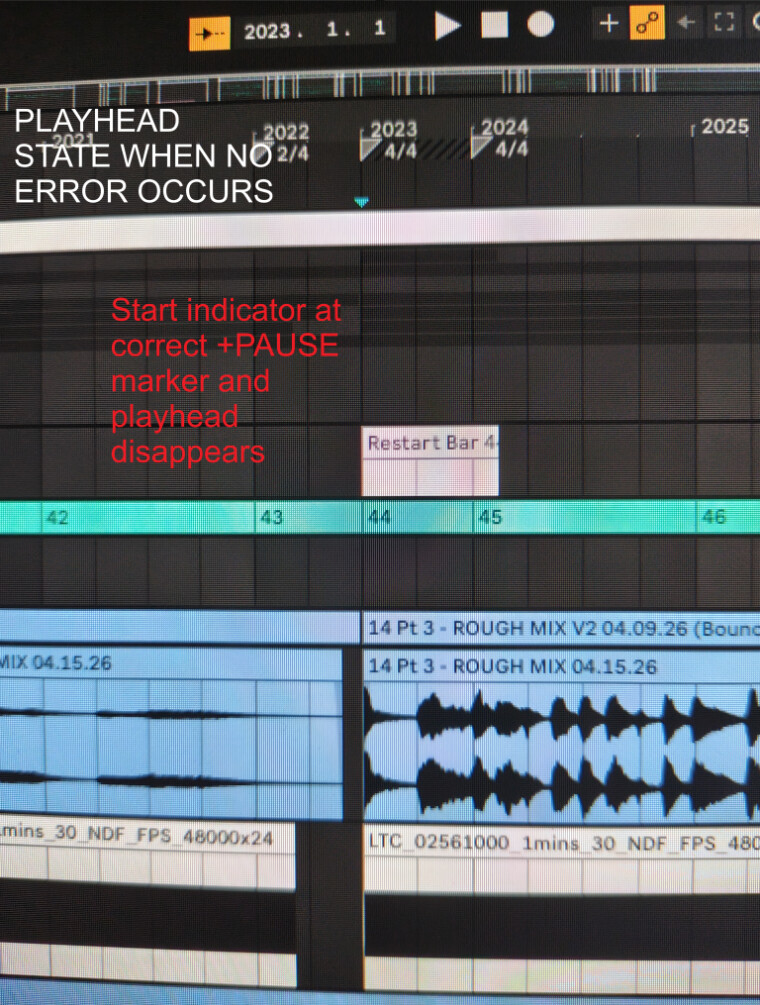
EDIT: I’ve noticed some interesting behaviour with the start marker and the playhead when this happens.
If the problem occurs, the playhead stops just before the +PAUSE session marker, and it visibly stays there. Also, the blue start point indicator triangle visibly stays at the previous pause marker. It does not move to the current +PAUSE marker that the track should be stopped at.
If the problem does not occur (and everything works normally), the playhead disappears and the blue start point indicator correctly moves to the +PAUSE marker that it should be at.
ableset_log_at_error.json (4.0 KB)