Hi @leolabs I’m wondering what order OSC values update and if you’ve a suggestion on how I can improve a project script. Sorry this is a long one!
Use Case
I have a project script that sets a “keysTrigger” shared variable at certain points in our show. I then have a midi mapping to a note on the keyboard that when the trigger variable is “armed”, it will send GO via OSC. I use this for a number of downbeat starts throughout the show, so I don’t need to use a pedal or take a hand off the keyboard to hit a button. I’ve got several triggers set to different notes for several songs.
These are only used when playback is stopped/paused and not intended to arm during playback, just to restart once stopped by hitting a specific note on the keyboard.
Issue
My variable sometimes doesn’t get armed and the best reason I can come up with in troubleshooting is that OSC values maybe aren’t always updated in the same order or maybe theres enough of a ms delay (sometimes) that the conditions in my project script aren’t quite evaluated correctly.
Current Workflow
Here’s an extract of my project script with just a couple of triggers
onOscChange("/global/beatsPosition", ([x]) => {
  armGo();
});


function armGo() {

  const beatPos = osc("/global/beatsPosition");
  const activeSongName = osc("/setlist/activeSongName");
  const currentMeasure = osc("/global/currentMeasure", 0);
  const currentBeat = osc("/global/currentMeasure", 1);

  if (activeSongName === "09 Overprotected" &&
             currentMeasure === "1" &&
             currentBeat === 1 &&
             Number.isInteger(beatPos)) {
    setShared("keysTrigger","arm09");
    setShared("keysTriggerLabel","#09 Armed - A1");

    log(activeSongName);
    log(currentMeasure);
    log(currentBeat);
    log(beatPos);

  } else if (activeSongName === "09 Overprotected" &&
             currentMeasure === "17" &&
             currentBeat === 1 &&
             Number.isInteger(beatPos)) {
    setShared("keysTrigger","arm09");
    setShared("keysTriggerLabel","#09 Armed - A1");

} else {

    setShared("keysTrigger","");
    setShared("keysTriggerLabel","");

  }
}
Issue
Most of the time, the variable arms, but sometimes it doesn’t. In this case, if I hit my +/- measure buttons to reset to the same place it will arm.
The best way I can demonstrate it not working is when I remove snap to grid in Ableton and slowly drag the cursor through the measures in question so that Beats Position changes slowly.
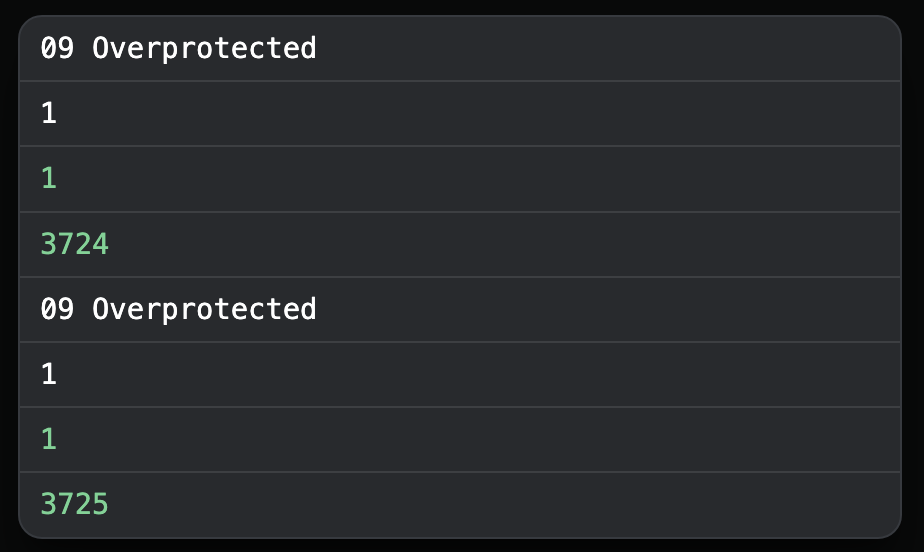
The log output below shows the same measure/beat with 2x different beats position values. So I wonder if sometimes the bar/measure values are updated after beats position, even just by a few milliseconds which would be enough not to trigger the conditions in the script?
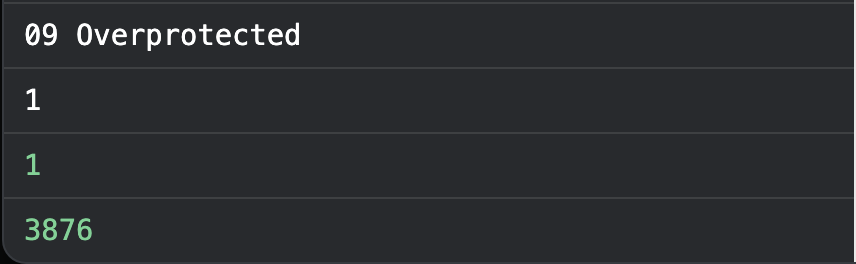
To further back up this idea, the above part of the script is also triggered when we get to 1.1 of the next song. Note the correct beats position of song 10 but incorrect song name. We are actually at the very first bar of song 10 when the below is logged.
Possible Solutions
When I first came up with this workflow, I based the triggers entirely around the beats position value. It seemed to work reliably, however, it’s not that great in practise as going through and editing 15x or so different places each time you add or remove bars from the project is not ideal.
In testing I’ve also tried firing the armGO function on multiple OSC changes but get more or less the same outcome as above.
onOscChange("/global/beatsPosition", ([x]) => {
  armGo();
});
onOscChange("/global/currentMeasure", ([x]) => {
  armGo();
});
onOscChange("/setlist/activeSongName", ([x]) => {
  armGo();
});
I wonder if example above re “song 10” is intended behaviour / would you have any suggestions on how I could better structure these triggers to work reliably?
Note: bring able to trigger playback like this is a game changer and make sections of our show so easy to run! 
Please fill out these values to make it easier to troubleshoot:
- OS and Version: Sequoia 15.5
- Version of AbleSet: 3.0.8
- Version of Ableton Live: 12.3.7

