Has anyone used the Oaktone but through a USB MIDI host such as the CME H2MIDI so that I don’t have to run a long USB cable to the laptop? Is there anything I should be thinking about when considering this route?
Hey @avalon9000,
Yes, that should work.
A couple of things to keep in mind:
Setup: Connect the Floor Vista to the H2MIDI’s USB-A port, then use CME’s UXMidi Tools software to configure your MIDI routing.
Cable lengths: For the USB side (Floor Vista → H2MIDI), try to keep it under 2 meters for reliable signal. For the DIN MIDI cable (H2MIDI → your interface), the MIDI spec supports up to 15 meters, though shorter is always better.
Latency: You’ll add a few milliseconds going through the converter, but in practice it’s negligible for live use.
For the best result, I’d keep the H2MIDI close to the Floor Vista with a short USB cable, and run the longer MIDI cable from the H2’s MIDI OUT toward your computer setup.
thank you very much! sounds good.
1 Like
Instead of the CME I’m now using a mioXM and I want to connect the oaktone to the mio instead of directly to the computer.
I copied all the midi control routing over from what I could see when I plugged the oaktone directly to the computer via usb, and those work, but I don’t know how to get the song titles to show up on the oaktone.
Is there a script or something else I need to copy over manually?
Hey @avalon9000,
The reason song titles aren’t showing up is that AbleSet recognizes the Oakboard by the name of its MIDI ports. When you connect the Floor Vista directly over USB, the ports already include “Oakboard” in their name, so AbleSet auto-detects it and starts sending the setlist to the display. Going through the mioXM, the ports take on the mioXM’s port names instead, and AbleSet doesn’t know those ports belong to an Oakboard.
Could you rename the ports and let me know if it fixes that on your end?
I’m looking forward to your reply!
I don’t think there’s a way to rename the ports on the mio xm. Is there anything I can do on the ableset side?
Hey @avalon9000,
Auracle lets you customize USB host port names, and the new name carries through so every app sees your custom label.
Here’s a tutorial video that walks through exactly how to do it.
Hope that clears it up!
Heya, I did rename them here but I think it’s just cosmetic for the auracle software and doesn’t carry the name through the app. Is there any way I can edit the ableset listener to have it accept a different hostname?
Thank you
I also tried to route it through a virtual IAC bus, renamed something oakboard, and I think the messages are being sent, but the screen on the oakboard doesn’t display the tracknames etc.
Hey @avalon9000, macOS seems to keep the old name of MIDI ports in memory. The easiest way to fix that is disconnecting the audio interface, then deleting the MIDI device in Audio MIDI Setup, and then re-connecting the audio interface to your computer.
It should then appear with the correct name:
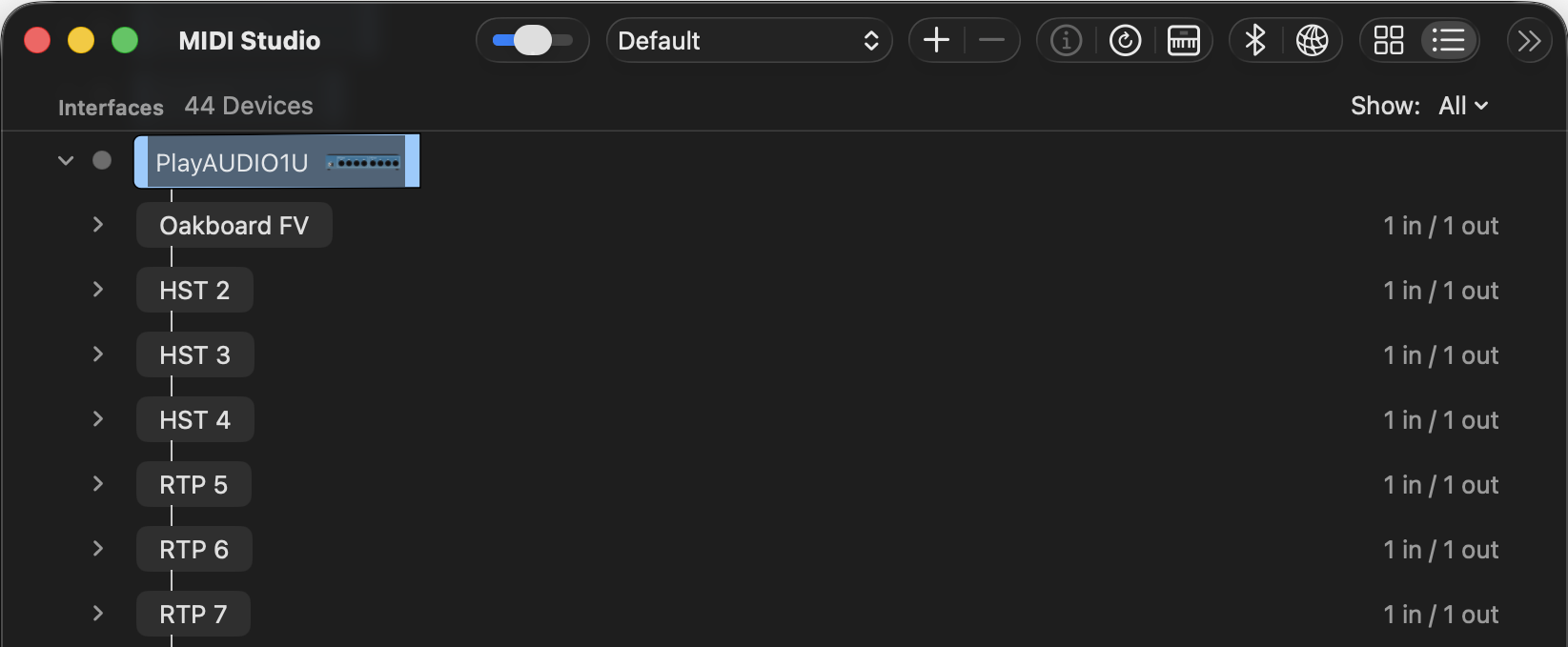
Let me know if this works! 
1 Like