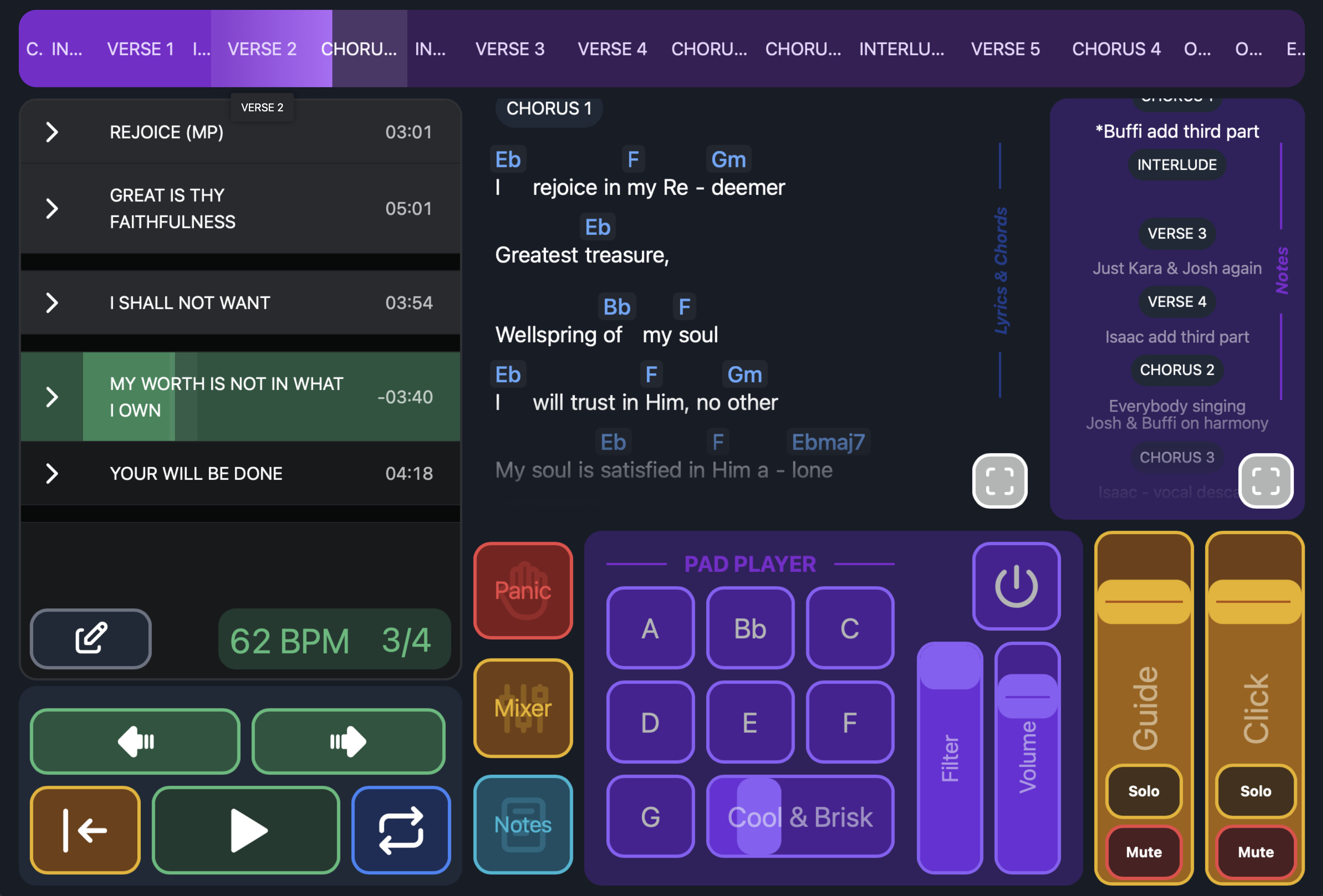
Wanted to share a canvas I’ve been putting a bunch of work into refining! My use case is worship leading in a church, so we sing a handful of songs that changes every week, out of a library of over a hundred songs. A little over a year ago, we switched away from the Multitracks Playback subscription and began using Ableton. Ableset has been completely vital to that switch. We started using canvases early (during the Ableset 3 betas), and with the full release of AbleSet 3, I have been able to finalize a canvas that gives us nearly all of the UI functionality that we had with MT’s product (without the subscription, or the unreliable cloud-based “features”). I know this canvas may target a somewhat narrow use case, and it’s a bit on the busy side. But as the worship director who also functions as an “MD”, worship leader, and many other things on a Sunday morning, this gives me quick access to pretty much everything I need from one spot.
I was able to create a tonic pads generator in Ableton, using an instrument rack and nested chain selectors. The samples are from Aerospace Audio. They’re just the .wav versions of what comes in their hardware pedal, and I can either initiate the pads from the Canvas, or I can automate them on the Ableton timeline using clips. They don’t fight each other, and the canvas gives constant updated feedback about which keys and voices are live. This required a fair amount of midi-mapping and shared variable setting, etc, which I mostly used ChatGPT to help me “vibe code”. 
The panic button fades everything out, stops the tracks, cues up the next section, and fades the tracks back in when I hit play again.
The tempo and time signature labels have a visual metronome behind them, since sometimes I forget what time signature we’re in when transitioning from one song to another.
The expansion button in the chords & lyrics window takes me to a fullscreen pdf version of the chart.
The notes button takes me to an Evernote note that I’ve shared with a public link, where I can have prepared notes about comments I want to make from the stage, etc.
I’m really happy with where it’s at! Thanks @agustinvolpe and @leolabs for all your work, and your help along the way!