Multiple section tracks

Hi Leo,

I recently switched from PC Live Player to Ableton and AbleSet, and I really like it so far. For us, it was definitely the next step.

We play a lot of medleys, and I’d love to be able to show both the song names and the song parts. I need the song parts for loop points, but I also need the song names because some of our older band members don’t always remember every song in every medley anymore (I hope he won’t see this post!).
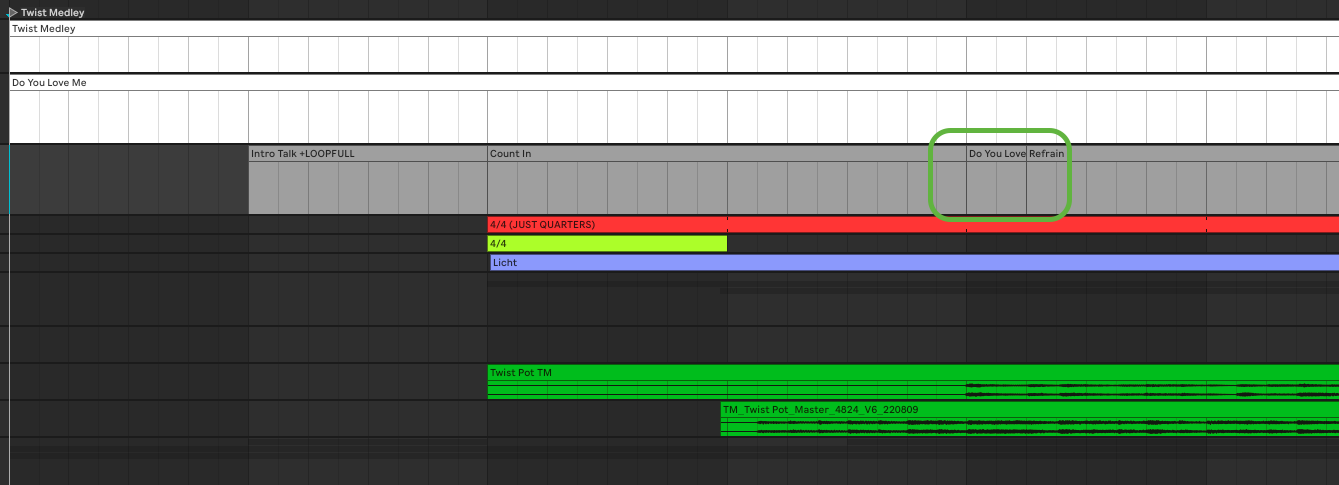
(The grey one is my sections track)

Right now, my workaround is to create a very short section, usually around a quarter note long, and use that to display the song title.

It actually works quite well, but it also affects the loop points. Since that extra section becomes part of the structure, all sections/loop parts, with a song name in its actual length, end up being a quarter note too short.

I was thinking that maybe something like a second level of sections could solve this. For example, one level for song names and another for song parts. In addition, it also could work like a folder-like structure in the Setlist view too.

Do you think something like that would be possible?

Greetings from Munich!

Best,
Max

Hey @Basstor, welcome to the forum!

Great to hear the switch to AbleSet has worked out for you!

Instead of the quarter-note section trick, I’d suggest two cleaner approaches:

Combine the names in your section labels

Instead of a separate section just for the song title, fold the song name into the section names you already use for your loop points. For example:

> SONG A - INTRO
> SONG A - REFRAIN +LOOPFULL
> SONG B - VERSE
> SONG B - CHORUS +LOOPFULL

This way you’d get no phantom sections, so your loop points stay exactly where they should be.
Plus the song name is always visible as part of the current section (in both Setlist and Performance View), not just for a quarter note. And you see the song name and the part at the same time.

It does mean repeating the song name on each section, but it’s a small price for keeping the structure clean.

Full-screen song name on transitions

If you’d like a bigger visual cue when each song in the medley starts, you can add an OSC track (a MIDI track with +OSC in its name) that fires a full-screen notification at each song boundary. It would look like this:

Medley Names +OSC [/notify/big all]

Then place a clip at the start of each song, named with the title and a duration (in ms), e.g.:

SONG A 4000
SONG B 4000

When the playhead reaches each clip, AbleSet flashes that song name big on every device for 4 seconds (adjust to taste). Keep in mind it fades out after the duration, so it works best as a heads-up at the transition rather than a constant reference.

One more handy tip since you’re coming from PC Live Player: in the Setlist View, each song row can be expanded to reveal its sections (tap the arrow on the left). If you turn on “Auto-Expand the Current Song” in the Setlist display options (the :gear: gear at the bottom-left), AbleSet automatically shows only the active song’s sections and collapses the rest, which gives you that folder-like overview you were describing.

You can see the sections setup and these display options in action in the official tutorial.

Would either of those approaches work for your medleys?

Hi Agustin,

thanks for that fast replay!

Unfortunately the solution with the OSC track does not work for me, as, exactly how you said, the information disappears after some seconds and it is not previewable, so you don’t see it upfront on stage…

And having the song in the name is no option for me, as everything needs to be overviewable at anytime. For now, it still is the best option to have the first quarter note of every song in every medley to be the name. For now, the first part of the song (most likely a intro or solo part) is not needed to be looped that often.

If that is also fine, I would like to keep the topic open, maybe someday @leolabs decides to implement something like this :stuck_out_tongue:

I already saw, that the playlist already works like a folder structure and it is completely implemented in my workflow. What I meant was, that the additional section track could work like another layer of folder in the setlist view. In our case it could show “Twist Medley” - one layer below there would be all the songs (in parallel to maybe some transition, which does not belong to a specific song, and if we open up those songs (if I could actually open them just as songs in the playlist), we can see the particular song parts.

Still thanks for your work!

Best,
Max