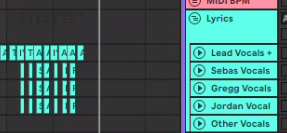
It would be awesome if we could color multiple words differently in a single clip on a +LYRICS track. For example, my group uses white for lead line, yellow for everyone, and blue for background singers. Sometimes in faster songs, the lyrics move too quickly since we have to move between a long lead line and a small background quip or chant. Being able to have two colors on the same line would help with readability, both in speed and what part people sing.
If there is a way to do this, I am unaware of it! Currently using the +CC function to color clips but couldn’t figure out how to do it on a word/character level, rather than the entire midi clip.
Are you only using one lyric line? You can use a different line for each person (or group). We have one for each member of the band who sings.
Our group is a wedding/corporate events band, and we constantly change singers and singer assignments. Having a single prompter is necessary since some weeks a singer may sing a part and won’t the next, depending on the event. Changing that for all our music each week would be a chore.
Splitting lyrics for lead and background vox could be helpful, but our singers are so used to a single prompter (we used to make them in Final Cut with all the parts on there). Color coding would be ideal.
I appreciate the comment and suggestion!
Ooof yeah, I can see that being an issue then. Hadn’t honestly thought of that.
Hey @buckzetaracker, you can make use of the italic and bold syntax of AbleSet to highlight certain words. When combined with a bit of custom styling, you can give these words colors as well. For example, a line like Why is there no *end* in **sight**? could look like this when styled using the following CSS:
.lyrics-line strong {
  color: var(--color-yellow-600);
}

.lyrics-line em {
  color: var(--color-blue-600);
}
You can also override the font settings so these words aren’t bold or italic anymore:
.lyrics-line strong {
  color: var(--color-yellow-600);
  font-weight: normal;
}

.lyrics-line em {
  color: var(--color-blue-600);
  font-style: normal;
}
Let me know if this helps! 
1 Like