Hi Leo,
I have a question regarding project transfer between two computers.
Why do I lose all the MIDI mappings from Computer A every time I copy the Ableton Live project to Computer B?
(On Computer A, AbleNet for MIDI Map in AbleSet is disabled.)
I also have another question:
When “Follow Current Audio Interface Scene” is turned on, will the Floating Window on Computer B mirror the AbleSet view from Computer A?
Thank you!
Hey @GOODSHOW,
Regarding when “Follow Current Audio Interface Scene” is enabled, Computer B will follow the currently selected audio interface scene, but the Floating Window view itself does not directly mirror another device’s UI layout. Each device can still choose its own view independently.
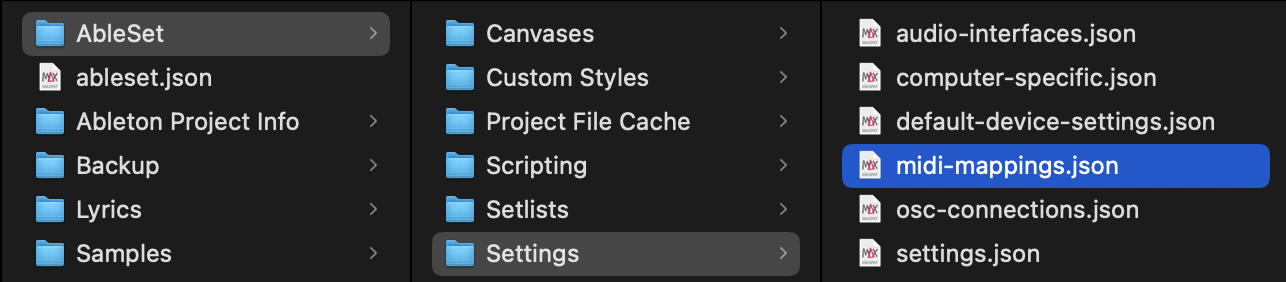
About MIDI Mappings, inside your Ableton project folder, there should be a folder structure like this:
AbleSet → Settings → MIDI Mappings
Please make sure that the midi-mappings.json file is actually located inside the Settings folder, which itself is inside the AbleSet folder within your project, as shown in the screenshot.
Could you double check that structure and let me know if it’s there?
If you still cannot see them after confirming this, let me know and we will take a closer look.
I’m looking forward to your reply!
Hi, I’d like to report an issue regarding MIDI mapping and AbleNet.
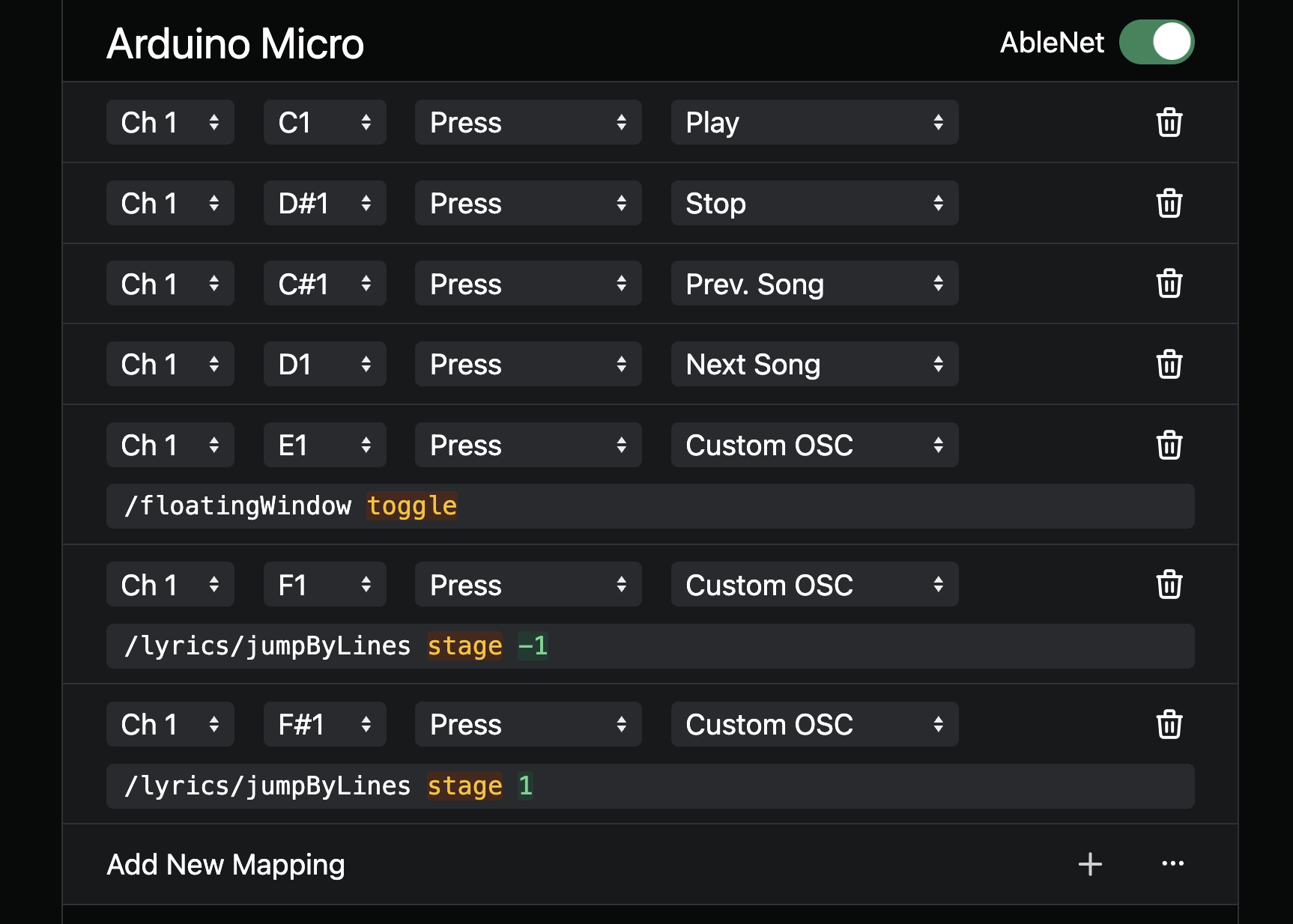
After setting up MIDI mappings on Computer A, when enabling AbleNet, Computer B only receives partial MIDI synchronization. For example, commands like Play / Stop / Next Song / Previous Song are synced correctly.
However, some functions are not synced, such as /floatingWindow toggle.
Could you please advise why certain MIDI-mapped functions are not being transmitted via AbleNet? Is this expected behavior or a limitation?
Hey @GOODSHOW,
A couple more questions to understand your setup better:
- Are you using the AbleSet Controller Max for Live device in your Ableton session? If so, are any of your transport controls (Play, Stop, Next Song, etc.) mapped there rather than in AbleSet’s MIDI Mapping settings?
- Could you give us a quick overview of how everything is mapped, which controls are set up where?
This will help us figure out if there are separate mapping sources involved.
I’m looking forward to your reply!
Hi!I am not using AbleSet Controller Max for Live device in my Ableton Session.
Here is the setting.
Thanks for sharing your mappings,
To troubleshoot this, could you please create a Log Package?
You can create a log package by opening AbleSet’s icon tray, clicking the gear icon, and then selecting “Create Log Package”.
Please make sure to include your project files as well (just the .als files, no audio needed).
To send the files, you can upload them to AbleSet’s support inbox.
I’m looking forward to your reply!
Hi, I’ve uploaded the log package along with the .als project files to the support inbox.
Looking forward to your reply. Thank you for your support!
Hi, I’m not sure if I’m misunderstanding, but this is my current understanding:
As long as MIDI mappings are configured on Computer A and AbleNet is enabled for the currently used MIDI device, all mapped commands should be forwarded to Computer B. This should allow both computers to stay fully synchronized for all MIDI commands, regardless of whether iConnectivity devices are used or not.
Could you please confirm if this understanding is correct?
Also, regarding a previous question I asked:
“Why do I lose all the MIDI mappings from Computer A every time I copy the Ableton Live project to Computer B?”
You suggested checking AbleSet → Settings → MIDI Mappings. I’ve checked, and the mapping files are present. However, it seems that the MIDI devices on Computer A and Computer B are not recognized as the same device. They appear as separate devices, including when using PlayAudio12 (Host 1).
Could this be the reason why the mappings are not working correctly across both systems?.
Hey @GOODSHOW, if the devices have different names on your two computers, that could very well be the cause of this issue. As a workaround, you could try mapping to “Any Input” which works independently of input names.
If possible, you could also try renaming your MIDI ports in Auracle. You might have to disconnect the PlayAUDIO12, then delete the MIDI device in Audio MIDI Setup, and then reconnect it for the port name changes to be detected.
Let me know if this helps