Hey Ableset Team,
one idea/feature suggestion: I regularly use short messages/reminders that appear at the start of a song, ie. on the canvas that our drummer is running the show with or the lyrics prompter. E.g. “wait for guitar change”, etc. It appears for 15sec as soon as the session moves to the start of a respective song.
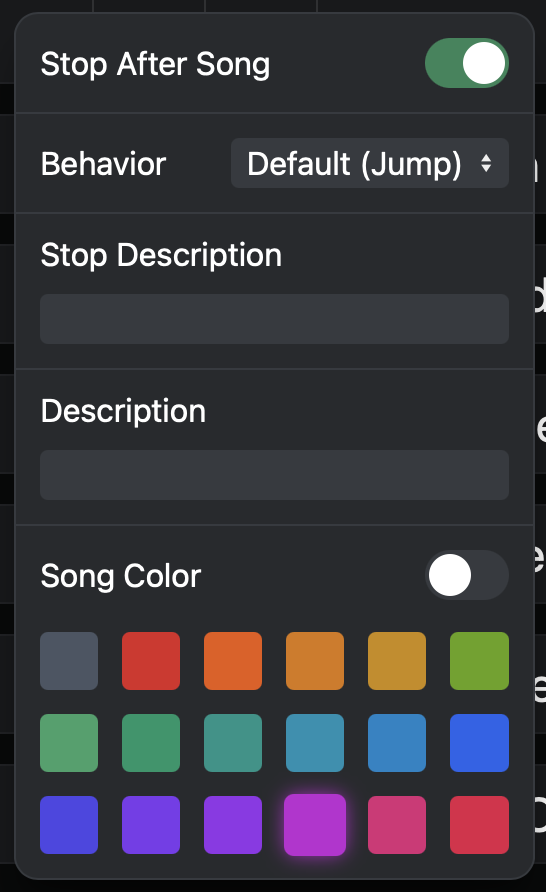
So far, I always add this in a “Message” track in the Ableton session. However, as the “reminders” change from setlist to setlist (e.g. guitar change alerts), it would be very handy not having to always search and move them arount within the Ableton session, but implement these in the setlist module in Ableset - e.g. adding a third line below “stop description” and “description”, called “Messages”, and choose the target these messages are sent to anywhere in the setup menu.
Alternatively, add a field “start description”, detailing information before a song starts (e.g. wait for guitar change), and an option to send this as message to canvases?
Best, Sebastian
Hey @Sebastian,
Thanks for your suggestion and for taking the time to explain your use case.
That’s an interesting idea. I totally get how it could be useful for workflows where reminders change depending on the setlist and are not really something you’d want to keep moving around within the Ableton session itself.
I’ll pass this along and we’ll see how doable it would be.
@Sebastian could this be done using the Stop Description instead? With a bit of scripting, you can display the stop description of the previous song on the screen of your devices when jumping to the next song:
let lastStopDescription = "";

onOscChange("/setlist/activeSongIndex", async () => {
  if (lastStopDescription) {
    sendOsc("/notify/big", "all", lastStopDescription);
  }

  lastStopDescription = osc("/setlist/activeSongStopDescription") ?? "";
});
Let me know if this works for you 
1 Like
Hi Leo,
unfortunately not - the messages (“wait for guitar change”) are related to the upcoming song (and need to be displayed before the song…), so stop marker would change as soon as I modify the song order. Therefore it needs to be a “start marker” or “message” field that moves around with the respective song it is related to.
Best,
Sebastian
Hmm, could the “Description” field work for this? You could create some kind of delimiter like // to separate the normal description from what’s displayed when jumping to the song:
onOscChange("/setlist/activeSongIndex", async () => {
  const description = osc("/setlist/activeSongDescription") ?? "";
  const message = description.split("// ")[1];

  if (message) {
    sendOsc("/notify/big", "all", message);
  }
});
So if you set your song description to “E Minor // Guitar Change”, AbleSet will display “Guitar Change” as a big notification.
Would that work for you?
Hey Leo, sounds reasonable - however I do not really get where to put that “onOscChange…” command (in the description field only the “description // message” is entered, right?
Best, Sebastian
I’m sorry, I forgot to mention this would go into your Project Script
alright, implemented this and it works well. Thanks, again
1 Like