MC6 Pro project script footswitch assignement issue

Continuing the discussion from Morningstar MC6 Pro Project Script Integration:

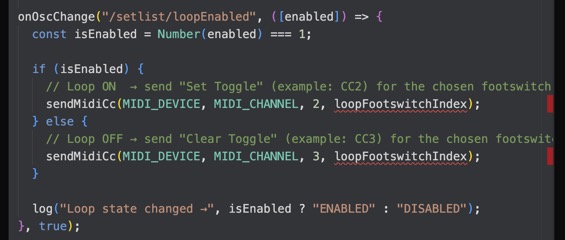
Hi Agus! I’m a huge fan of the script, great work! But there’s a little error on the “loopFootswitchIndex”, unfortunately I’m not very into Java and I think I need a little help.. Is there maybe a quickfix? And is it possible to get the song titles to the left display und the name of the upcoming section to the middle one? Sorry I’m an absolute beginner to this, I hope you got me an answer. Thanks!
Hey @Sudewa, welcome to the forum!

Most likely the reason you see loopFootswitchIndex underlined is because it isn’t properly defined.

For this to work, you must set a single letter from A to X — the one you use on your MC6 to toggle the loop.

In this part of the code:

/**
 * Loop state mapping
 * User-friendly: choose the loop footswitch with a letter (A–X).
 */
const loopFootswitch = "B"; // Example: "B" → index 1

You need to replace "B" with the letter of the switch you actually use.

It must be just one capital letter (A–X) — nothing else.

If it’s not set correctly, the index won’t be created properly and the editor will underline it.

Let me know if this solves the issue.
I’m looking forward to your reply!