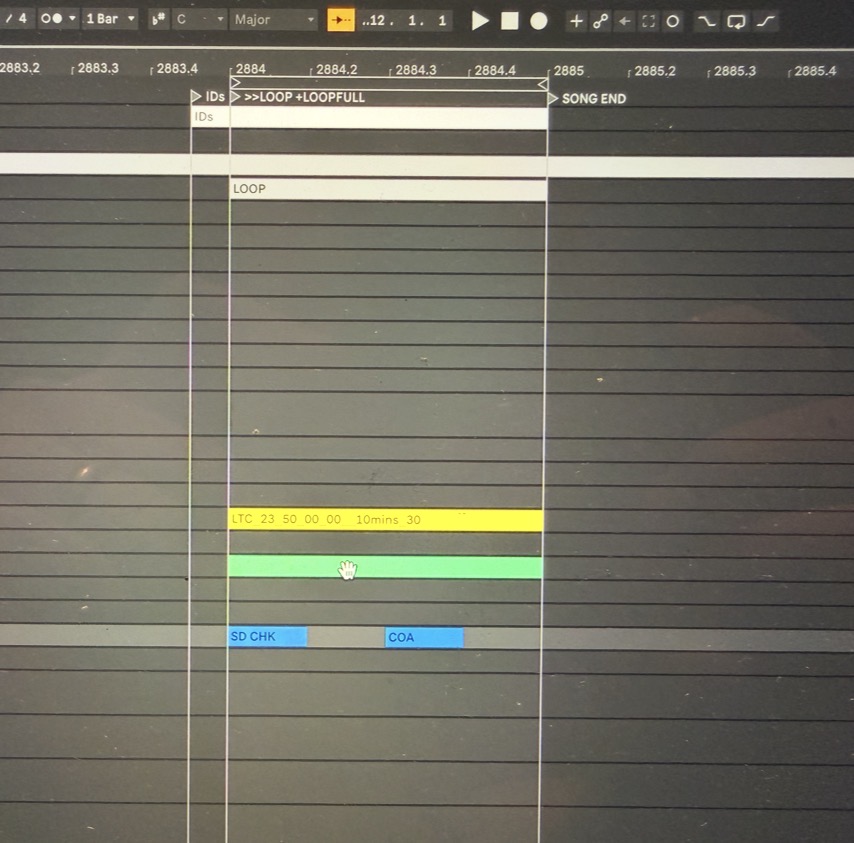
Started using Ableset on a new tour, and it’s great. Only thing I’m trying to figure out if I can have a song marker as a loop? I have IDs, White Noise and Sine, all as short loops at the end.
I have the section labeled Loop, and the right length, I have tried labelling the starting marker “IDs +LOOPFULL” with a “SONG END” at the end. With the song end marker, it won’t loop. With no song end it just uses the next marker as the loop end, not the section.
My current fix is having a marker a half bar before labeled “IDs”, then a marker just after “>> LOOP +LOOPFULL” and the a “SONG END” marker. That then works.
I’ve had a good look in the docs/forum and with the chat bot, but if I’m being an idiot, please tell me how!
Please fill out these values to make it easier to troubleshoot:
- OS and Version: MacOS Sequoia 15.7.4
- Version of AbleSet: 3.0.5 pro
- Version of Ableton Live: 12.3.5
Hey @neo_nmik, welcome to the forum!
Glad to hear you’re enjoying AbleSet on tour!
Just to clarify one important thing, if you’re placing +LOOPFULL and SONG END on the same locator, that won’t work.
If those two are notated on the same locator, they will conflict with each other:
+LOOPFULL tells AbleSet to loopSONG END tells it to move on to the next song, or stay at the end, depending on the behavior set either in Setlist Edit Mode (song menu) or in the Settings UI
So in that case, SONG END “wins”, and the loop won’t happen.
Are you defining your sections using MIDI clips (Sections track)?
That approach is usually much more flexible for this kind of use case.
If not, here’s how you can set it up:
- Create a dedicated MIDI track and name it “Sections”
- Add empty MIDI clips where each clip represents a section
- Name each clip (for example:
IDs, Loop, etc.)
- AbleSet will use those clip names as sections instead of relying only on locators
If you can, feel free to send a screenshot of how your locators or sections are currently set up in your session so we can see exactly what’s going on.
I’m looking forward to your reply!
Hey,
Thanks for the quick reply.
I’m just trying to have the +LOOPFULL in the track marker. I’ve attached what I’m doing as a work around below, but if I put “IDs +LOOPFULL” as the only marker, it doesn’t work.
Hey @neo_nmik,
I just managed to reproduce the issue on my end. If there’s a section clip that starts at the same time as your song, the loop properties of that section clip are used. This should be an easy fix and I’ll try to publish it with the next update.
In the meantime, just add the +LOOPFULL flag to your section clip instead of the song locator or remove the section clip.
Hope this helps! 
Hey Leo,
That’s great. I hadn’t figured out deleting the section block, probably the only thing I didn’t try!  .
.
Also, didn’t know I could use the +LOOPFULL directly in the sections! Do all of those modifiers work there too? I currently have a couple of Markers for looping in sections, but sections would definitely be easier for building sets.
Thanks loads for the help, and for the app. Making our playback world a lot more powerful, especially with the MC6 scripting.
Cheers!
1 Like
Hey @neo_nmik,
You should be able to use all kinds of cue notation on section clips. The only thing that’s not possible at this time is defining songs using clips