Label - Dynamic Text Color - Next Clip Color

I could use some help:

I’m building a page for the FOH engineer and want to use a separate MIDI clip - either as an OSC track or a lyrics track (preferred) - to send information about the current “section” (not the same as song section) and the next one. These should be independent, meaning FOH should receive its own dedicated information, and the color coding should be custom, based on the MIDI track’s clip color.

So far, I’ve tried several approaches, but I’m not really satisfied with any of them.

This is my favorite way, but it’s not ideal:

  1. Track: FOH +CC +LYRICS [large]
    Label: ${osc("/lyrics/foh/current")}

  2. Track (COLOR DUMMY): FOH CC CURRENT +OSC [/shared/canvas/foh_cc1 ?cc]

  3. Track (COLOY DUMMY): FOH CC NEXT +OSC [/shared/canvas/foh_cc2 ?cc]

Text Color - Dynamic:
2. FOH CC +OSC [/shared/canvas/foh_cc1 ?cc] (CURRENT CLIP COLOR)
3. FOH CC +OSC [/shared/canvas/foh_cc2 ?cc] (NEXT CLIP COLOR)
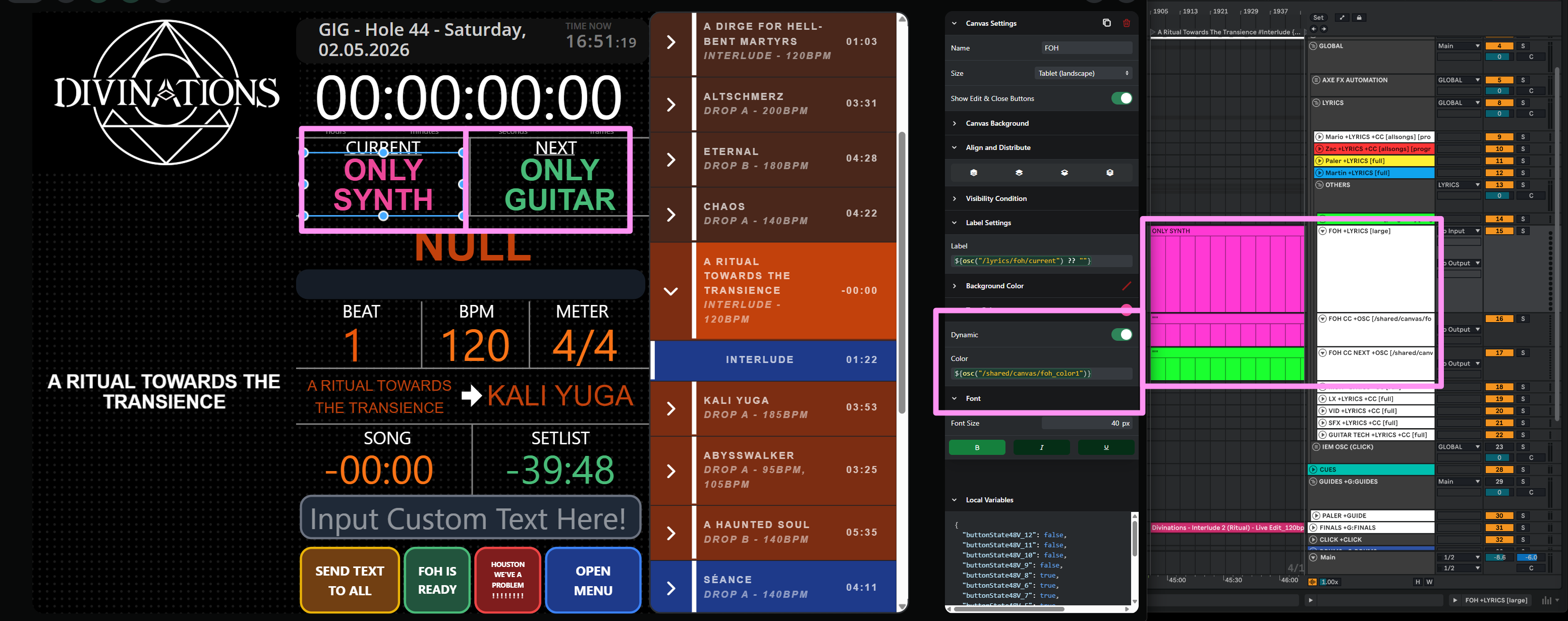
I just don’t understand yet what the syntax in Dynamic Input needs to look like for the “Text Color” section in order to read the color. I feel a little stupid right now.

Maybe add these osc commands in the future?

Lyrics

  • /lyrics/[slug]/previousColor the color of the previous lyrics line’s text
  • /lyrics/[slug]/currentColor the color of the current lyrics line’s text
  • /lyrics/[slug]/nextColor the color of the next lyrics line’s text

I’d be really happy if you could help me.

Hey Tabora,

Your approach is solid, and you were actually just one small piece away from having it work!

The syntax you were missing

In the Label’s Text Color section, enable the Dynamic toggle and use:

${shared("canvas/foh_cc1")?.[0]}

And for the “next” label, the same with foh_cc2:

${shared("canvas/foh_cc2")?.[0]}

Make sure that template goes in the Text Color field — not in the Label (text) field. The Label field defines what the element says; the Text Color field defines what color it’s painted.

Why the ?.[0]

?cc resolves to a color name (green, red, blue, …), which is exactly what a dynamic color field expects. But on a +OSC track, the clip name is always appended as an extra argument. So your command ends up as /shared/canvas/foh_cc1 green MyClipName, and the shared variable gets stored as an array like ["green", "MyClipName"]. The color always lands at index 0, so ?.[0] pulls it out.

One tweak to your dummy tracks

Add [single] to the track names so the clip name is sent as one clean argument:

FOH CC CURRENT +OSC [/shared/canvas/foh_cc1 ?cc] [single]
FOH CC NEXT +OSC [/shared/canvas/foh_cc2 ?cc] [single]

You’ll still read it with ?.[0] (the clip name is still appended), but this keeps things tidy if your clip names contain spaces.

One thing to keep in mind is that the variable is “sticky”, so once the playhead crosses a clip, the color stays until the next clip is crossed. If you want a neutral color in the gaps, the cleanest way is to fill those gaps on your dummy tracks with clips of a neutral color, so there’s always a clip defining the current state with no gaps.

The +CC flag on your FOH +LYRICS track only colors text inside the actual Lyrics element — it has no effect on a Label. Since you’re reading the text into a Label with osc("/lyrics/foh/current"), the coloring has to come from your dummy tracks, exactly as you set it up. So +CC on the lyrics track isn’t doing anything in this case. You can leave it or remove it, your call.

You can also see dynamic colors in action in the official tutorial

As for the /lyrics/[slug]/currentColor / nextColor / previousColor values — that’s a good idea, I’ll pass it along!

Hope that helps, let me know how it goes!

1 Like

:open_mouth: That explanation was super clear!
Everything’s working great. :white_check_mark:

Tbh: My current approach feels more like a workaround. :factory_worker:

With the new commands, I could skip using both tracks, and since the color is tied to the clip anyway, the whole thing becomes even more flexible - for example, when jumping around in the song or looping.

Your support is truly outstanding.
Thanks so much! :folded_hands:

1 Like