Hi All, is there a way to increase just the text size of the setlist in canvas? The lyric size is fine but the actual text for the set list is tiny in comparison.
Hey @KevinP,
The workaround is Custom Styles (CSS).
This came up in another thread recently, and the solution is the same: open your styles.css file (AbleSet icon tray →  → Show Global Custom Styles) and add:
.setlist-entry button.title {
  font-size: 1.3rem;
}
Adjust the value to your liking. Just note that this will also affect the text size in the main Setlist view, not just the Canvas element.
Would that work for your use case?
Yep, that did the trick. Thanks!
Actually, 1 more little oddity. Why does it show previous songs? The top of the Setlist should be the current songs, previous songs are not useful for me as we are already past them.
Hey @KevinP,
Do you by any chance have [allsongs] in your lyrics track name? That attribute displays the lyrics of all songs in the setlist as one continuous page, which would explain why you’re seeing previous songs.
If that’s the case, removing it will make the Lyrics element only show the current song’s lyrics.
I’m looking forward to your reply!
This is the setlist element, not the lyrics element. But I do not have [allsongs] anywhere in the project.
Hey @KevinP,
Sorry for the confusion, there are two options that might help here:
-
Auto-Scroll to the Current Song or Section: this keeps the current song always in view as you move through the setlist. You can enable it in the Setlist View configuration menu (gear icon, bottom-left of the Setlist View).
-
Remove Played Songs Automatically: this removes songs from the list once they’ve been played, so only upcoming songs remain. You can find this toggle under Settings → Setlist.
Would either of those work for your use case?
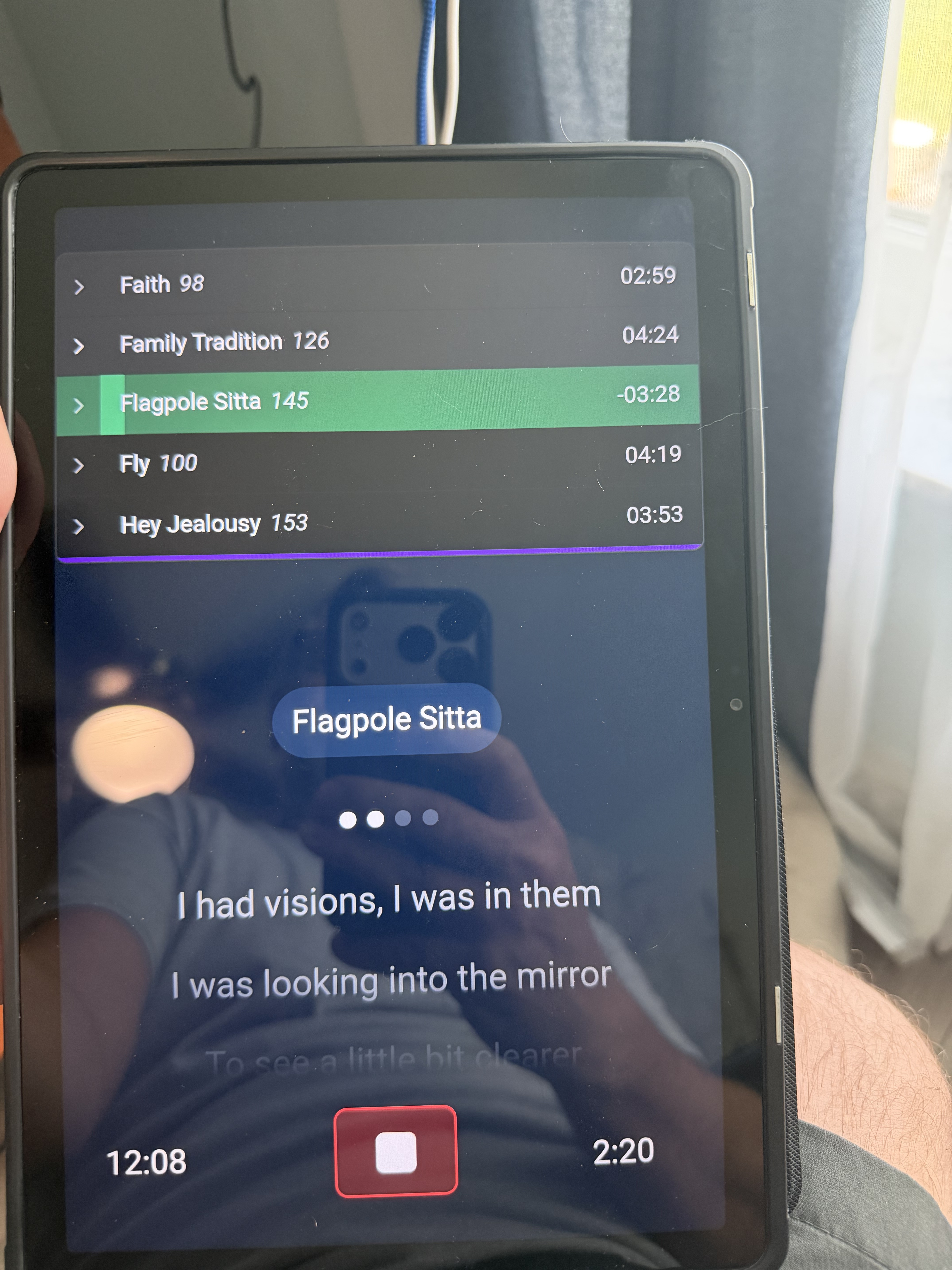
I have autoscroll to song set already. Removing would not work as sometimes I skip a song and come back to it later. It’s highlighting the current song, it’s just showing the previous 2 and next 2 by default in my setlist view.
Hey @KevinP,
The Setlist element centers the active song when it’s not expanded, which typically shows a couple of songs above it. So the current behavior is by design.
I totally understand what you’re after, having the active song anchored at the top rather than centered.
I’ll pass it along as a feature request!
1 Like
Is there a way to do a custom label like current song +1, 2, 3, 4? That would enable what I am going for.
Hey @KevinP,
Could you describe a bit more what you have in mind? Specifically:
- What would you want each element to display? For example, the name of the next song, the one after that, etc.
- Should they just show the names, or should tapping/clicking them do something (like jumping to that song)?
I’m looking forward to your reply!
Just showing:
Current Song
Next Song
Next Song 2
Next Song 3
Next Song 4
Not a requirement for touching them to select them as I have a foot switch. But also not a bad thing
Hey @KevinP,
Here are two approaches:
Stacked song buttons (current + next 4)
Create 5 Button elements stacked vertically. Each one shows the song at currentIndex + offset, where the offset is 0 for the top button (current song), 1 for the next, and so on up to 4.
For each button, set the Label to Dynamic and paste this — just change the offset number per button (0, 1, 2, 3, 4):
${(() => {
  const songs = osc("/setlist/songs", "all") ?? [];
  const i = osc("/setlist/activeSongIndex");
  const offset = 0; // 0 = current, 1 = next, 2, 3, 4...
  return songs[i + offset] ?? "";
})()}
For the highlight, set the Background Color to Dynamic and paste this (again, change the offset per button):
${(() => {
  const songs = osc("/setlist/songs", "all") ?? [];
  const i = osc("/setlist/activeSongIndex");
  const offset = 0; // same offset as the label
  if (offset === 0) return "emerald-600"; // current song, highlighted
  return songs[i + offset] ? "gray-800" : "gray-950"; // upcoming dimmed, empty very dim
})()}
The top button stays highlighted as your current song, and the names shift automatically as you move through the set — so the active song is always anchored at the top, exactly what you were after.
If you want them clickable, set the button type to OSC and use OSC Command on Press with the matching offset:
/setlist/jumpBySongs 0
Change the 0 to 1, 2, 3, 4 per button. (For the current-song button you can use /setlist/jumpBySongs 0 force=true to restart it.)
Single dynamic label + Prev/Next buttons
If you’d rather keep it minimal, use:
- A Label (Dynamic Value) showing the current song:
${osc("/setlist/activeSongName") ?? ""}
- Two Buttons beside it. You can drop in the built-in Previous Song and Next Song presets directly, or set them as OSC buttons with:
/setlist/jumpBySongs -1
/setlist/jumpBySongs 1
That gives you a clean “current song + step forward/back” layout that pairs nicely with your foot switch.
Would either of those work for your use case?
The only problem I see is it creates a green highlight, but some of my songs are highlighted differnt colors for indicating a tuning change. How would I remove the highlight so it does the default song color?
Thanks much!
Hey @KevinP,
Just replace the Background Color (set to Dynamic) template with this one - it pulls each song’s own color instead of using a hardcoded green (change the offset per button, same as before):
${(() => {
  const songs = osc("/setlist/songs", "all") ?? [];
  const colors = osc("/setlist/songColors", "all") ?? [];
  const i = osc("/setlist/activeSongIndex");
  const offset = 0; // change per button: 0, 1, 2, 3, 4
  if (!songs[i + offset]) return "gray-950";
  const color = colors[i + offset] || "gray";
  return offset === 0 ? `${color}-600` : `${color}-900`;
})()}
The current song button shows its color at -600 (bright), upcoming songs show the same color at -900 (dimmed), and empty slots at the end of the set go gray-950.
Let me know how it goes!
Great, that did the trick. Thanks!
1 Like