Describe your issue here:
Getting this error. Not sure where to look or do.
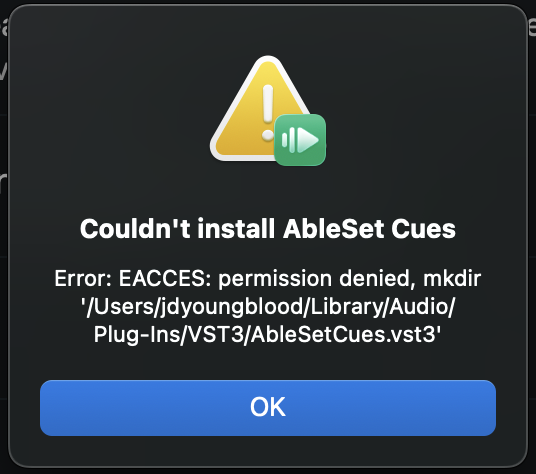
- OS and Version: Sequoia 15.7.4
- Version of AbleSet: 3.1.4
- Version of Ableton Live: Ableton 11 Suite 11.3.43
Hey @jdyoungblood,
That error is popping up because AbleSet is trying to create the AbleSetCues.vst3 bundle inside your user VST3 folder, and the system is denying write access to it.
Could you go through the following steps so we can narrow it down?
1. Check the folder’s permissions
In Finder, press ⇧⌘G and go to:
~/Library/Audio/Plug-Ins/VST3
Right-click the VST3 folder → Get Info → open Sharing & Permissions at the bottom. Your user account should be listed with Read & Write, and the Locked checkbox near the top shouldn’t be checked.
2. Fix the ownership from Terminal
If your account isn’t listed with Read & Write, or if the folder doesn’t exist at all, open Terminal and run:
mkdir -p ~/Library/Audio/Plug-Ins/VST3
sudo chown -R "$(whoami)":staff ~/Library/Audio/Plug-Ins
sudo chmod -R u+rwX ~/Library/Audio/Plug-Ins
You’ll be asked for your Mac password — nothing appears on screen while you type it, that’s normal. This needs an admin account, so if yours isn’t one, you’ll need someone with admin access to run it.
3. Remove any leftover folder
A failed attempt can leave a partial folder behind, so let’s check for that:
ls -la ~/Library/Audio/Plug-Ins/VST3
If you see an AbleSetCues.vst3 entry in there, delete it before moving on.
4. Retry the install
Restart AbleSet and run the Cues plugin installation again — it should go through without the error this time.
Once it’s installed, open Live’s Preferences → Plug-Ins, make sure “Use VST3 Plug-In System Folders” is enabled, and click “Rescan Plug-Ins”. You’ll then find AbleSet Cues under Plug-Ins > AbleSet in Live’s browser.
If the error still comes up after all that, let me know what the Get Info window shows under Sharing & Permissions and we’ll dig further from there.
Let me know how this goes!
these terminal prompts all worked. thank you for the step by step. I have no error anymore. thank you!