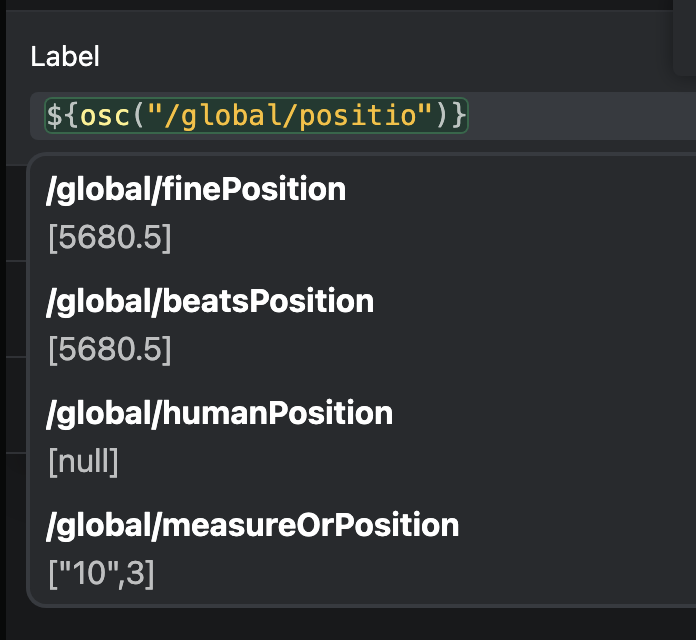
I’m struggling to get a value out of “/global/humanPosition”, please see the below screen cap so show the values of all the position end points.
Screen cap is from playback is paused, however, the value remains null when playback is in progress.
Wondering if there’s anything else I could check?
Please fill out these values to make it easier to troubleshoot:
- OS and Version: macOS Sequoia 15.5
- Version of AbleSet: 3.0.6
- Version of Ableton Live: 12.3.6
Hey @zacjohnsnz,
The dynamic label
${osc("/global/humanPosition")}
should work and update continuously during playback.
I tried reproducing this on my end by adding a label element in Canvas and inputting ${osc("/global/humanPosition")}, but it works correctly on my end.
Just to be sure, could you try adding the AbleSet plugin to Ableton again, rebooting, and let me know if this still happens?
If it does, could you please send over a log package so we can take a closer look?
You can create a log package by opening AbleSet’s tray icon, clicking the gear icon, and then selecting Create Log Package.
Please make sure to include your project files as well (just the .als files, no audio needed).
To send the files, you can upload them to AbleSet’s support inbox.
I’m looking forward to your reply!
Thanks @agustinvolpe, tried removing the plugin then restarting Ableton and my Mac and still no luck, have just sent in a log package 
1 Like
Hey @zacjohnsnz,
The humanPosition OSC value requires the AbleSet Controller Max for Live device to be loaded in your project. Could you try adding it to your project and check if that helps? 
Thanks @leolabs that’s fixed it! Might be good to note that under the OSC address in the docs
Also - I had assumed the output of this address would give the measure number as set by the measures track as opposed to the Ableton session bar number.
Lastly - I’ve found the beat output of the address gets out of sync about half way through a big session with lots of time changes. Sending the log+ALS to the support inbox for you to check
1 Like
Hey @zacjohnsnz,
This is a known issue with how Max for Live receives the current Bar and Beat from Live. Unfortunately, there’s not much I can do from my end to fix this. If you’d like to use the current measure from your Measures track instead, you can use /global/currentMeasure to access it.
Let me know if this works for you!
1 Like
Thanks @leolabs no worries about that issue and feeling a bit dumb that I didn’t find this end point when working through this initially!!
1 Like
Wondering if there’s a cleaner way to return measures and beats from /global/currentMeasure into a single string?
I’ve got this so far which works but is long!
var measureBeat = osc("/global/currentMeasure",0) + "." + osc("/global/currentMeasure",1);
Hey @zacjohnsnz, this should do the job:
const measureBeat = osc("/global/currentMeasure", "all").join(".");
The “all” parameter tells the osc function to return an array of all values on this OSC address, and the join function joins all values into a single string, delimited by a dot.
Let me know if this works for you
1 Like
So fast, thanks @leolabs, that’s great! Have also just had a quick refresher on array methods and all making sense 
1 Like