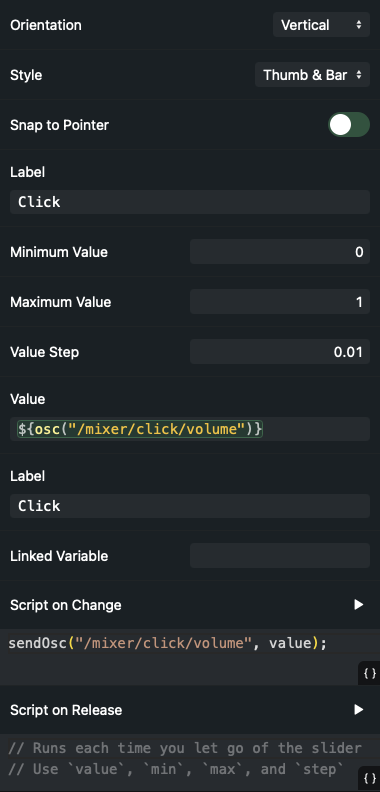
It would be great to be able to add a custom volume fader for a channel on the canvas surface.
Purpose: Would like to be able to quickly adjust the click-track channel directly from the canvas surface. The general in ear mix is quite constant throughout the set, however our drummer (who handles Ableton) wants to be able to adjust his own drum click track very fast without changing surfaces.
Would be a very helpful addition (if not possible already, however I did not find something like this yet).
Hey Sebastian!
Yes, you can create a custom volume fader on the Canvas — the key is to connect the slider to AbleSet’s mixer using a small script.
AbleSet exposes mixer group volumes via OSC:
/mixer/[group name]/volume // value between 0 and 1
(Note that group names in OSC paths are always lowercase, even if your track group is +CLICK or +G:CLICK.)
How to set it up
Make sure all your click tracks belong to a mixer group in AbleSet, e.g. +G: CLICK.
Add a Slider element to the Canvas clicking on the + button.
Choose whichever range you prefer:
Option A — Slider from 0 to 1
Slider settings:
Minimum Value: 0
Maximum Value: 1
Value Step: 0.01
Script on Change:
// Ensure it's a number and clamp to 0–1
const vol = Math.max(0, Math.min(1, Number(value)));

// OSC path uses lowercase group names
sendOsc("/mixer/click/volume", vol);
This directly controls the CLICK group volume.
Option B — Slider from 0 to 100
Slider settings:
Minimum Value: 0
Maximum Value: 100
Value Step: 1
Script on Change:
// Convert the slider value (0–100) to a normalized 0–1 range
const v = Number(value);
const normalized = (v - min) / (max - min);

// Clamp, just in case
const vol = Math.max(0, Math.min(1, normalized));

// Send the volume to the CLICK mixer group
sendOsc("/mixer/click/volume", vol);
This gives your drummer a dedicated click-track volume fader directly on the Canvas.
Let me know if this helps, I’m looking forward to your reply!
Hey Agus, thanks a lot - comes quite close. However it seems like this fader is always “relative” - so if I move the canvas fader on the Mac it doesn’t move the fader on the iPad and vice versa, and moving the iPad fader just adds relative on top. So it is kind of impossible to estimate what the absolute position (dB in the Ableton mixer) is from looking on the fader.
You can use the “Value” field of the slider to bind its value to the current volume of the click track. With a slider from 0 to 1, it would look like this:
in the new version, these sliders within the canvas do not work anymore….. Not sure if this is related to an update of the clicktracks automatically appearing in the mixer, or something else. However, even if I leave only one click track in Ableton named click, which appears as Click in the mixer, I still do not get a slider working with the manual you provided in this thread.
Even the Canvas-Preset “Click Track Volume Slider” doesn’t work anymore if I add this to my canvas…..