I wanted to ask about the post below. Is it actually possible to control an XAIR mixer through Ableset?
I recently came across an app called Coyote MIDI, but I wasn’t able to integrate it in a way that would let a virtual control (through Ableset) communicate with the XAIR. So I was wondering if I might be missing something, or if there’s another approach that makes this possible that I simply don’t know about. I’m using Ableset 3.1.1 on a Macbook pro 12.7.6
Basically, what I’m trying to do is recreate the XAIR mixer in Canvas so I can have a monitoring control interface.
If you own AbleSet Pro, you can build a Canvas to remote-control an XR18 via OSC. To do this, first create a new OSC connection by going to Settings → OSC Settings → Add New Connection.
Set the Send Address to the IP of your mixer, and port 10024, e.g. 192.168.1.5:10024.
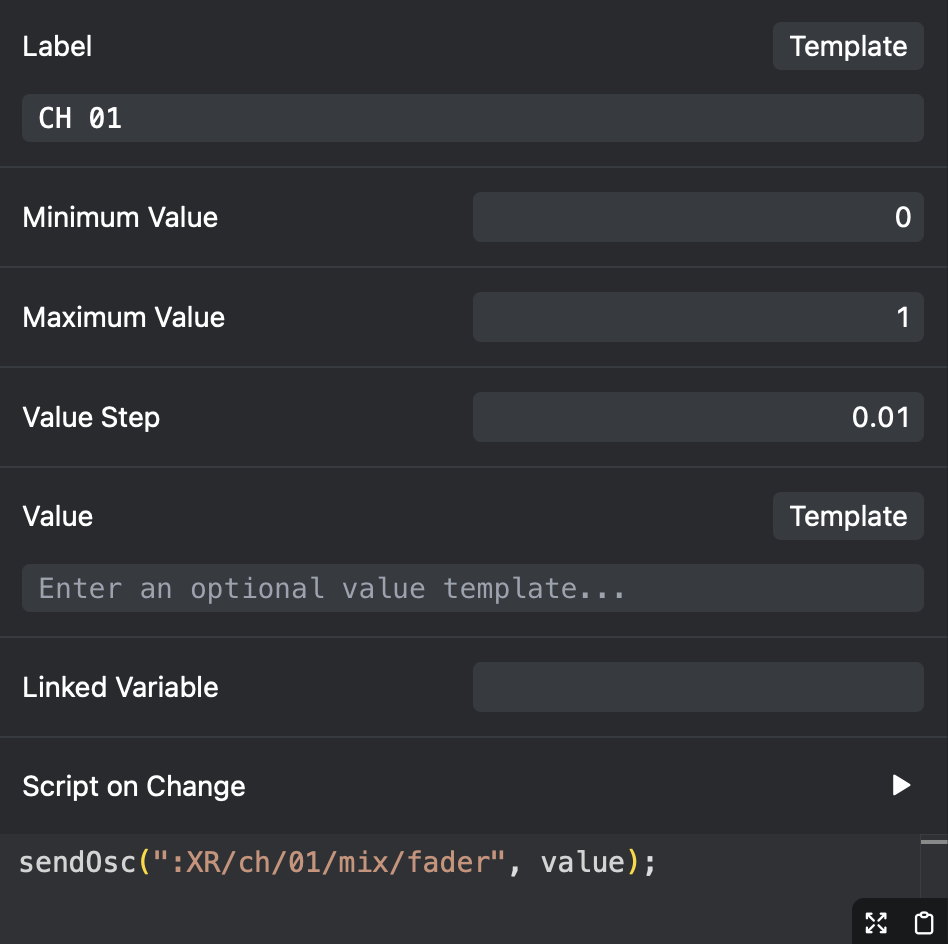
You can give the connection any name you like, but I’ll name it XR. Now, to control the mixer, you can send OSC commands to this connection. For example, to control the volume of a channel, you can send :XR/ch/01/mix/fader 0.75, where XR is the name of your OSC connection. Or you can change t
To control this fader from the Canvas, add a new Slider element, and set its min, max, and steps like follows:
For now, if the value changes externally, AbleSet won’t be notified. This is an internal limitation with how OSC connections currently work in AbleSet, and I’m working on improving this so the fader values can react to external changes.