I am having issues with companion connection to both A and B playback computers. It seems to be able to connect to both defined in the Host IP (192.168.1.120,192.168.1.125) But when either of the defined hosts disconnects, it also loses control of the other host. So not really working for redundancy.
The same thing happens for remote connection from an iPad. I go to 192.168.1.120, and I can see that it has connected to 2 hosts, but if “main” host crashes, it will not maintain connection to the remaining host (192.168.1.125). Is there a way to define both host IP’s for real redundancy?
Hey @Tor_Bach_Kristensen, thank you for reporting these issues, and please excuse my late reply!
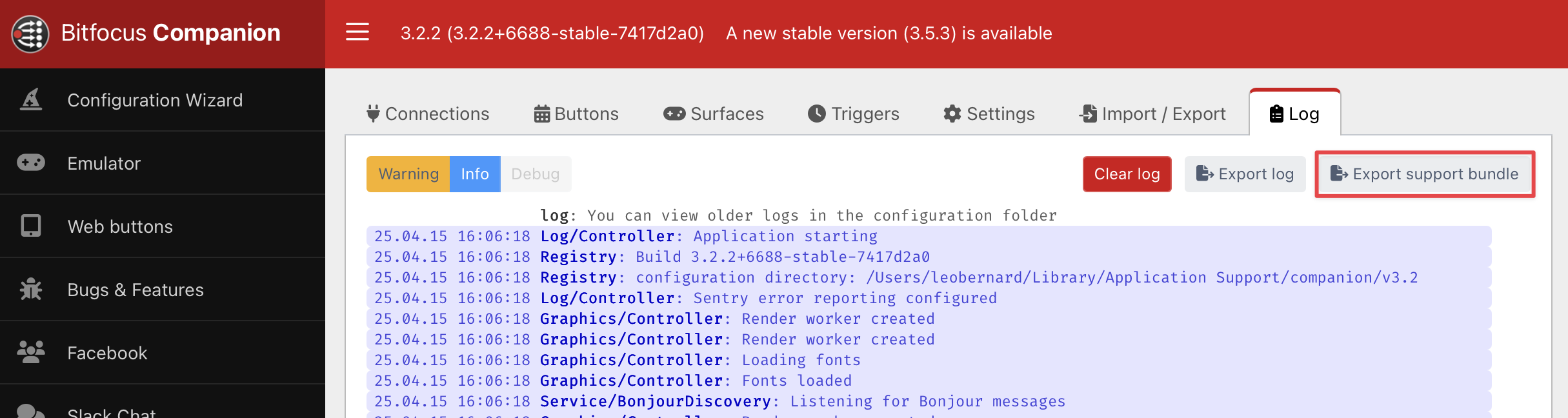
To troubleshoot this, could you try to reproduce the issue with Companion and then send me a support bundle of your Companion instance? You can create one in the logs tab:
The ipad was a network problem, as I had the same problem on the computers. This was fixed with moving away from the new Mini M4, which seems to have massive network issues on sequoia. None of the updates have fixed it sadly.
But the redundant connection from companion does not seem to be working. I can reach both ableset computers just fine, but redundancy does not work. Only the first specified IP will work, and if it fails fallover to the backup doesn’t work.
I cannot upload logs, your forum says the file is unauthorized.
Thank you for your feedback, and please excuse my late reply!
I forgot that some files can’t be uploaded to the forum. Could you upload them to my support inbox instead so I can take a closer look at the issue you described with Companion?
I’ve heard of multiple customers who had issues with M4 Macs and Sequoia and I’ve recently purchased one myself to figure out a good workaround to make AbleSet’s network features work with them more reliably. As soon as I know more, I’ll post about it on the forums.
Having similar issues - I’m using M4 Mac Minis and tested w/ current release and beta.11. I’m not able to have multiple hosts. As long as the first ip listed Host is active, then the connection works great. I’m not suffering issues if the second host/redundant goes down - The companion connection doesn’t seem to fail over to the other host or really even see another host as an option after the comma.
Getting this in the log:
Trying to connect to AbleSet…
sending message: [“/subscribe”,“auto”,39041,“Companion”,false,“uuid=6fqWjd91Gm3hvF1m1eCg8H”]
sending message: [“/getValues”,39041,“uuid=9nPYDvHDU3yUcerSKbsZMC”]
I’m sorry to hear that the Companion plugin isn’t working the way it should on your end!
I’ve just submitted a new version of the plugin which should improve the handling of multiple connections along with more detailed logs in case something goes wrong. This is waiting on approval by the Bitfocus team but should be available in a few days at most
Great! I can confirm that the multiple host continues to stay connected when losing first host listed. Thanks!
When I simulate main computer loss - I only have Play/Pause Transport control of the redundant Ableton computer but not the “Jump to Song/Section based on number”
Really, wanting it to operate like the web browser does w/ Ableset but with companion. I’m using the browser in a few locations, but like using Companion’s physical buttons for the drummer.
Sorry for the super late reply! You’re right, there was a sneaky bug I overlooked that caused messages sent to the 2nd specified instance of AbleSet to lack any parameters. This is why your play/pause (/global/play and /global/pause) commands work for both machines while more complex commands like jumping between songs (/setlist/jumpToSong 3) don’t.
This should be fixed in the latest version of the Companion plugin. Could you let me know if it all works on your end now?