Can Canvas osc buttons Access Drum Rack midi triggers?

All,

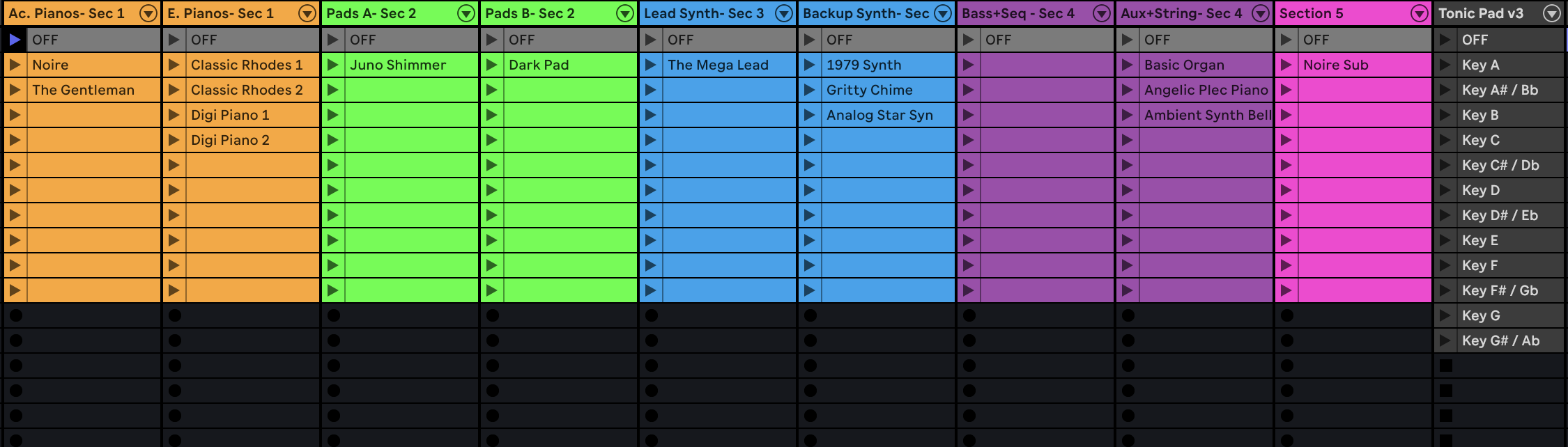
Does anyone know if I can access drum rack midi notes via the Canvas osc buttons? I Use drum rack to organize cues so the midi notes get Friendly names in the time line.
I’m Hoping to see a button panel on an iPad of everything I have assigned in the drum rack. let me know if anyone has a way they might be doing anything similar to access the drum rack.

Thanks

Matt

Hey @Mattwalker7362514, you can use the /midi/send OSC commands to send MIDI notes to any output on your computer, including IAC loopbacks on macOS so you can feed those notes back into a drum rack, for example.

Would that work for your use case? :slight_smile:

Hey! Were you able to make this work? I’m also curious to see if I can set up the same for my setup. I have the IAC Driver setup correctly as I use it for other things, I just can’t seem to get Ableton to recognize any midi cc from the Canvas.

Hey @SirDandol!

Just to double-check a couple of things:

  1. Are you running the latest beta?

  2. In Ableton Live → Preferences → Link, Tempo & MIDI, make sure that on the MIDI Input corresponding to your IAC Driver, Track is enabled.
    If Track is off, Live won’t actually receive the CC messages, even though they’re being sent.

In Canvas view, add a Button element and put the OSC command directly in OSC Command on Press, like this:

/midi/send/cc "MIDI DEVICE NAME" 1 64 127

(Replace "MIDI DEVICE NAME" with the exact name of your IAC port as it appears.)

Here’s an example button you can try with the exact same configuration:

IAC Driver CC.json (579 Bytes)

Let me know if this works for you, I’m looking forward to your reply!

I’m on the latest beta! And actually that worked perfectly! Thank you so much

1 Like

Okay last question with this. Is there a way or a M4L device that can send what clip is playing in session view? Or a way to update midi so that the canvas can be updated with ableton? I ask this because I use tracks through arrangement view but if I play keys I use session view to launch clips with my keys presets.

With what you helped me with before I was able to get the Canvas to be able to send midi to Ableton to be able to select the clip but it’s only a momentary light up on the canvas. And if I switch directly on the computer it would be awesome if Canvas could update as well.

Is there any way to do this? Normally I would use “remote” on Ableton settings to send midi updates to my devices but I think either the IAC Driver or OSC messages cause Ableton to freak out and start or stop playback and glitch out.

Thanks for the help yall! Sorry if this is complicated

Hey @SirDandol, please excuse my very late reply on this topic!

The behavior you experienced when you enable “Remote” on the output of the IAC driver is because Ableton sends the same note back when a clip is started, which macOS forwards back to Live, leading to an infinite feedback loop.

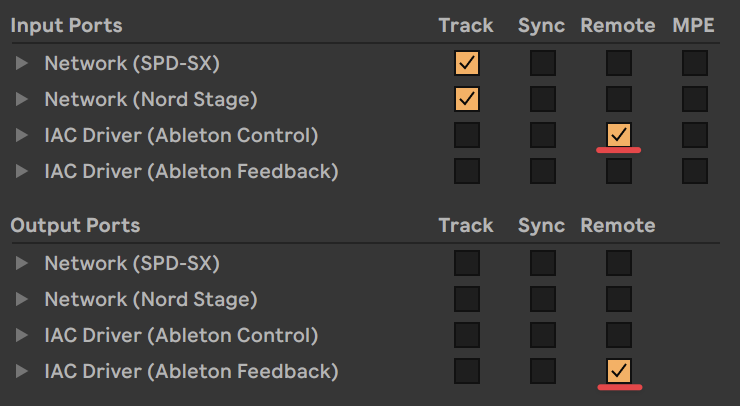
To make this work with MIDI, I’d recommend creating a 2nd IAC connection. I’ll call the first one “Ableton Control” and the 2nd one “Ableton Feedback”. In Live’s MIDI settings, enable “Remote” on the Ableton Control input and on the Ableton Feedback output:

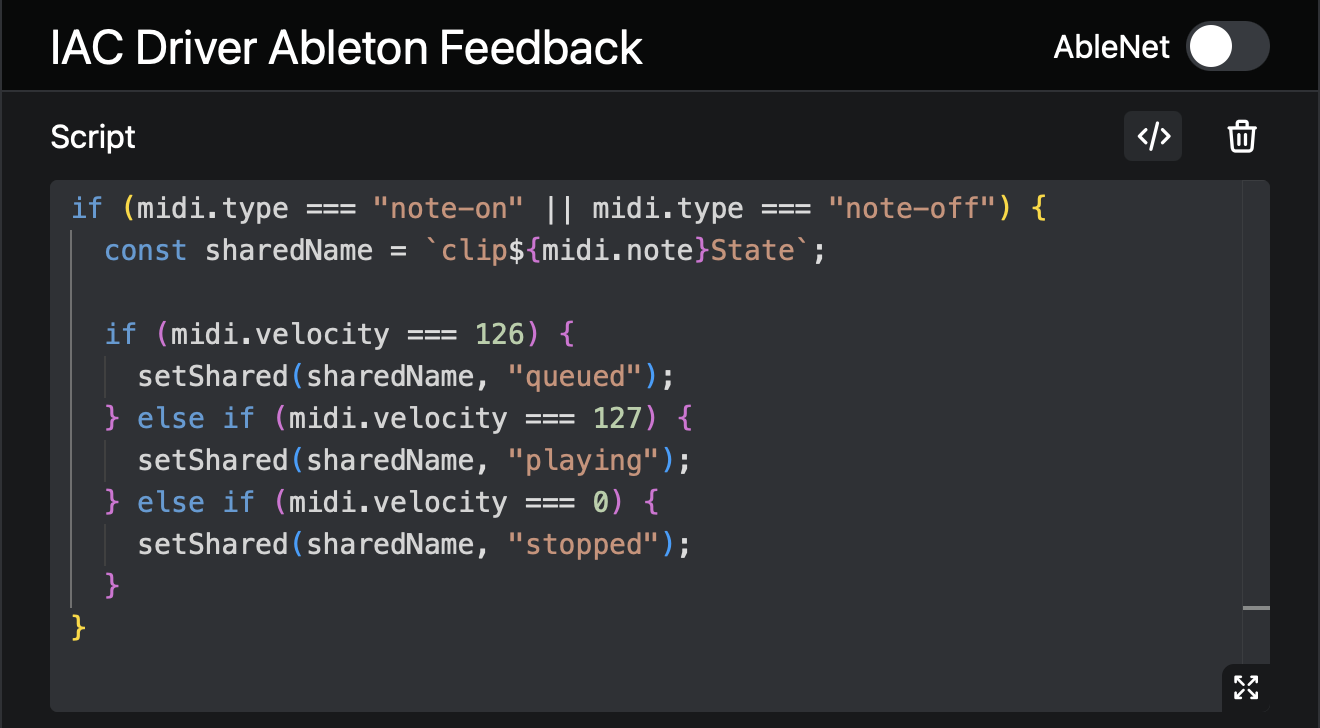
Then, in AbleSet’s MIDI mapping settings, add a new “Script” mapping to your Ableton Feedback MIDI input and set it to the following script:

Here’s the script to copy:

if (midi.type === "note-on" || midi.type === "note-off") {
  const sharedName = `clip${midi.note}State`;

  if (midi.velocity === 126) {
    setShared(sharedName, "queued");
  } else if (midi.velocity === 127) {
    setShared(sharedName, "playing");
  } else if (midi.velocity === 0) {
    setShared(sharedName, "stopped");
  }
}

If you’ve mapped your clips to MIDI CC, you should be able to use this mapping script:

if (midi.type === "cc") {
  const sharedName = `clip${midi.cc}State`;

  if (midi.value === 126) {
    setShared(sharedName, "queued");
  } else if (midi.value === 127) {
    setShared(sharedName, "playing");
  } else if (midi.value === 0) {
    setShared(sharedName, "stopped");
  }
}

This will create shared variables for each MIDI note that contain the current state of the related clip. To make a button’s color react to this state, set it to “Dynamic” and use the following expression:

${shared("clip60State") === "playing" 
  ? "green-600" 
  : shared("clip60State") === "queued" 
    ? "green-700" 
    : "green-900"}

This is for a clip mapped to “C3” (note 60 in MIDI). For a clip mapped to “C#3”, you’d use “clip61State”, “D3” is “clip62State”, and so on. For CC, you’d just use the CC number instead.

I’ve used different shades of green to convey the status of that clip, but you could also use different colors here, depending on your preference.

Let me know if this works for you, I’m looking forward to your reply! :slight_smile:

Hey @leolabs! That worked and everything runs well! It’s just now I am getting this error. It doesn’t affect anything. It just shows up repeatedly on the log.

IAC Driver Ableton Updates / Script
RuntimeError: Aborted(Assertion failed: list_empty(&rt->gc_obj_list), at: ../../vendor/quickjs/quickjs.c,1998,JS_FreeRuntime). Build with -sASSERTIONS for more info. RuntimeError: Aborted(Assertion failed: list_empty(&rt->gc_obj_list), at: ../../vendor/quickjs/quickjs.c,1998,JS_FreeRuntime). Build with -sASSERTIONS for more info. at M (ableset://localhost/_next/static/chunks/672.252c8d51c79d2958.js:1:1834) at b (ableset://localhost/_next/static/chunks/672.252c8d51c79d2958.js:1:4556) at ableset://localhost/_next/static/media/emscripten-module.1e0c139d.wasm:wasm-function[701]:0x36306 at ableset://localhost/_next/static/media/emscripten-module.1e0c139d.wasm:wasm-function[961]:0x509c1 at t._QTS_FreeRuntime [as QTS_FreeRuntime] (ableset://localhost/_next/static/chunks/672.252c8d51c79d2958.js:1:8591) at e.disposer (ableset://localhost/_next/static/chunks/226.a69c837eb88f6d33.js:6:1052) at e.dispose (ableset://localhost/_next/static/chunks/226.a69c837eb88f6d33.js:1:2839) at e.dispose (ableset://localhost/_next/static/chunks/226.a69c837eb88f6d33.js:4:710) at R.dispose (ableset://localhost/_next/static/chunks/226.a69c837eb88f6d33.js:5:2701) at e.dispose (ableset://localhost/_next/static/chunks/226.a69c837eb88f6d33.js:4:710)