Hi. I often find myself in the midle of rehersal going back to ableton itself if i need o go forward of backward from the point i pause the playhead. Since ableset already presents the progress on a song or group of songs would it be possible to add a horizontal bar in that same progress shown and by touching in the left or right directions we could scrub the audio (dislocate the playhead)? Maybe this isnt exaclty audio scrubbing but it would improve navigating in the midle of song sections without having to go to ableton. If i missed a feature that would allow me to do this, please excuse me. Thank you.
Hey @Rskeys_S,
Thanks for the suggestion! I’m not sure how feasible this would be to implement, so I can’t make any promises, but I’ll pass this along.
In the meantime, there are a few things that might help you navigate without switching back to Ableton:
-
Sections Track: If you have your songs broken into sections (Verse, Chorus, Bridge, etc.), you can tap on any section in the Performance View or Setlist View to jump directly to it. That’s usually the quickest way to get around within a song during rehearsal.
-
Jump by Bars / Measures: AbleSet has OSC commands like
/setlist/jumpByBarsand/setlist/jumpByMeasuresthat let you move the playhead forward or backward by a set number of bars or measures. You could map these to buttons in a Canvas for quick access. Note thatjumpByMeasuresrequires a Measures Track in your project to work. -
Canvas section buttons: You can create a Canvas with buttons for each section of a song (using
/setlist/jumpToSection SectionName), giving you a custom layout to jump around freely.
If your songs have a Sections Track set up, the combination of section jumping and jump-by-bars should cover most rehearsal navigation needs.
Would that work for your use case?
Hey @agustinvolpe ,
Thanks for the reply and the suggetions, I dont breakdown songs by sections, because in this specific project we play medleys of several songs I end up just making a section for each song, with that said I wasnt aware of the jumpbybars OSC command , that should be enough to help me navigate audio better , thruth be told I didnt touch ableset to update it since I started touring last year and only now can I update it, I need to make sure to revise the literature. Thank you.
1 Like
@Rskeys_S, the bars/measure jump feature is also available as buttons in the setlist view. You can enable it from the setlist settings menu:
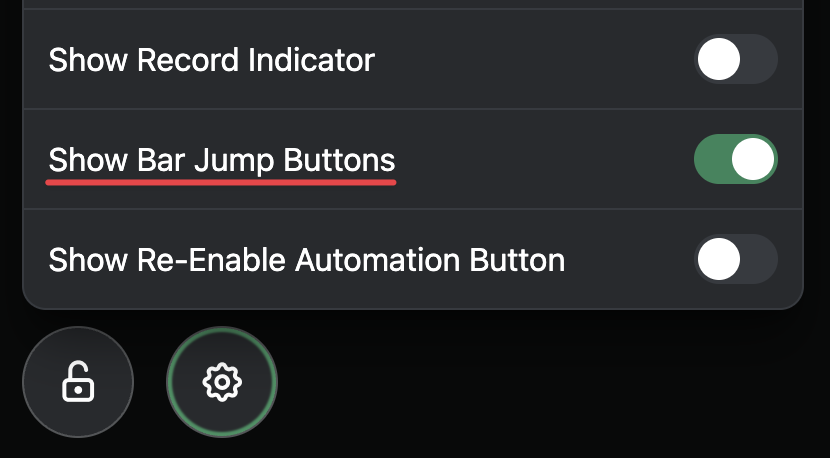
You can also use the shortcuts ⇧ ← and ⇧ → to jump backwards and forwards by a bar or measure 
1 Like
Thanks for the Hint Leo.
For what it’s worth, the sections track is great for exactly this. Can break the song into as many sections as you like and jump to it instantly - and having all labelled in Ableset makes it so simple and quick. Add the “count in” sections and we can say, let’s take it from the bridge, or verse 2 or wherever and get a count in for that section. Use this a lot.  Thought worth sharing.
1 Like