Any way to change active and inactive text?

Hello,

Today when text is active, text has the color define into tracks and previous and next text has same color but with less opacity. is it possible to set the color of inactive and active text to have clear difference between active and inactive text ? thanks

Hey @Pat,

There’s currently no built-in option to set two separate colors for active and inactive lyrics lines. The color comes from the track (or from the clips if you use the +CC flag), and inactive lines use that same color at a lower opacity.

That said, you can get what you’re after with Custom Styles. Here’s a snippet that gives active and inactive lines their own colors:

/* Active lyrics line */
.lyrics .line.active,
.lyrics .line.active * {
  color: #ffffff !important;
  opacity: 1 !important;
}

/* Inactive lyrics lines */
.lyrics .line.before-current,
.lyrics .line.before-current *,
.lyrics .line.after-current,
.lyrics .line.after-current * {
  color: #4b5563 !important;
  opacity: 1 !important;
}

Just swap the two hex values for whatever contrast works best on your screen. The opacity: 1 lines are what remove the default fade, so the difference comes purely from the colors.

To add it: open AbleSet’s icon tray, click the gear icon, and select “Show Global Custom Styles”, then paste the snippet into styles.css and save. AbleSet applies the changes automatically — you may need to reload the page in your browser. If you’d rather keep the styling tied to one specific project, you can use the “Custom Styles” folder inside your project’s AbleSet folder instead.

Keep in mind that this overrides the color attribute on your lyrics track, so for e.g. [blue] (or whichever color you’re using) won’t apply anymore on that track.
Chords are also not affected, so if you’re using [chords:orange] or similar, they keep their own color.
Custom Styles are an experimental, so it’s worth testing before a show.

If you’d prefer to stay with native attributes, there are a few that also help the current line stand out: [nozoom], [nofade], [linemarker] (adds a marker next to the current line), and [top+2] (hides past lines so the active one sits near the top). You can also see this in action in the official tutorial.

Would that work for your use case?

Hi Agustin,

I think yes. I’m developer and I’m familiar with css :blush:

Thanks for your reply. I will test it Saturday because tonight I have a concert and I don’t want to change something 6 hours before show….

But I’m sure it is exactly what I need.

Thanks again.

Pat

I’m just thinking about problem I can have. I want to apply your css but
only on track lyrics 1 not on lyrics 2.

I think your proposal is for all Lyrics, no ?

Is it possible to apply the custom css just for one of lyrics track ?

Thanks,

Hey @Pat,

The snippet I posted applies to every Lyrics track. But you can scope it to just one.

AbleSet adds the track’s slug as a CSS class on the lyrics container, so you can use that to target a single track. The slug is the track name in lowercase with spaces replaced by hyphens — the same one you see in the browser’s address bar when you’re viewing that track (/lyrics/your-track-name). That’s the easiest way to check yours.

So if your first track is named “Lyrics 1”, the scoped version looks like this:

/* Active line — Lyrics 1 only */
.lyrics.lyrics-1 .line.active,
.lyrics.lyrics-1 .line.active * {
  color: #ffffff !important;
  opacity: 1 !important;
}

/* Inactive lines — Lyrics 1 only */
.lyrics.lyrics-1 .line.before-current,
.lyrics.lyrics-1 .line.before-current *,
.lyrics.lyrics-1 .line.after-current,
.lyrics.lyrics-1 .line.after-current * {
  color: #4b5563 !important;
  opacity: 1 !important;
}

Just replace lyrics-1 with your actual slug in all six selectors, and your second track will keep AbleSet’s default look.

If you ever want different colors per track, you can simply duplicate the whole block and change the slug and the hex values in the copy.

Would that work for your use case?

Hi Agustin,

It should be great.

I’m trying to use it but the name of track contains upper and space. Do I need to change for css ?

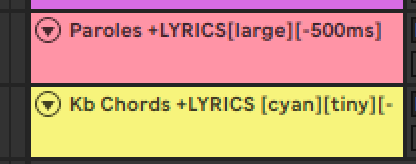
I want to affect only Chords because color lyrics of first track manage color directly to lyrics event one by one. I put snap shot to show you.

I want to affect only Kb Chords tracks not Paroles tracks which must have same beahvior os before.

thanks

here after the exampel of my 2 trakcs. I want to apply only on track Kb Chords not to Paroles. how is the name ? do I need to remove space and caps ? thanks