Hey Leo! Just tried the new support for multiple section tracks. I’ve wanted something like this for my medleys. A couple of things came up while testing it:
Sections starting at the same beat. When two clips on different section tracks start at the exact same beat, I only see one of them in AbleSet. At a medley transition, I’d like to see both the new song title and its first section, with both clips starting on the downbeat. My current workaround is to give the title its own beat, which cuts a beat off either the new song’s first section or the previous song’s last section. Both need to stay loopable in full.
Song titles as folders for sections. Could the uppermost section track in Ableton optionally act as a parent track, similar to folders in the setlist? I’d put the song titles and keys on that track, then put the count-ins, intros, verses and choruses on the track below. In AbleSet, each song title would be an expandable header, and the sections underneath would keep their usual jump and loop controls. For example, if “Song B (G major)” and “Intro” both start at bar 65, I’d see the song title with “Intro” underneath it and could loop the intro from beat one.
One extra idea for live use: an option to automatically expand the currently playing song and collapse the others. That would keep the medley compact while showing the sections I’m most likely to jump to or loop.
Hey @Basstor, this behavior you described is expected, the sections track is still a flat structure and clips on lower tracks overwrite those on upper tracks.
This feature is mostly meant to make it easier for people who build sets by dragging multiple songs from different project files into one depending on which ones they need.
In your case, I’d either create one song per medley part and add the same tag to each one so you can add them all to the setlist at once or keep it as one song and name the first section “Song name - Intro” or your whatever your first section is so it stays loopable.
This is already available as a setting, you can enable it by clicking the settings button on the bottom left of the setlist and turning on “Auto-Expand the Current Song”
That is what I already know and use! I meant, to prioritize the section tracks in the order in which they are located (from top to bottom) and being able to kind of create a folder structure in the song itself but would be very specific
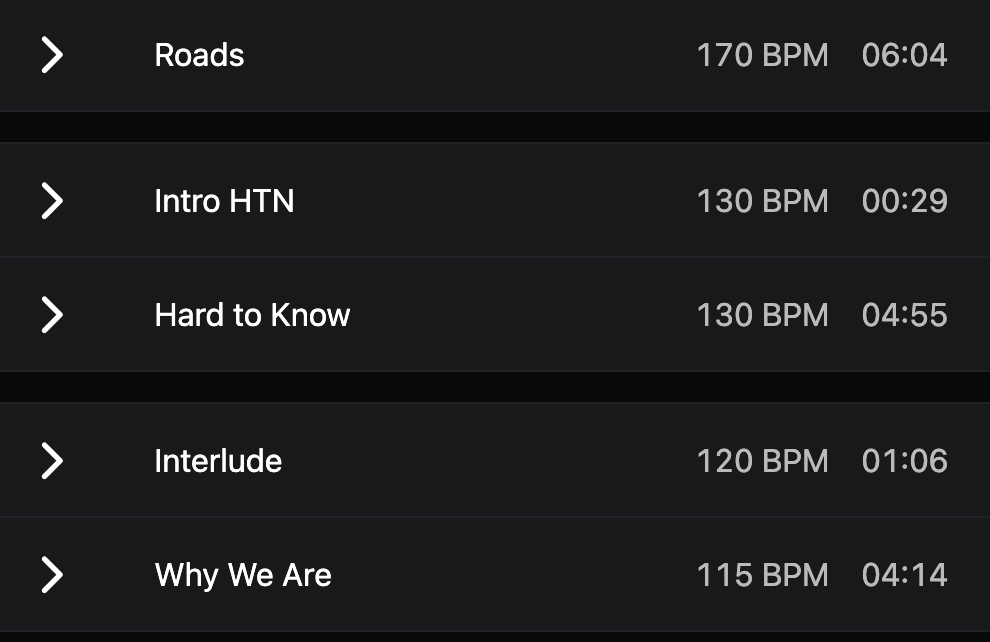
All what I thought about: Is there a possibility to show the actual BPM values in Ableset (potentially for each section and/or song), so you can check on the fly, which song you could put directly after the current song?
Also what I thought about was if there is a possibility to nudge in given steps, like a quarter note or a full bar?
Regarding the BPM feature, that’s a good idea! AbleSet already has the data so I just need to display it in the setlist. I’ll release it with the next beta:
I’m also working on a way to add the key of each song so it’s easier to see on the right side of each song
That’s already possible. In setlist view, you can enable the Bar Jump Buttons option to add buttons for nudging by one bar, and in Canvas or MIDI Mapping, you can use the /setlist/jumpByBeats and /setlist/jumpByBars OSC methods to jump by a given number of beats or bars. Does that work for you?
Regarding the nudge option: that is exactly what I was looking for. Because even if we missed the transition between songs for let’s say 1 beat, I can readjust the backing, that’s brilliant!
For the BPM part: For me, it would be important to also be able to make the BPM values visible in the sections so we can also jump into medleys. Medleys are whole defined songs, e.g. a song called “Rock Medley“, in which there are multiple sections (for the specific songs) and another sections track (for the actual sections or song parts) - same would be for the key
That would be phenomenal - was just thinking the other day that some ‘metadata’ would be really helpful to see in addition to the description. I’d put forward the idea that it would be good to be able to turn on/off each of those elements, maybe that’s your thinking already.

 but would be very specific