I added support for this in beta.3, so you can now use [c:0] to disable the cue for a section, [c:1] for a 1-bar count-in and [c:2] for a 2-bar count-in. You can read more about this in the docs
Would it be possible to have cues that you want to be announced but not necessarily be displayed as a section on the different views. For example: “hits“, “key change”, “off”, “band down”, etc. In addition to these, I have several “cues” in the cues folder that I would like to use but don’t want to ever display as a “section” necessarily. Hope that makes sense! Thank you!
You can already do this using an OSC track. To speak certain phrases automatically, create a MIDI track named “Cues +OSC [/cues/say] [single]”, then place a clip named after the phrase e.g. (“Band Down”) where you’d like the phrase to be spoken.
If the phrase doesn’t exist yet, it will be generated automatically and then played.
I know that this could be handled more easily, maybe with a “+CUES” track, but this is a simple workaround for now
Hey I have tried with all the 3.1.0 betas but I can’t for the life of me get the cue plugin to install. it doesn’t even appear in the physical vst3 folder on my Mac. Any Way to get a direct download to the plugin?
This works awesome! Would love there to be an option to ONLY have cue section count-in when starting a section track from stop and solo’ing the click.
For me personally having every single section count in during playback is distracting
For now I just have the track deactivated with a +CLICK flag so it solo’s during count-in then mutes for the rest of the song which works actually pretty well ha
The plugin should automatically be installed in “/Users//Library/Audio/Plug-Ins/VST3”. Could you check if you see it there? You might have to enable “Use VST3 Plug-In System Folders” in Live’s “Plug-Ins” settings:
If that doesn’t work and you’re not seeing the .vst3 file in the VST3 folder, could you send me a log package so I can take a closer look at why the plugin isn’t automatically installed as expected? You can upload it to my support inbox referencing this thread
That’s already possible. AbleSet solos all tracks with the “+CLICK” flag during count-in, so you just have to add that to your Cues track and mute it. Muted tracks get unmuted while they’re soloed, so you’ll only hear the section count-in when jumping to a section and then starting playback.
Hey Leo. Do i have to renew my licenses in order to use the betas? 3.0.8 works fine for me. But with the newest betas it says that my license is invalid
It seems that your license only covers AbleSet 3.0 but not 3.1, so you’d have to renew it to use the latest betas. I hope that’s alright, let me know if you have any further questions
Alright, i’ll do so =) I was under the impression that the pro version covered future updates. However, i’m happily renewing the licenses, as i know how much hard work you put into ableset and keep it up to date with exciting features
Hey @TinoSchulz, your license covers one year of free updates, regardless of which version you bought it for. You purchased your license on the 13th of February 2025, so it was valid for all new versions until the 13th of February 2026, which includes AbleSet 3.0 but not AbleSet 3.1
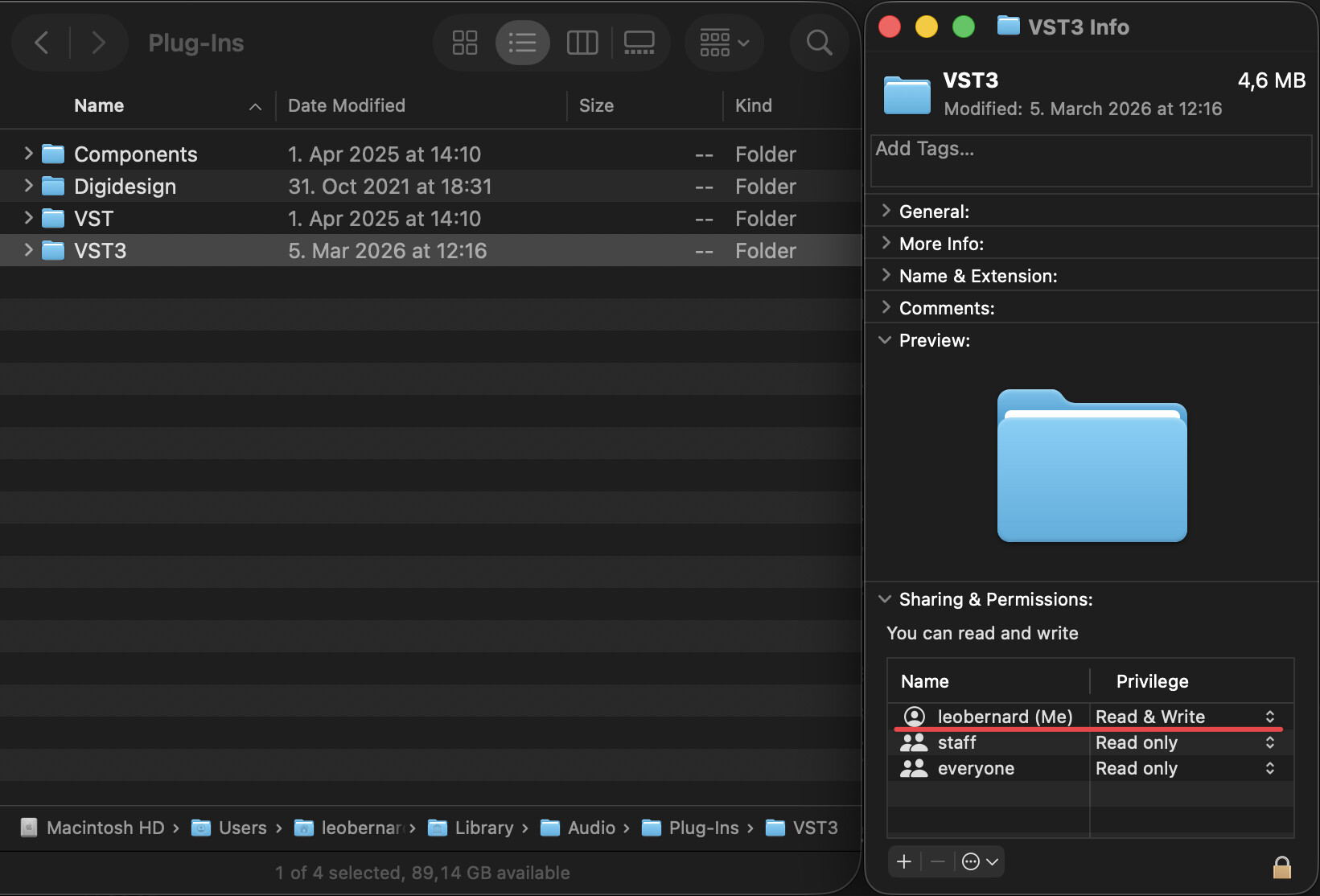
I just took a look at the logs you sent and it seems that AbleSet isn’t allowed to access your VST3 folder. Could you right-click it, select “Get Info” and then ensure that your user has Read & Write access to the folder? Then restart AbleSet so it can try to install the plugin again.
Let me know if this helps. I’ll make sure to add a note about this to the documentation
Edit: If nothing works, you can also manually right-click AbleSet.app, select “Show Package Contents”, go to Contents → Resources → vst, and copy the AbleSetCues.vst3 file to your VST3 folder yourself.
I’d recommend this only as a last resort as AbleSet won’t be able to update the plugin automatically with this method.