as you already incorporate the sliders, perhaps you could aproach the VU meter bars, so we could see those change on canvas as well
Hey @Gerson_Benjamin_Sobe, that’s a cool idea! If you’d like to get the meter values of a track in Ableton Live, you might be able to do so using AbletonOSC, though it’s not the easiest solution yet.
How would you like these VU meters to look? Do you have any examples in mind?
I’m looking forward to your reply!
1 Like
Great! I will look for some ideas to share. thank you once again! you are making such a great work here!

+1 from a church rig. We run everything from a single Stage canvas on an iPad: setlist, jumps, a small group mixer (click, cues, drones, band), drone keys and stage mutes. Our music directors are volunteers, so the point of the canvas is that they never need to leave it.
To answer “what should it look like”: a simple vertical peak bar with a short hold, either as its own element bound to a mixer group or as an option that draws inside a Slider bound to that group’s volume. Colour thresholds like the Mixer page would be plenty. A dB readout under the Slider would be a nice extra.
Why it matters: a fader with no meter gives no feedback. The MD can see where the fader is, not whether the group is passing signal. That’s the question at the moments that count: is the drone actually sounding under this transition, is the click bus there before the count-in, did the stage mute take the right group. Today the answer is to flip to the Mixer page mid-service, which is exactly the navigation the custom canvas exists to avoid.
Since the Mixer page already has the levels, exposing them on OSC as well (/mixer/meter or similar) would let Labels and canvas scripts use them, and would sidestep the AbletonOSC route, which is more machinery than most of us want on a stage machine.
Hey @jameskoziol, the meter values are already published via OSC, so you could build a button that lights up by changing the background color whenever there is a signal, like this:
${osc("/mixer/ref/meter") ? "green-600" : "green-900"}
Just replace the “ref” part with the name of the group, in lower case. Hope this helps! 
1 Like
Thanks @leolabs, that works. Confirmed on 3.1.4: /mixer/<group>/meter comes through and canvas templates can read it, so I’ve built a small eight-segment ladder next to each group fader out of labels with a dynamic background colour. No script needed. Screenshot attached.
A few things I noticed while testing, in case they’re useful to others or worth a line in the OSC docs:
- The value is the mean of the member tracks’ meters, rounded up to the nearest eighth, and it’s only sent when it changes. That’s plenty for “is this group passing signal”, which was my main ask.
- The mean dilutes groups where only one track sounds at a time. Our drone group has two tracks that never play together, so it reads at half. I scale it in the template, but a max-across-tracks option would read more naturally.
- It’s not in the OSC docs yet, so it took a look at the code to trust the semantics. Worth documenting.
Appreciate the quick reply.
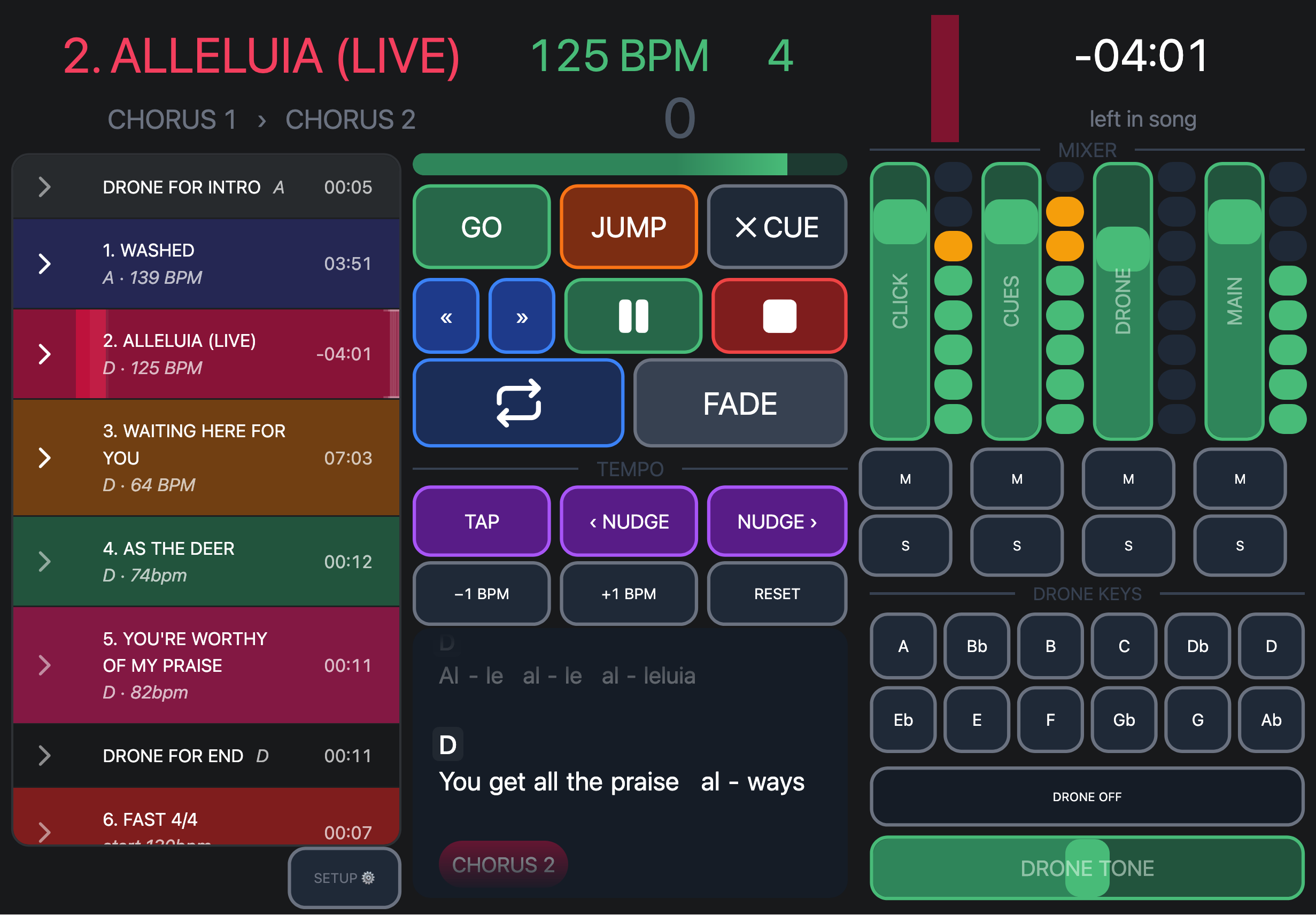
Hey @jameskoziol, thank you for your feedback!
That’s a good point! I’ll add a /meter/max OSC value for groups in the next beta.
That must’ve slipped through the cracks, the value should’ve been documented. I just added it to the docs.
Let me know if you have any further feedback!
Brilliant, thanks Léo. The docs line and the max value are both exactly what I was hoping for. Happy to test /meter/max on the beta when it lands and report back. And thanks for the quick turnaround generally, it makes building on AbleSet a pleasure.
its been a long time since my last comment here, i am glad to know you have been working o this request. thank you so much Leo. you have been doing a great job! I have tested the meter feature, itworks great, ill keep waiting for the meter/max improvement. have a nice day
Hey @jameskoziol and @Gerson_Benjamin_Sobe,
Quick follow up on this one: the /mixer/[group]/meter/max OSC value is now available in the latest beta.
While /mixer/[group]/meter sends the average level of all tracks in the group, /meter/max sends the level of the loudest track in the group. Both use the same scale (0 to 1, in steps of 0.125), so groups where only one track sounds at a time (like a drone group with two pads) will now read at full level instead of half.
To use it, just replace meter with meter/max in your templates. For example, a background color that lights up whenever the drone group is passing signal:
${(osc("/mixer/drone/meter/max") ?? 0) > 0 ? "green-600" : "green-950"}
For a segment ladder, each segment checks its own threshold. This would be the fourth segment of eight:
${(osc("/mixer/drone/meter/max") ?? 0) >= 0.5 ? "green-600" : "green-950"}
@jameskoziol, since you were scaling the value in your template to make up for the averaging, you can drop that for the groups you switch over to meter/max.
Let us know how these work out for you!
1 Like
thank you so much! will be working on this!
1 Like
Thank you so much Agustin! works well.
1 Like