Hi all!
I have the following situation that comes up frequently, maybe someone else has figured out a way to do what i need:
Depending on the setlist, some of the songs have an intro added, other times they do not. The intros transition smoothly into the main track, and the audio lies on a seperate track. Now, when i trigger the song without the intro, the end of the intro still plays because there’s of course a count in.
Is there a way to dynamically mute tracks, depending on whether i start play from the intro’s marker or the main song’s marker?
1 Like
Something I often run into - would be interested to hear other solutions but one way to do it is to have each intro be its own song, then in the setlist the ‘actual’ song can play automatically after. You can include the band’s count-in as part of the intro song, then the main song can start on Verse 1, for example.
This obviously works well when there’s no overlap of audio, but as you mention in your scenario, there often can be. You could solve this by changing the point at which you’re splitting up the songs.
So for example. Say your intro to a song has a pad, then it fades out during Verse 1. The intro song could include Verse 1, and then the main song starts Verse 2. Of course it follows seamlessly so nobody is any the wiser.
Then for the ‘no intro’ version, you make another song, but this one is just a count in plus Verse 1. Main song, again, starts Verse 2.
This solution does mean that for the song in question, you’re always playing two songs. You just change up the starting song to determine how the whole arrangement goes. Kinda like swapping out Lego bricks or something 
Hey @hannesbachofner, welcome to the forum!
If the tail of the intro is coming through during AbleSet’s count in, there’s a setting that handles exactly that:
- Go to Settings → Section Count-In.
- Enable Solo the Click Track during Count-In.
With this on, AbleSet solos your click track while counting in, so the intro track stays silent when you start from the main song’s marker. Once the song begins, the click is unsoloed and everything plays normally. Starting from the intro’s marker works the same way: you get the click first, then the intro.
A couple of notes:
- AbleSet uses the first track or group with “click” in its name as the click track. If yours is named differently, add
+CLICK to its name.
- If there’s another track you want to hear during the count in (a guide or cues track, for example), add
+CLICK to it as well, since all +CLICK tracks are soloed during count ins.
You can also see this in action in the official tutorial: https://youtu.be/0eNheFYAh6w?t=873
@LewisDavie, thanks for sharing your approach! Splitting the intro into its own song (and moving the split point when the audio overlaps) is a great option, especially when the intro has to blend into the first verse in a way the count in alone can’t cover.
Would that work for your use case?
1 Like
Thanks for sharing! This would mean i have to copy the whole song if i understand correctly? That’s something i’d like to avoid, as if i want to make a general change to the song i’d have to do it twice…
Thanks for answering! I know about this feature, it’s very useful for rehearsals! But i think it wouldn’t work because sometimes the intro-track overlaps with the actual start of the song. let’s say we have a pad-intro, rising with a big boom right at the downbeat of the song.
Also songs might have tracks already during the count in, like a slow fade in that combines with the intro in some way, but also works on it’s own. But adding +CLICK to every single backingtrack doesn’t seem like a very good solution, as it also messes with group levels (if i want to change the click-level via Ableset e.g.)
Also if i remember correctly, the section count-in only works when starting playback from a section, not when triggering an entire song.
Am i understanding this correctly?
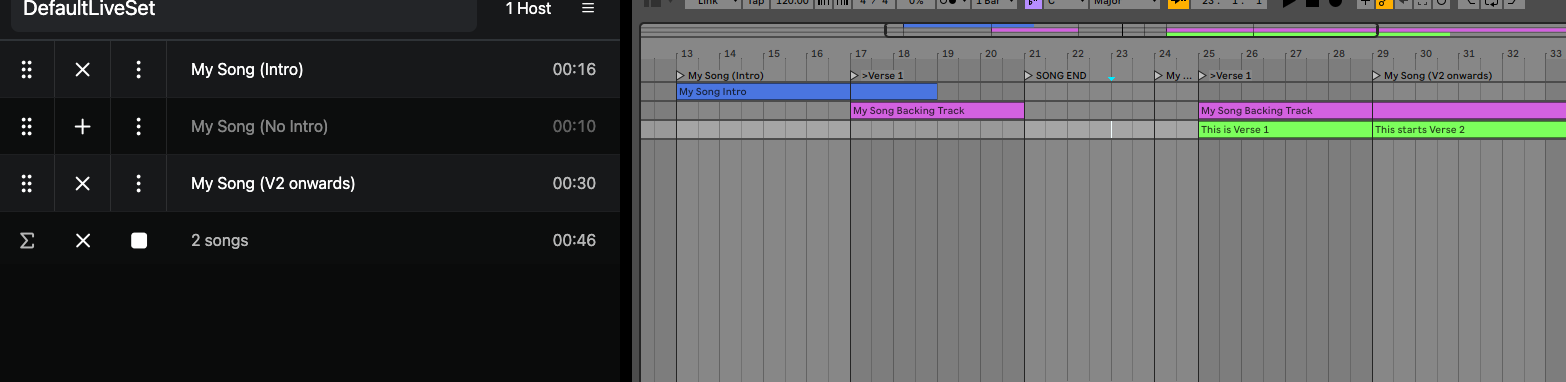
You don’t have to copy the whole song, only parts of it. Maybe best if I illustrate:
So if I want my intro - I use ‘My Song (Intro)’ plus ‘My Song (V2 onwards)’. If I don’t want an intro, I use ‘My Song (No Intro)’ and ‘My Song (V2 onwards)’. This is only necessary if the intro track overlaps with the main body of the song, as you can see in the Ableton window on the left side. On the right side, that’s the original track, which is unaffected. I’ve just put down another song marker at the start, and at Verse 2 as well.