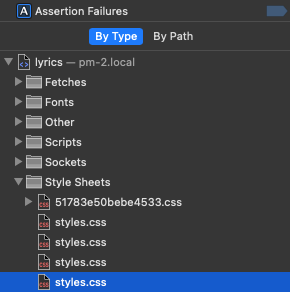
I am having an issue where I cannot edit the styles.css file when opening it directly from the Ableset custom folder. I can make changes and they do save but nothing happens to the canvas or lyrics. When I look in inspector > sources, there are multiple styles.css files (as shown in screenshot attached) showing. When I manually edit one of those files in the “Sources” tab in inspector, one of them will make the changes but it seems to be random on which one makes the changes. Thanks!
It appears that every time I edit, the network tab displays an additional styles.css file. If I reload it then shows two but every time I edit and saves, another one appears. Didn’t seem to go higher than 6 at once before it should started removing one and putting the new one at the top. The changes that I made would show in one of the files and it would sometimes be the file that would cause changes to be made however when I made changes on the files in VsCode, it would not do anything.
Make sure you’re editing the styles.css inside AbleSet > Custom Styles, 'cause that’s the one AbleSet actually loads.
Maybe just try opening it in a simple text editor (like TextEdit or Notepad) and make your changes there. Then do a hard reload with cache disabled.
Yeah I’ve tried editing the file by clicking on the tray icon for ABLESET and opening the file inside that folder. But there is also the folder that is created in the Abelton project folder in the beta and it doesn’t work when editing that one either. No luck yet. Going to keep playing around and see if I can figure it out
I’m still having issues where I cannot edit the styles.css file and it update in real-time like it has for me in the past.
Which file should I be editing? The one that is contained in the Ableset folder within the Ableton Project File of the specific song or the one that is in the main Ableset Custom Styles folder that can be accessed by clicking on the Ableset icon and selecting Show Custom Styles?
Also, when I make edits and save (tested in both VSCode and TextEdit), no changes are made until I close and reopen Ableset. I have tried this in a private browser as well as tried editing both CSS files (at the same time, one at a time, etc.).
That’s strange, both the project’s styles.css and the styles.css in AbleSet’s preferences folder should work as expected. I just tried it on my end and the changes are shown immediately.
Could you try editing your styles again and then send me a log package so I can take a closer look at what might be causing this issue?
I feel like this has something to do with AbleSet not being properly notified of file changes, but I’m not able to reproduce this behavior on my machine, unfortunately.
I’m looking forward to your reply and hope I’ll be able to fix this issue soon