I got a response from Ableton’s support team, they were able to reproduce the issue on their end and are waiting on feedback from their developers.
4 Likes
FINALLY  Glad Ableton have acknowledged and able to reproduce
1 Like
Great to hear Ableton are aware. In the meantime, I have some info that might be useful.
@jegomat worked out that the issue was related to markers - I’m not sure what the limit is after which this issue appears, but even in a cut-down set I used the other night (18 songs with a marker every section of each song), I still had issues.
I believe the problem has something to do with editing the Ableton file after it’s been opened. During a long pre-production, I didn’t get any disk dropouts until after I started making changes to the file.
I’d therefore recommend, while we wait for Ableton to fix this, that if you have to make any changes to your playback sessions, save and restart Ableton after your final change. I can’t say for certain that this will stop the problem but it does appear to mitigate it.
1 Like
Curious, has anyone tried downgrading to a previous version of Live 12 to verify this bug does only exist in 12.3?? Maybe I missed that in the long thread but was curious. I just downloaded a few and was going to try, because I’m still getting these dropouts randomly. I also saw 12.3.5 came out, maybe that fixes the bug too? Should be able to test and verify all this in the next couple days.
As far as I know, this has been happening even with Live 11 
Does your session contain a lot of locators?
dang! I’ve never experienced it until recently. Yeah, it’s about 20 songs, all with locators for every section. That’s my last resort is to remove all of the locators for sections. ideal to keep them so they can jump between sections if needed. I’ve tried zooming in, and re-opening works, but it starts happening in the middle of the set, so re-opening the session just isn’t an option. this is actually the same session I uploaded from this thread: Setlist order keeps changing anytime I edit the timeline (duplicate or delete time) - also playback is jumping back to first song anytime a song locator is hit by the playhead playing before it - #9 by SETHBUILDSRIGS hoping nothing is related to the other issues?
Still nu Updates right? 
Unfortunately not 
I’ll update this thread as soon as I hear more from Ableton.
Having this issue as well! Glad to know ableton is aware. Hoping it gets fixed soon.
I just downgraded 13 Macs to 12.2.5 and still having the issue!
Just started having this issue! Had been rock solid for so long then all of a sudden…
I sent my issue to the Ableton support and got this message back.
From the log, it seems that a Python script handling some functions is creating issues with Ableset:
As you can see in the screenshot, there is a warning log entry from Ableset that causes lag. UDP is the User Datagram Protocol, a communication protocol in the Internet protocol suite that sends messages to other hosts on an Internet Protocol (IP) network. In the Midi port, I can see that you have a Network device set up. If the issue occurs again, I’d suggest revisiting the current configuration for locators and mapping to test if the problem persists.
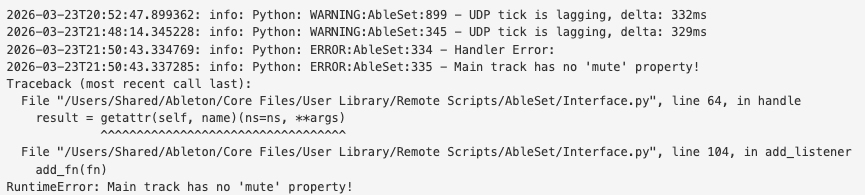
I hope this can give some insight.
Hey @lpage,
This is a bit misleading, the “UDP tick is lagging” lines only log these lags, but that doesn’t mean they were caused by AbleSet. Usually, they’re caused by the UI lagging, for example when you display too many songs at once, but they shouldn’t have any effect on the performance of the audio engine.
The “Main track has no ‘mute’ property” error is something I’ll fix soon, but this also shouldn’t cause any issues with the audio engine.
So far, these audio dropouts have also occurred when AbleSet isn’t loaded as a plugin, and I suspect that they’re caused by too many locators in the Live project.
If you like, you can send them this thread and my case #3054271 so they can take a look at everything we gathered here so far 
Just following up on this one. I was experiencing this issue a lot during a stint of pre production last year.
At the time I was running MacOS 15.6.X, Ableton 12.2.X, on a pair of MacBook Pro M4 Max. My Ableton project contained about 2.5GB total of samples, all of which were loaded into RAM, so it was very confusing/surprising that I was still getting disk dropouts. CPU usage was hovering around 10-15% until and unless I jumped to different locations on the timeline (which would always result in a momentary CPU spike).
The problem went away after I made the following changes:
- I switched from an RME Digiface Dante to a MADIFace USB.
- I bypassed my CalDigit TS4 Dock for the audio interface, connecting this directly to the MacBook Pro instead.
- I removed my working Ableton project file from iCloud Drive (it was stored on the Desktop, which was syncing to iCloud by default)
Obviously I changed too many variables to know exactly what the cause was, but on that last point I’m wondering whether anyone can verify if this could be a factor, i.e. are any of you running your Ableton project in a disk location that is periodically synchronising with iCloud, and could this be causing the disk dropouts?
These sound like factors that could affect but alas I have seen this happen in projects on my MacBook where I’m
- Running MacOS 15.6
- Running on CoreAudio on just laptop speakers
- No audio interface.
- Local storage
Large projects with many locators for section tracks is the issue. What the cause is we still don’t know but I think Ableton is looking into it now?
1 Like
Some News with it? Maybe a fix with the New Release of 12.4?
I’ve asked them for an update a few days ago, but they haven’t found a fix yet, unfortunately. I’ll keep checking in with them
I’m having a lot of these same issues with little to no solution for fixing it yet.
I’m curious to know if anyone has had these issues for a Mac from a factory state. I have had numerous issues (not ableton/ableset related) in the past with new computers using a Time Machine backup from a previous computer, specifically a backup that is jumping a couple of OS updates.
I haven’t tried this yet but my next step when I have the time is to factory wipe my computer and only redownload necessary content and see if that shows any improvement
i’m having the same issues.
after some testing i noticed that the problem only occurs when running the ableton project locally. when i copy the project to en external ssd (Samsung T7) and run it from there, I no longer get any dropouts.
2 Likes
Had it happen to me yesterday in a rather extreme way mid-gig; I’ve left a support ticket now and I think we should all do the same.
I’m sure Ableton won’t be very happy to have a lot of messages saying the same thing, but maybe they just need a bit of pressure to focus on fixing what is, frankly, a pretty debilitating bug in our line of work.
Edit: I’ve also linked them this forum thread so they might see some of the things we’ve tried
2 Likes