To demonstrate the flexibility of the new scripting options, here’s a project script that sends the current song and section name to a connected MC6 PRO:
Here’s the MIDI mapping:
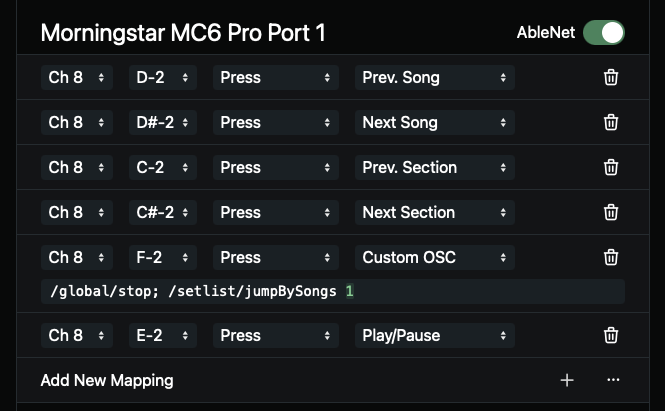
And here’s the full project script:
/**
 * The checksum is used by the MC6 Pro to check
 * if all bytes were received correctly
 */
function calculateChecksum(bytes) {
  return bytes.reduce((acc, cur) => {
    return acc ^ cur;
  }, 0xF0) & 0x7F;
}

/**
 * Sends a string to the MC6 PRO
 */
function sendBankName(name) {
  const normalizedBankName = name.slice(0, 32).padEnd(32);
  const songBytes = makeAscii(normalizedBankName);

  // This payload tells the MC6 Pro to update its bank name temporarily
  const payload = [
    0x00, 0x21, 0x24, 0x06, 0x00, 0x70, 0x10,
    0x00, 0x00, 0x00, 0x00, 0x00, 0x30, 0x00, 0x00,
    ...songBytes
  ];

  payload.push(calculateChecksum(payload));
  sendMidiSysex("Morningstar MC6 Pro Port 1", payload);
}

let lastSongNameUpdate = 0;
let songName = osc("/setlist/activeSongName");

// When the song name changes, display it on the screen
onOscChange("/setlist/activeSongName", ([songName]) => {
  songName = songName ?? "No Song";
  lastSongNameUpdate = Date.now();
  sendBankName(songName);
  log("Song name:", {songName});
}, true);

// When the section name changes, and it's not immediately
// after the song name changes, display it on the screen for
// one second and then display the song name again
onOscChange("/setlist/activeSectionName", async ([sectionName]) => {
  if (!sectionName || Date.now() - lastSongNameUpdate < 100) {
    return;
  }

  sendBankName(sectionName);
  await sleep(1000);
  sendBankName(songName);
}, true)