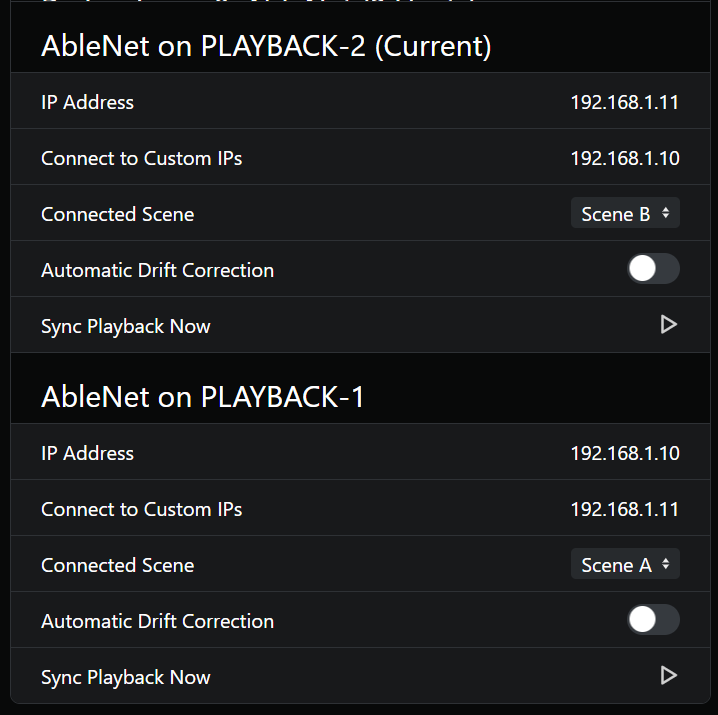
Hi, I’m running into a networking issue with my live rig and could use some advice on getting AbleNet to connect and sync my second machine across a network switch. I’m pretty novice at messing with any network stuff, so I’m going to try and be as detailed as possible.
Hardware & Network Setup:
*XR18: This is my in-ear and playback mixer for the main PC.
* Router: GL.iNet Opal router (housed inside a fly rack, assigns IP addresses to mobile devices to control their in-ear mix ).
* Main Computer: Runs the main Ableton Live session and AbleSet. Connected to the network switch.
* Visual Computer (Visuals/Redundancy): Runs an exact copy of the Ableton session with all audio removed. Connected to the network switch. Used mainly for keeping visuals off of my main laptop to help performance.
* Access Point: Used to extend the router’s wireless range. Connected to the network switch.
* Cudy Network Switch: Connects the Opal router, Main Computer, Visual Computer, XR18 and Access Point together.
The Problem:
Previously, I had both computers connected via the wireless access point, but I experienced occasional dropouts and stuttering. To make the connection more stable, I re-routed everything through a physical network switch.
While I can successfully ping both computers from each other using the command prompt, AbleNet only shows themself as one host.
At this point, I’m kind of at a standstill abusing Gemini to try to get me as far as I can. Any help would be appreciated.
- OS and Version: Windows 11 Pro 10.0.26200
- Version of AbleSet: 3.0.11
- Version of Ableton: 12.4.2